


OnlyFans Academy
.png)
No, you don't need to hire a 20-person team to run a serious OnlyFans account. Some solo creators manage six-figure months with the right setup and one or two trusted people helping out. But you do need to understand what "management" actually covers, because the term gets used loosely across the industry, and knowing what's included changes who you hire, what you pay, and what you should expect back.
What OnlyFans Management Actually Means
OnlyFans management is the ongoing work of running a creator's account as a business: chatting with fans, promoting on other platforms, keeping the account itself optimized, and protecting the content from being stolen or leaked. Some creators handle all of it themselves. Others hire an assistant for the parts that eat the most time. Larger operations hand the whole thing to an agency that runs it like a sales floor.
The confusion usually starts here: "management" can mean a single virtual assistant scheduling posts for $200 a month, or it can mean a full agency taking 30% of gross revenue and running a 12-person chat team. Both call themselves OnlyFans management. Only one of them is going to move your numbers.
The Core Services Every Management Operation Runs
Whether it's a solo creator with one assistant or an agency with a full floor of chatters, the same four categories of work show up every time. The difference is scale and who's doing it.
Chatting and Fan Interaction
This is where the money actually gets made. Direct messages are where PPV content gets sold, where fans get upsold to higher tiers, and where a casual subscriber turns into a high-value repeat customer who spends hundreds a month. High-performing accounts often aim for broad coverage across different hours, since fans purchase on their own schedule, often late at night or during a lunch break, and a slow reply can reduce the chance of converting interested fans into buyers.
Here's the catch: coverage without quality is just noise. A chat team answering fast but sending generic, copy-paste replies will convert worse than a smaller team that actually reads what a fan wrote and responds like a person. Volume matters, but only once the conversation quality is there to back it up.
Social Media Funneling
An OnlyFans account doesn't grow on its own. The traffic usually comes from X, Instagram, TikTok, Reddit, and more, where a creator or agency posts free previews, teasers, and calls to action that push followers toward the paid page. This is often the most visible part of management from the outside, since it's the content people actually see before they ever subscribe.
Good funneling isn't just posting more. It's matching the platform: what works as a TikTok hook falls flat as an X caption, and vice versa. Agencies that manage multiple creators usually build a repeatable posting cadence per platform rather than improvising content day to day.
Account Optimization
This is the quieter, more operational side: scheduling posts so the feed stays active, structuring subscription tiers so fans have a clear reason to upgrade, and tracking which content and price points actually perform. It's less glamorous than chatting or social growth, but it's the layer that turns a good month into a repeatable one.
So, how do you know if your account is optimized? Look at whether your tiers are actually being used. If every subscriber sits on the base tier and nobody upgrades, the pricing structure isn't doing its job, no matter how good the chatting is underneath it. The same logic applies at the PPV level: charging every fan the same price for the same content ignores what each fan has actually shown they're willing to pay, which is money left on the table.
Content Protection
Leaked content is a real cost, not just an annoyance. Watermarking, monitoring for leaks across piracy sites and Telegram groups, and having a takedown process in place protects revenue that would otherwise get siphoned off by people never paying a cent. Bigger agencies build this into their standard service. Solo creators often skip it until the first leak happens, which is the wrong order to learn the lesson in. Knowing the actual steps to take once content gets stolen, from documenting it to filing a takedown, saves a lot of panic later.
How Top Solo Creators Run Their Own Accounts
Independent creators making real money rarely do everything by hand. Most build a lean system: one or two trusted people helping with chat during off hours, a content calendar planned a week or two out, and some kind of tool tracking which fans are spending and which have gone quiet. The creator stays the face and voice of the account, but the operational load gets split.
The biggest mistake solo creators make is treating every fan the same. A subscriber who's spent $12 total and one who's spent $600 need completely different attention. Top earners build a rough system for spotting their high spenders, whether that's manual notes or an actual fan CRM, so their limited time goes toward the relationships that pay. For the specific inbox habits and content systems that make this work day to day, this breakdown of how organized creators run their accounts covers it in more detail than fits here.
Remember that balance matters here. Chatting all day without sleep isn't sustainable, and it isn't necessary either. The goal isn't more hours in the inbox. It's making the hours you do spend count more, which is exactly where an AI chatter that handles first replies and low spenders has started changing what "solo" management looks like.
How Top Agencies Run Their Accounts
Agencies operate more like a sales floor than a creative studio. A typical structure splits creators across a small team of chatters, with a manager overseeing volume, tone, and conversion rates across the roster. The best agencies build tiers into how they staff: junior chatters handle lower-spend, high-volume conversations, while senior chatters or the creator themselves step in for VIP fans and custom requests.
Access is a real operational concern here, not an afterthought. Handing out an OnlyFans password to ten different chatters is a security risk waiting to happen. Agencies that run this well use platforms with role-based access, allowing each chatter to have their own secure login instead of sharing a single password, which improves accountability when issues arise in a conversation.
Performance tracking is what separates agencies that scale from ones that plateau. Messages per hour, revenue per chatter, and conversion rate by shift are the numbers that tell a manager whether someone needs coaching or whether an account itself has a pricing problem. That's a coaching problem, not a hiring one, more often than agency owners assume when a chatter's numbers dip. For a deeper look at setting up role-based access and chatter benchmarks, it's worth reading as its own guide.
Matching Management to Where You Actually Are
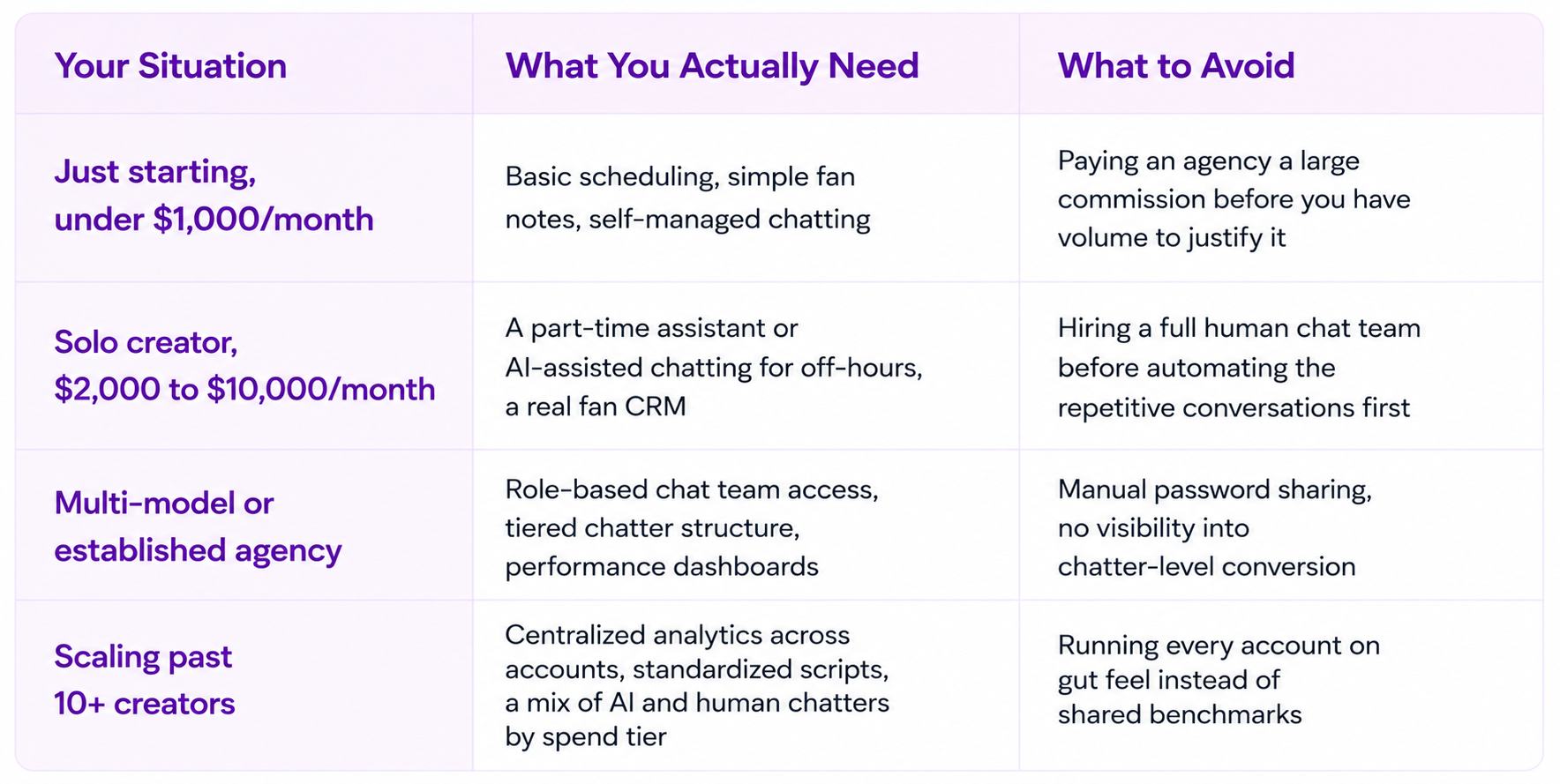
Not every creator needs the same setup, and buying more management than your account can support just eats margin. Here's a plain breakdown of what typically fits at each stage:
Compensation and Terms: What Management Actually Costs
Commission structures vary widely across the industry, and this is the part where creators most often get burned, either by paying too much for too little or by trusting numbers an agency can't actually back up. Broadly, agency commissions run from around 10% to 50% of gross revenue depending on how much of the work the agency takes on. A lower commission usually means the creator is still handling socials and content themselves, while a higher one usually includes full-service chatting, funneling, and account management combined.
Here's the part worth being blunt about: any agency or tool quoting you a specific revenue lift, like "we'll take you from $15,000 to $30,000 a month," should be able to show you where that number came from. Vague promises with no data behind them are a red flag, not a selling point. Ask what the number is based on, whether it's from a comparable account, and what happens if results land below it.
The same honesty applies to platforms and software. AI chatting tools and CRMs typically charge either a flat monthly fee, a per-message cost, a commission on AI-generated sales, or some combination of the three. Don't accept a pricing model you can't reconstruct with your own numbers. If a platform can't clearly explain what a typical month would cost you at your current volume, that's worth a second look before you commit. Supercreator's own plans and per-message costs are published for exactly this reason, so you can run the math yourself before signing up for anything.
Vetting an Agency Before You Sign
A few questions cut through most of the noise when you're evaluating a management agency. Ask how many creators each chatter handles, since an overloaded chatter means slower replies and generic conversations regardless of what the sales pitch says. Ask whether they can show anonymized performance data from existing accounts, not just testimonials, since testimonials are easy to write and hard to verify. And ask directly what happens to your account access if you decide to leave, since password-sharing arrangements can turn an exit into a security problem. If you're comparing agencies rather than building an in-house team, the OnlyFans agency directory is a reasonable place to start narrowing options.
Where Automation Fits Into Modern OnlyFans Management
The management model has shifted in the last couple of years, and the shift is mostly about coverage. Human chatters still handle the relationships that matter most, but more agencies and creators are beginning to incorporate AI chat assistants alongside human chatters to cover the volume a small team physically can't. Supercreator's Izzy AI can provide 24/7 coverage (when configured to do so) without gaps, and it handles qualifying conversations and lower-spend fans, so the humans on the team can focus on VIPs and custom requests instead of burning hours on small talk.
That same shift is why role-based access, chatter performance tracking, and a real fan CRM aren't optional anymore for anyone managing more than one or two accounts. Guessing which chatter is underperforming, or which fan tier is worth the most attention, is the kind of gap that live analytics on chatter activity and revenue close fast once you have them in place.
Signs You Need Management
Some signs are easy to miss because they show up gradually, not all at once. If two or three of these are true at once, that's usually the point where an account has outgrown doing everything solo.
- Your inbox is unmanageable. You're opening OnlyFans to hundreds of unread messages instead of a handful. That's not "busy"; that's structurally behind, and no amount of late nights fixes it on its own.
- Response times are slipping. Fans are waiting for hours instead of minutes for a reply, especially those actively trying to buy something. A fan ready to spend right now usually isn't still ready three hours from now.
- Posting has gotten inconsistent. A content calendar that used to be reliable now has gaps, or posts go out whenever there's time instead of on a schedule. Fans notice the silence before it shows up as a number you can point to.
- You can't track your top spenders anymore. Once you have more than a handful of regulars, keeping their spend history in your head stops working. If you can't name your five biggest spenders this month off the top of your head, you're probably treating a $500 fan the same as a $15 one.
- You're seriously considering your first chatter. This is usually the clearest signal. Before taking on the cost and overhead of a human hire, it's worth asking whether an AI assistant, like Supercreator, covering first replies and lower-spend fans could close that gap first.
Turning Management Into a System, Not a Guessing Game
Whether you're running your own account or managing a roster of ten, the operators who win aren't working harder than everyone else. They're running a system: clean chat coverage, secure team access, real performance numbers, and automation covering the volume a person alone can't. Supercreator brings those pieces together in one platform, from Izzy handling first replies and low-spend fans to role-based access that lets a chat team work without ever sharing a password, backed by analytics that show exactly where your revenue is coming from.
If you're managing your own account and want to see what AI-assisted chatting and a real fan CRM can do for your time, start free with Supercreator and connect your account in minutes. If you're running an agency and want to see how role-based access, chatter benchmarks, and Izzy work together across a full roster, book a demo and we'll walk you through it on your own numbers.
OnlyFans Management: How Top Creators and Agencies Run Their Accounts


But that system breaks the moment you add a second chatter, a second model, or more than a few dozen active fans. At that point, you need software built for the job, not a workaround. That's what an OnlyFans CRM is for.
This guide covers what an OnlyFans CRM actually does, what to check before you buy one, and how to match the right tier to where your account or agency is today.
What Is an OnlyFans CRM?
OnlyFans doesn't give creators or agencies a way to manage multiple chatters, track fan value, or automate replies. There's no built-in team dashboard and no fan history beyond a basic chat thread. A CRM (customer relationship management platform) fills that gap. It securely connects to your OnlyFans account and gives you a single place to view fan history, run chat tools, manage your team, and track revenue.
Here's why that fan history matters more than it sounds like it should: For many successful creators, PPVs, tips, and paid messages generate as much, or more, revenue than subscriptions. Your subscriber count isn't the real business. The DMs are. A CRM that only shows you subscriber numbers misses the bigger picture, and that's exactly what a chat-first CRM is built to fix.
What an OnlyFans CRM Should Actually Do
A CRM built for OnlyFans needs to cover four jobs well. Miss one of these and you'll end up patching together multiple tools with a spreadsheet again.
Fan History and Purchase Tracking
Every fan should have a profile: what they've bought, how much they've spent, what they responded to, and any tags your team has added. Without this, a new chatter picking up a conversation is starting without context, and blind chatters send the wrong offer to the wrong fan constantly.
Chat Automation and AI Chatter
This is where the CRM earns its keep on volume. AI chatter tools handle repetitive replies, bump messages, and win-back sequences so your human chatters aren't spending hours on fans who were never going to spend much. Supercreator's own data on chat activity across agency accounts puts a healthy messages-per-hour range at 50 to 70 for a human chatter. A CRM should surface that number automatically, not leave you counting messages by hand at the end of a shift.
Team and Access Management
If more than one person touches an account, you need role-based logins, not a shared password sitting in a group chat. Secure access management lets you add or remove chatters without ever handing over the actual OnlyFans credentials, which matters both for security and for keeping the account in your name, not a former employee's browser session.
Analytics and Revenue Reporting
You need to see revenue per chatter, per account, and per campaign in one dashboard. Analytics built for chatter management should show you where money is coming from and where a chatter is quietly underperforming, not just a top-line revenue number that hides both.
Comparison: What You Actually Need Depends on Your Setup
A solo creator and a 15-model agency are buying two different products, even if the software is the same. Here's how the priorities shift.
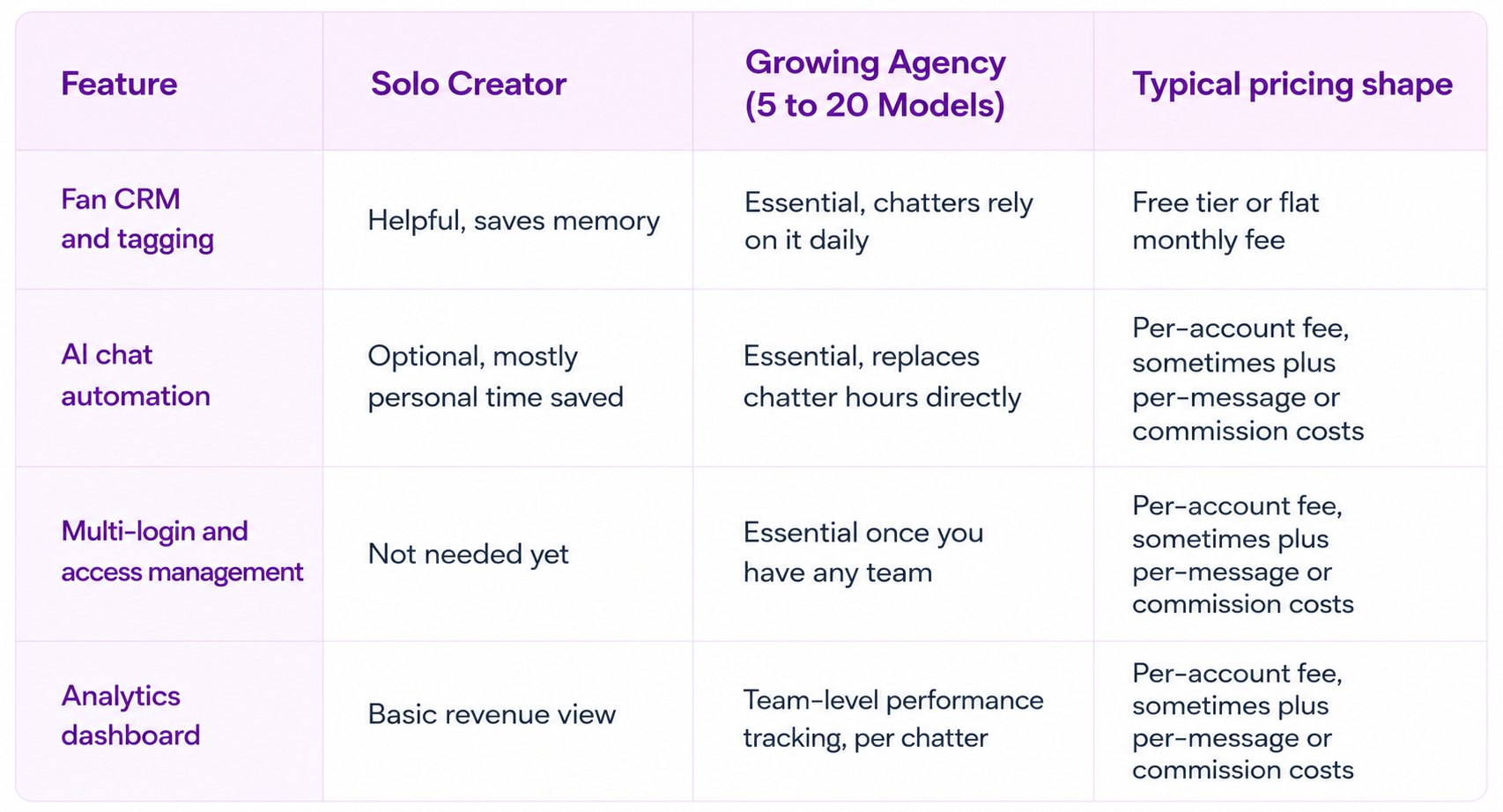
If you're solo, the CRM is mostly about not losing track of your own fans. If you're running a team, it's an operations tool first and a chat tool second.
How to Choose the Right OnlyFans CRM
So, how do you actually pick one? Run through these four questions before you commit.
Does it connect without asking for your password to be stored insecurely? A CRM should use secure, simulated access rather than storing your raw OnlyFans login. If a tool asks you to hand over credentials with no explanation of how they're protected, that's a red flag, not a minor inconvenience.
Does the pricing model match your volume? Some platforms charge per message sent plus a commission on AI-driven sales, on top of a base account fee. That model rewards efficiency at low volume, but here's the catch: as your message count climbs into the tens of thousands a month, per-message costs stack up fast, and a flat per-account fee can end up cheaper. Run the math on your actual monthly message volume before you assume the cheaper-looking plan stays cheaper.
Does it support your team's size today, not just where you'll be in a year? Buying enterprise-tier access management for a 2-person operation wastes money. Buying a tool that caps out at 3 accounts when you're already managing 8 wastes time migrating later.
Can you test it before committing? A free tier or trial period tells you fast whether the interface actually fits how your chatters work. If a platform won't let you try before you buy, ask why.
Common Mistakes When Buying an OnlyFans CRM
Picking based on price alone. The cheapest plan often locks the automation and analytics features you actually need behind a higher tier. Check what's included before comparing the sticker price.
Skipping access management until it's a problem. Agencies that start with shared logins usually add proper access controls only after a chatter has left but still has access to the account. Set this up before you need it, not after.
Ignoring the setup process. A CRM with a detailed fan bio, persona, and script setup takes real time to configure correctly. Rushing this step is the most common reason AI chatter performance disappoints early on. Budget a real afternoon for setup, not twenty minutes between chats.
Judging automation by day one results. Performance usually improves as you refine your persona, scripts, products, and automation settings. Judging it after 48 hours tells you almost nothing about how it performs after a month.
If you want platform-by-platform breakdowns rather than a buying framework, Top OnlyFans CRM Tools Compared for Agencies and Managers and Best OnlyFans CRM & Automation Tools for Sales and Engagement line up specific platforms feature by feature.
Final Words
An OnlyFans CRM isn't an optional add-on once you're managing more than a handful of fans or more than one chatter. It's the difference between guessing at what's working and actually seeing it. Start with what your setup needs today, not the feature list that sounds impressive, and the right tier follows naturally.
If you're running an agency and losing hours to shift schedules and shared logins, Supercreator's OnlyFans CRM puts your whole team, fan history, and revenue tracking in one dashboard, with Izzy handling the repetitive chat volume your team shouldn't have to.
- One dashboard for fan history, chats, and revenue across every model
- Role-based access so chatters never touch your real login
- AI chatter that picks up the repetitive conversations automatically
- Message Library for saving and reusing your best-performing scripts and PPVs
- Activity & Message Logs for full visibility into who did what, and when
- Auto-Translation so language never costs you a sale
- Fan Lists and Exclusion Lists to control exactly who gets automated and who doesn't
- Inbox Copilot to help your team draft faster replies without leaving the chat
Book a demo and see how it fits your operation.
If you're managing your own account solo, start on the free CRM Lite tier, no credit card required, and turn on AI chat automation whenever you're ready to hand off the repetitive replies.
OnlyFans CRM: What It Does and How to Choose One
OnlyFans AI Content Compliance: Standards for Agencies in 2026

OnlyFans credits a creator's share after the platform fee, keeps eligible earnings in a pending balance, then moves available funds through payout methods shown for that creator's account and country.
As a hub for everything from fitness and lifestyle content to more mature offerings, OnlyFans offers an unrivaled platform for creators to connect with their fans and earn substantial income. But how does the financial aspect work? How do these earnings translate from the virtual realm of likes and subscriptions to tangible money in the bank?

The Limitless Earning Potential:
While many platforms set a cap on earnings or take a significant cut, OnlyFans sets itself apart with its truly limitless earning potential. Essentially, the sky’s the limit when it comes to how much a creator can earn. Based on the price they set for subscriptions, the content they offer, and their promotional efforts, earnings can range from a few hundred dollars to jaw-dropping monthly incomes. Some of the platform’s top creators are raking in hundreds of thousands, if not millions, of dollars each month. This testament to the power of content, coupled with effective marketing and audience engagement, has made OnlyFans an attractive destination for content creators around the globe.
The platform’s transparent payment structure ensures that creators are well aware of their earnings and can strategize effectively to maximize their income. With stories of top creators making figures that rival CEOs of major corporations, the allure of OnlyFans for budding and seasoned content creators is undeniable.
Below, we will look at the journey from content monetization to understanding the intricate payout rules of OnlyFans, ensuring that every creator is well-equipped to make the most of their efforts.
How Do Creators on OnlyFans Make Money?
OnlyFans has proven itself as a lucrative platform for creators to monetize their content. With multiple revenue streams available, there’s an opportunity for every creator to earn, irrespective of their niche or follower count. Let’s look at the various avenues through which OnlyFans creators can generate income:
Subscriptions:
At the heart of OnlyFans’ monetization model is the subscription system. Creators can set a monthly fee for fans to access their exclusive OnlyFans content.
- Benefits: A paid OnlyFans account ensures a steady income flow. It also creates an exclusivity allure, making fans more inclined to subscribe.
- Pricing Strategy: The pricing should reflect the content’s quality. For instance, if offering high-resolution videos, expert tutorials, or personalized content, one can charge a premium. New creators can lure in subscribers by offering a free month or promotional deals.
- Example: If you have niche content, such as exclusive fitness routines or in-depth beauty tutorials, you can price subscriptions anywhere from $10 to $30, ensuring content value aligns with the fee.
Pay-Per-View (PPVs):
With PPVs, creators can send exclusive content to fans, accessible only after a specified payment.
- Benefits of Supercreator: Supercreator can be an instrumental tool, optimizing chats and PPV content to maximize revenue. It offers analytics to understand which content resonates most with fans, helping to curate successful PPVs.
- Strategy: PPV content should be distinct from regular feed offerings, providing added value or exclusivity. This could be behind-the-scenes footage, personal stories, or highly requested content.
- Timing: Sending PPVs during peak engagement times or after a particularly engaging post can yield better results.
Tips:
OnlyFans has a tipping feature, enabling fans to show extra appreciation for creators’ work.
- Benefits: Incorporating a tip option in one’s bio or subtly encouraging tips during chats can significantly boost earnings.
- Strategy: Personalized interactions, shoutouts, or creating content based on fan feedback can make subscribers more inclined to tip as a token of gratitude.
Live Streaming:
Live streaming brings real-time engagement, and there are several ways to monetize this feature.
- Entry Fee: Creators can set a fee for fans to access the live stream.
- Non-Subscriber Fee: A higher fee can be charged for non-subscribers, incentivizing them to subscribe for future benefits.
- Tips: During live streams, creators can earn from spontaneous tips from fans.
- Content Ideas: To enhance live streams, consider Q&A sessions, tutorials, real-time reactions, or collaborations with other creators.
The Pillars of Monetization:
- High-Quality Content: The better the content quality, the higher the value perception, justifying subscription fees and tips.
- Consistency: Regular content updates keep subscribers engaged and reduce churn rates.
- Captivating Captions: A catchy caption can make all the difference, enticing fans to engage more deeply with the content.
By strategically leveraging these monetization avenues and ensuring a steady stream of valuable content, creators on OnlyFans can not only build a loyal subscriber base but also ensure a consistent and lucrative income.
How Do OnlyFans Creators Get Paid?
Navigating the world of content creation can be thrilling, especially when you witness your follower count and engagement rates soar. But understanding the financial mechanics is equally crucial. After all, monetizing content is a primary objective for many creators on OnlyFans. So, how does this platform ensure that creators get their hard-earned money?
Payment Transfers Tailored to Your Preferences:
OnlyFans offers flexibility in its payment methods, ensuring that creators can access their earnings in a manner that’s most convenient for them. Here’s how it works:
- 💰Payment Methods:
OnlyFans processes payments by transferring earnings directly to the bank account designated by the creator. Instead of limiting creators to a single payment method, they can choose the one that best fits their needs. - 💱Currency Options:
While USD is a standard transfer currency, creators aren’t confined to it. Understanding the global diversity of its user base, OnlyFans allows earnings to be transferred via e-payments or as international transfers in the currency of the creator’s country. This feature is particularly beneficial for international creators who prefer local currency to avoid exchange rate hassles. - 💲Understanding the Earnings Split:
OnlyFans operates on a transparent revenue model where creators are entitled to 80% of all the money they earn, while OnlyFans retains 20% for platform maintenance and operational costs. To provide clarity: - For every subscription, let’s break it down: If a creator sets their subscription fee at $10 per month, from every subscriber who pays this fee, the creator will receive $8, while OnlyFans takes a $2 cut. This split ensures that while creators earn a majority of the revenue, OnlyFans continues to offer a robust, user-friendly platform.
- 💸Payout Frequency:
Typically, there’s a waiting period before the funds get transferred to a creator’s account. This is standard across many platforms and is designed to accommodate potential refunds or chargebacks. Once cleared, the funds get systematically transferred. It is typically 7 days, but depending on the country, this can be up to 21 days.
OnlyFans has simplified the payment process, making it both transparent and efficient. By offering flexibility in payment methods and currency, coupled with a clear understanding of the earnings distribution, creators can focus on what they do best: producing stellar content and engaging with their fanbase.
How to Get Cash Out: A Step-By-Step Guide to Requesting a Payout on OnlyFans
Navigating the financial landscape of OnlyFans is imperative for every creator. While the platform offers an enticing opportunity to monetize content, understanding how to access those earnings is crucial. Here’s a step-by-step breakdown to make the process of requesting a payout on OnlyFans as clear as possible.
- Understand the Commission Structure:
OnlyFans deducts a 20% commission from creators’ earnings, which covers the platform’s operational costs. As a content creator, you retain a hefty 80% of your earnings. Given the platform’s vast user base, the potential for profitability remains substantial even after commissions. Remember to account for this split when determining your subscription and content fees. - Link Your Bank Account:
Begin by integrating your bank details with the OnlyFans platform. This step is foundational and ensures a seamless transfer of your earnings. - Track Your Payments:
Your earnings for a particular month can be viewed at the beginning of the subsequent month. This waiting period is standard across most content platforms to account for potential refunds or chargebacks. - Request Your Payout:
After verifying your month’s earnings, you can initiate a payout request. The transfer usually takes 3-5 business days to reflect in your linked bank account. - Facing Payment Delays? Here’s Why:
At times, your earnings might go into a “pending” status. This could last for about 8-9 days. Once cleared, the amount then appears in your available balance. From this point, it takes an additional 3-5 working days for the funds to land in your bank account. - Choose Your Payment Method:
While many creators opt for traditional bank transfers, OnlyFans also allows payouts through international banking systems like PayPal, ePayments, or eWallets. This flexibility ensures that no matter where you’re based, you can access your funds. - Automate Your Payouts:
To further simplify the process, you can set your account to automatically request payouts. This means that, monthly, your earnings will be transferred to your chosen bank account. Typically, this automatic transfer takes between 7-10 business days. - Minimum Threshold for Payout:
OnlyFans has a payout threshold to ensure that transfer fees don’t consume a significant portion of smaller earnings. To be eligible for a payout, creators must have a minimum of $20 in their OnlyFans account. This can be from subscriptions, tips, or other content sales. If your account has less than $20, you’ll need to wait until you’ve crossed this threshold before initiating a payout.
So, while the payout process on OnlyFans involves multiple steps, it is designed with transparency and efficiency in mind. By understanding and following this guide, creators can confidently navigate their OnlyFans financial journey and enjoy the fruits of their hard work.
How Difficult Is It to Withdraw OnlyFans' Payment?
One of the most common concerns when venturing into a new platform, especially one focused on monetization, is the ease of accessing earned funds. Understandably, after putting in the hard work, creators want to be assured that they can conveniently withdraw their earnings. Let’s dive deep into the ease of the withdrawal process on OnlyFans.
Understanding the Basics:
OnlyFans has designed its payment system with user-friendliness at the forefront. The platform ensures that as long as creators provide accurate banking information, the process remains smooth and hassle-free.
Setting Up Correct Bank Details
The initial step is foundational and ensures the subsequent steps flow smoothly. Creators must:
- Provide accurate bank account details, ensuring there are no errors.
- For international creators, select the appropriate payment method via traditional banking or e-payment systems like PayPal.
- Ensure the bank account is active and can receive international transfers if you’re based outside the U.S.
Automated Monthly Payouts
For those who prefer a hands-off approach, OnlyFans provides an option to automate the payout process. This means:
- Once set up, the system will automatically initiate a transfer of your earnings every month to the linked bank account.
- Creators can select the specific date on which they’d like the transfer to occur.
- This minimizes the need to remember to request payouts, ensuring that earnings are consistently accessed without any added effort.
Manual Payouts for the Hands-On Creator
If a creator prefers having more control over the payout timings, OnlyFans supports manual payout requests. This entails:
- Logging into the account dashboard and navigating to the earnings section.
- Initiating a payout request once the balance meets or exceeds the $20 threshold.
- Manual requests give the flexibility to choose payout timings based on personal needs or financial strategies.
Withdrawing payments from OnlyFans is designed to be a straightforward process. Whether you’re a creator who prefers setting things on autopilot or one who likes to be actively involved in every step, the platform caters to all. The primary focus is ensuring creators have a seamless experience, allowing them to concentrate on what they do best – creating content and building their community.
How Does OnlyFans Payment Work - The Minimum Threshold
OnlyFans, while offering a lucrative avenue for creators to earn, operates on a commission-based model. In this section, we’ll break down the key details surrounding the OnlyFans payment system and its minimum threshold.
Understanding the Commission Structure:
OnlyFans takes a 20% commission from a creator’s earnings. This commission is utilized for the platform’s operational, maintenance, and promotional costs. But, even with this deduction, the earning potential of OnlyFans remains substantial, and many creators have found great financial success here.
Real-World Earning Examples:
Let’s break it down with some simple math to provide a clear perspective:
- Scenario 1: If you’ve set your subscription fee at $50 and you manage to get 100 subscribers in a month, you would gross $5,000. Taking into account OnlyFans’ 20% commission, you would net $4,000.
- Scenario 2: For a creator with a $10 subscription fee and a loyal following of 500 subscribers, the monthly gross would be $5,000. After the 20% commission, this translates to earnings of $4,000.
- Scenario 3: Even at a lower subscription price of $5, if you amass a subscriber count of 1,000, you’d gross $5,000. After deductions, you’re looking at a neat $4,000 in your pocket.
The Minimum Threshold:
It’s worth noting that while the potential to earn is vast, OnlyFans has implemented a minimum payout threshold. This is to ensure efficiency in the payment process and to minimize excessive transaction fees for smaller amounts. For a creator to initiate a payout, they must accumulate at least $20 in earnings. This system ensures that once you hit this threshold, you can confidently request your well-earned funds.
As you can see, the OnlyFans commission structure is transparent, and even after their cut, creators have the potential to earn significant amounts. By pricing content wisely, engaging with fans consistently, and delivering quality regularly, the earning possibilities are expansive.
What Are the Payment Methods Available on OnlyFans?
As one of the leading content monetization platforms, OnlyFans offers a spectrum of payment methods to cater to its global user base. Each method has its nuances, benefits, and potential fees, ensuring creators have the flexibility to choose the best one suited to their needs. Let’s look at these payment types and what they entail:
1. Direct Transfer:
A direct transfer, as the name suggests, is a straightforward method where OnlyFans transfers the creator’s earnings directly to their bank account. It’s efficient, with the primary requirement being that the creator has provided accurate banking details to the platform.
Advantages:
- Quick and efficient.
- Suitable for those who prefer earnings to be sent directly to their primary bank account.
2. International Transfer:
For creators based outside the United States, international transfer becomes an important option. It allows earnings to be transferred across borders to bank accounts in different countries.
Advantages:
- Facilitates global creators to receive earnings in their local bank accounts.
Potential Drawbacks:
- There may be additional fees associated with international transfers.
- Exchange rates may vary, and creators should be aware of the current rates when expecting a transfer.
3. E-Payments:
E-payments represent a broad category of electronic money transfer methods, including services like PayPal, eWallets, and other similar platforms. They are especially useful for those who prefer not having their earnings sent directly to a bank account or those who want quicker access to their funds.
Advantages:
- Fast and efficient.
- It can offer an additional layer of privacy since the money isn’t directly tied to a traditional bank account.
- It might be more accessible for creators in regions where traditional banking is less prevalent or convenient.
Points to Consider:
🧑💻It’s vital to note that, as of the last update, OnlyFans does not support Bitcoin or other cryptocurrencies as a payment method. While the platform continually evolves, creators should keep an eye on any announcements or policy changes related to this.
🌏The availability of specific payment methods might vary based on a creator’s location and the evolving policies of OnlyFans. Always check the platform’s official guidelines or support section for the most current information.
As you can see, OnlyFans provides a robust set of payment options to ensure creators worldwide can conveniently access their earnings. By understanding each method and its nuances, creators can make informed decisions on the best payout strategy tailored to their individual needs.
How Often Do Creators Receive Payments from OnlyFans?
OnlyFans offers two primary payout methods: Automatic Payments and Manual Payments. Let’s check out each of these and highlight their distinct features and benefits.
1. Automatic Payments:
Automatic payments are precisely what they sound like – they’re set up to be processed automatically at regular intervals without the need for continuous manual intervention.
Advantages:
- Consistency: Regular and predictable payments can help creators manage their finances more effectively. Knowing when the money will arrive can aid in budgeting and financial planning.
- Convenience: Once set up, creators don’t have to worry about requesting payments continually. This saves time and reduces the administrative hassle.
- Flexibility: Creators have the freedom to set their preferred frequency. Whether they want weekly, bi-weekly, or monthly payments, the choice lies in their hands.
2. Manual Payments:
With manual payments, creators have to initiate a payment request each time they want to withdraw their earnings from OnlyFans.
Advantages:
- Control: Some creators prefer to have a hands-on approach to their finances. Manual payments offer them complete control over when they request their payouts.
- Variable Amounts: If a creator doesn’t want to withdraw their entire available balance, they can opt for a specific amount with manual payments. This can be especially useful for creators who have different financial strategies or needs at various times.
- Security: By actively initiating each payment, creators might feel a heightened sense of security, knowing they are in command of when the transfer occurs.
Benefits of Each:
- Automatic Payments are ideal for creators who prefer a ‘set it and forget it’ approach. They’re best suited for individuals who value consistency and ease over manual control.
- Manual Payments, on the other hand, are perfect for those who want a more active role in their payout process. It caters to creators who might have fluctuating financial needs or those who simply prefer the act of manually initiating each payout.
Whether a creator opts for automatic or manual payments largely depends on their personal preferences and financial management style. OnlyFans offers the flexibility to choose, ensuring every creator finds a method that aligns with their needs.
How Much Can Creators Earn on OnlyFans?
The answer primarily depends on individual choices. Your earnings on OnlyFans will largely be influenced by factors like your subscription fee, the type of content you produce, and the level of engagement you maintain with your subscribers. It’s conceivable for OnlyFans creators to make anywhere from $100 to an astounding $100,000 a month, underscoring the platform’s potential.
OnlyFans has in place certain minimum and maximum subscription rates. For instance, the lowest subscription rate a creator can set is $4.99/month, while the cap stands at $49.99/month. Beyond these subscriptions, the platform allows creators to earn through other means. Tips and paid private messages, which start at a modest $5, offer an additional revenue stream. These mechanisms not only enhance earnings but also play a crucial role in fostering a more engaged and devoted fanbase.
Several creators have mastered the art of monetizing their content on OnlyFans:
- Miss Swedish Bella (Monica Huldt) is a testament to the platform’s potential. While her monthly subscription rate is just $6.50, she garners a significant chunk of her earnings through commissioned work sent via private messages. As per Business Insider, Huldt enjoys the patronage of over 1,100 subscribers and accumulates in excess of $100,000 annually on OnlyFans.
- Audrey Aura, with an impressive tally of over 3k subscribers, has made her mark as one of the platform’s top 0.46% creators.
- Isabella James has effectively leveraged her vast following of over 128,000 to rake in a whopping $2 million in yearly revenue.
- Morgan Edwards, better known to her fans as “Kitty K,” boasts over 5k fans on OnlyFans and has successfully built a business that has earned her over $2 million.
In essence, OnlyFans offers an expansive canvas for creators to paint their success stories. It’s all about identifying your OnlyFans niche, setting the right pricing strategy, and maintaining a consistent rapport with your subscribers.
How Much Does OnlyFans Pay Celebrities?
OnlyFans has risen in prominence as a favored platform for content creators, and its appeal has ensnared many from the celebrity echelons. High-profile personalities have not only leveraged the platform to strengthen their connection with fans but also to amass considerable financial gains.
Here are some examples of celebrity earnings on OnlyFans:
- Bella Thorne: Bella’s foray into OnlyFans was groundbreaking, amassing over $1 million within a mere 24 hours of her debut. This meteoric rise underscores the synergy of star power and a platform like OnlyFans.
- Blac Chyna: Another heavyweight in the celebrity sphere, Blac Chyna reportedly earns an astounding $17 million a month, underscoring the platform’s monetization potential.
- Tyga: This acclaimed artist has effectively used OnlyFans to share exclusive content and, in return, enjoys a handsome monthly paycheck reportedly in the vicinity of $7 million.
Such earnings offer a glimpse into the monumental potential OnlyFans presents, especially for those wielding significant influence.
Furthermore, influencers spanning various niches, from fitness to cooking and music, have embraced OnlyFans. Many, including renowned TikTok figures, are optimizing their earnings by providing exclusive monthly content and tiered subscriptions.
Adult Entertainment Industry Professionals on OnlyFans
Beyond mainstream celebrities, OnlyFans has been a magnet for the adult entertainment industry. For content that might be deemed too explicit for platforms like Instagram or TikTok, OnlyFans has become a sanctuary. Several adult entertainers are pocketing incomes soaring into the thousands monthly.
Some notable adult entertainment personalities thriving on OnlyFans include:
- Farrah: Successfully transitioning to OnlyFans, Farrah offers her subscribers unique content and reportedly earns upwards of $100,000 monthly.
- Morgan Edwards: Boasting a substantial following, Morgan’s monthly earnings on OnlyFans are estimated at around $500,000.
- Kitty K: A dominant figure in the industry, Kitty K’s reported earnings are a staggering $1.5 million monthly on OnlyFans.
- Isabella James: Through dedicated content creation, Isabella reportedly garners around $400,000 monthly, establishing her as one of the top earners in her domain.
Some Money-Making Techniques Used by Top Creators:
Maximizing earnings on OnlyFans isn’t just about signing up and posting content. The top creators on the platform use a blend of innovative strategies and advanced tools to increase their revenue and reach a wider audience. Here are some key techniques and tools that have proven beneficial for top earners:
Social Integration:
- Cross-Promotion: Use your existing social media platforms to promote your OnlyFans account. Your followers on Twitter, Instagram, and TikTok can become potential subscribers on OnlyFans.
- Engaging Teasers: Share a snippet of your OnlyFans content on your socials to pique interest. This not only gives a taste of what to expect but also entices followers to subscribe for the full experience.
Video and Content Editing:
- Quality Over Quantity: While it’s essential to post consistently, it’s equally vital that each piece of content is of high quality. Ensure videos are shot in good lighting and that audio is clear.
- Stick to Your Niche: Understand what your audience loves about your content and stay true to it. If you’re a fitness guru, for example, consistent workout videos or diet tips can be more engaging than random content.
- Editing Tools: Invest in good editing software or apps. Enhancing your content visually can make it more appealing and professional.
One-on-One Interactions:
- Personalized PPVs: Pay-Per-View content can be a goldmine. Create content tailored to specific subscribers. For example, a personal shout-out or a custom video can fetch a higher price.
- Engage with Fans: Regularly chat with your fans. The more they feel a connection with you, the more likely they are to engage with your PPVs or tip you.
- Flirt for Tips: Casual flirting can be a significant revenue booster. A playful and friendly interaction can encourage fans to tip more.
- Focus on the Right Fans: It’s essential to recognize and focus on fans who are genuinely interested and willing to spend on your content. Engaging more with these fans can lead to higher earnings.
Utilizing Advanced OnlyFans Analytics Tools:
Analytics for Insights: Many top creators use advanced OnlyFans tools like Supercreator. This tool provides detailed analytics, giving creators insight into their performance. By understanding which content performs best or which messaging resonates with fans, creators can optimize their approach for maximum earnings.
Incorporating these techniques and tools can substantially increase your OnlyFans earnings. Remember, success on the platform is a blend of quality content, consistent engagement, and smart promotional strategies.
Conclusion
So there you have it…Navigating the world of OnlyFans can initially seem daunting with its myriad of tools, payment structures, and content strategies. However, at its core, the platform offers a unique opportunity: the chance for creators to truly be in control of their earnings. Your potential earnings aren’t capped by a salary or an hourly wage. Instead, they are limited only by your creativity, consistency, and the strategies you employ.
While OnlyFans provides the platform, it’s the creators who bring the magic with their unique content. And in this journey of content creation and monetization, tools and insights become invaluable allies. That’s where Supercreator steps in. We’re here to be your guiding light, offering advanced analytics and insights that can help optimize your content and strategies. With our expertise, you can transform your OnlyFans account into a thriving business hub, maximizing both fan engagement and revenue.
Remember, in the world of OnlyFans, your earning potential is truly in your hands. With dedication, strategy, and a little help from Supercreator, the sky is the limit.
How does OnlyFans Pay Creators?
With its subscriber-based monetization model, OnlyFans has become the top platform for adult content creators. Top performers now earn 7-figure incomes by building engaged audiences. However, the competition is intense. This article will review the steps necessary to take and teach you how to create an OnlyFans account that will perform like Beyoncé on the SuperBowl halftime show.

How to Open an OnlyFans Creator Account
To open an OnlyFans creator account, create a standard account on OnlyFans.com, verify your email, complete your public profile, and apply for creator status. You must then verify your age and identity, add the required tax and payout information, choose your pricing, and publish your initial content.
You must be at least 18 years old. Opening an account is free, but OnlyFans retains 20% of fan payments. You can use a stage name publicly, but OnlyFans must verify your real legal identity before you can earn money.
What You Need Before Creating an OnlyFans Account
| Requirement | Why it is needed |
|---|---|
| Be at least 18 years old | Only adults can create or use a creator account |
| Active email address | Required for sign-up and account communication |
| Strong, unique password | Protects the account from unauthorized access |
| Valid government-issued photo ID | Used to confirm identity and age |
| Smartphone or camera | Needed for the selfie or biometric verification process |
| Real legal information | Account, ID, tax, and payout details must be consistent |
| Bank or supported payout account | Required before withdrawing creator earnings |
| Tax information | Requirements depend on the creator’s country |
| Profile and cover images | Needed to complete the public creator profile |
| Social profile links, if requested | OnlyFans may request these during creator verification |
Before You Start, Consider This:
Starting a successful OnlyFans account requires more than just engaging content; it demands a strategic approach from the get-go. From conducting thorough market research to developing a consistent posting strategy, every step you take before hitting the ‘launch’ button can make a difference. Dive into these essential pre-launch considerations to ensure you kickstart your OnlyFans journey on the right foot:
- Conduct competitor research: Closely study 5-10 creators thriving in your planned niche. Analyze their posting schedules, content styles, captions, promotion strategies, messaging approaches, and more. This market research helps you emulate what’s working.
- Refine your niche: Take time picking a niche aligned with your interests and attributes. The niche should have audience demand, but also be something you enjoy creating content for consistently. Consistency within a niche builds your brand and loyal audience. For example, if you enjoy dressing up, cosplay could be a niche. If you like cooking, the girlfriend experience niche may suit you.
- Set a posting strategy: Create an initial 90-day content calendar detailing what you’ll post and optimal posting frequency for your niche. For example, schedule 2 photo sets, 1 video per week.
- Develop content ideas: Brainstorm 5-10 creative photoshoot concepts and video ideas tailored to your niche. Note required props, costumes, locations, etc. This preparation ensures you start with lots of quality content.
- Learn best practices: Thoroughly read OnlyFans policies, guidelines, and tips from successful creators on growth strategies, promotion tactics, what content converts best, etc. Absorb as much knowledge as possible pre-launch.
- Set a launch plan: Outline collaborations, promotions, bundles, and early subscriber incentives you’ll offer at launch to gain initial traction. Plan your launch promotions for momentum.
- Setup tools: Explore onlyfans crm tools like Supercreator to help with messaging, analytics, and growth automation. Integrate them pre-launch so you’re leveraging them from day one.
What are the rules for starting an OnlyFans?

While flexible for creators, here are the rules you should know when starting an OnlyFans:
- You must be 18+ years old to create an account. This is strictly enforced.
- Legal ID verification is required during signup. Passports and driver’s licenses are accepted.
- Impersonation or identity theft leads to permanent bans.
- All content must comply with OnlyFans’ rules. Illegal material is prohibited.
- OnlyFans takes a 20% cut of creator earnings through commissions.
Following the guidelines ensures your account stays active. Carefully read the terms and acceptable use policy to avoid violations. Tools like Supercreator also help creators manage content and growth while staying compliant.
Read more on OnlyFans TOS here
How to Create an OnlyFans Account Step by Step
Step 1: Create your account
Visit the official OnlyFans website and select “Sign Up.” Enter an active email address, create a strong password, and provide the requested account information. Use accurate legal details wherever the information will later be compared with your identification.
Step 2: Verify your email and secure the account
Open the verification email sent by OnlyFans and confirm your address. Once the account is active, enable two-factor authentication and avoid reusing a password from another website.
Step 3: Complete your public profile
Choose a memorable username and display name, then add a profile photo, cover image, and short bio. A public stage name can differ from your legal name, but your private verification and payout details must be accurate.
Step 4: Apply for creator status
Open the creator or payout section and follow the instructions to become a verified creator. Account creation alone does not allow you to earn money. Creator verification must be completed first.
Step 5: Verify your age and identity
Submit a valid government-issued photo ID and complete the current selfie or biometric verification prompts. Make sure the ID is not expired and that every image is clear, uncropped, and free from glare. OnlyFans may also request social profile links or additional information.
Step 6: Add tax and payout information
Enter the required tax details and connect an available payout method. Names and other identifying information should match the details used during verification. Payout methods, processing times, and minimum withdrawal amounts can vary by country.
Step 7: Choose your pricing
Decide whether to operate a paid or free profile. Paid profiles charge for access, while free profiles commonly monetize through PPV content, tips, and private messages. Pricing should be based on the content offered and the intended audience rather than a universal recommended amount.
Step 8: Review the rules and publish your first content
Read the current Terms of Service and Acceptable Use Policy before publishing. Upload enough initial content to show new visitors what the subscription includes, check your profile from a fan’s perspective, and then begin promoting the page.
Common Reasons OnlyFans Verification Is Rejected
| Possible issue | Recommended fix |
|---|---|
| ID is expired | Submit a valid, unexpired government-issued ID |
| Image is blurry or contains glare | Retake the photo in clear, even lighting |
| Part of the document is cropped | Show the entire document and all required sides |
| Legal details do not match | Ensure the name and birth date match the ID |
| Face is obscured | Remove sunglasses, filters, or anything covering the face |
| Selfie does not meet the prompts | Retake it exactly as instructed during verification |
| Required information is missing | Complete every requested account field |
| Social profiles were requested but not provided | Add valid profile links if they appear as a verification requirement |
OnlyFans does not guarantee a fixed creator-verification time. Some applications are processed quickly, while others require additional review. Check your email and account notifications for requests rather than submitting repeated applications.
Does It Cost Money to Open an OnlyFans Account?
Opening an OnlyFans account does not require a sign-up or monthly platform fee. OnlyFans instead retains 20% of each fan payment, leaving the creator with 80% before taxes and other business expenses.
Optional costs can include equipment, lighting, editing software, promotional tools, and account-management software. These are business choices rather than OnlyFans signup requirements.
What to do when starting on OnlyFans?

Here’s a proposed timetable to consider :
First 30 days:
- Set up your profile, upload 30+ initial photos\videos to engage newcomers.,
- Promote daily on platforms like Reddit, Twitter, Telegram, and Instagram. Interact genuinely to start building connections and community.
- Analyze data like top-performing posts and pricing levels. Refine based on this early feedback.
First 3 months:
- Produce new content consistently, at least weekly. Add costumes, props, and new locations to keep it fresh.
- Continue growing social media following by posting teasers and chatting with potential subscribers.
- Run promotions, bundles, and sales to attract initial subscribers. Offer discounts if needed.
- Engage thoughtfully with fans via likes, comments, and messages. Get to know them and deliver a personalized experience..
First 6 months:
- Consider niche-specific content that’s in demand, but you enjoy making. Consistency within a niche builds your brand.
- Collaborate with similar creators by cross-promoting each other’s content and exchanging shoutouts.
- Explore additional monetization like pay-per-view messaging and tip menus. Create higher-value content to upsell.
- Analyze fan data to identify the most lucrative niches, prices, etc. Refine your content style and offerings accordingly.
The key is providing value to subscribers through high-quality, personalized content and experiences. Patience and persistence are vital, as growth takes time. Management tools like Supercreator help streamline messaging and data analysis for better optimization.
For more information on promoting your OnlyFans, check out our How to Promote OnlyFans article.
To Conclude
A good account is a planned one; think of it this way – you are opening a business. Although the steps of starting an OnlyFans are similar to those of opening any social media account, it’s more like opening a shop where you need to constantly innovate, work on your product, and offer competitive prices.
Once you’ve done your research, you’re ready to start on the right foot, and we highly recommend using the power of Supercreator to fully maximize your earnings from day 1!
With its smart analytic tools and wide range of features to help you focus on the right subscribers and optimize your pricing, it’s another way you can ensure your account will skyrocket as fast as possible!

How to Open an OnlyFans Account in 2026
An expired fan has already paid once. They know your content, they liked it enough to subscribe, and they're far easier to win back than a brand-new subscriber. Ignoring them is leaving money on the table. This guide covers why they left, how to tag and track them, and exactly what to send to turn lapsed subscribers back into consistent PPV revenue.
An Expired Fan Is Not a Dead Lead
When a fan doesn’t renew their subscription, it’s not necessarily because they lost interest in your content. It might actually have nothing to do with your content or chat quality. Chances are, they’re dealing with a relocation, a new job, or another external factor.
They Left the Sub, Not You
Fans unsubscribe for all kinds of reasons that have nothing to do with you. Such reasons could include an expired credit card, tight finances, life distractions, or even content fatigue. Interestingly, none of these reasons is permanent, as an expired sub could return to buy a PPV tomorrow.
Subscription Revenue Is Not the Whole Picture
Your subscription count isn't the full picture. The real money is in PPVs.
Your expired fans can still purchase your content, often through DMs, without having an active subscription. You can still follow, tag, and send offers directly to expired fans. So, stop obsessing over your monthly subscriber count and start monetizing existing relationships.
Why Following Expired Fans Is a Strategic Move
Following an expired fan isn't desperate. It's the start of a warm-up strategy. Following them means you still get to send them messages, which may include your discount PPV offers.
The Access Argument
OnlyFans allows you to message fans who follow you and who you follow back. Once a fan fails to renew, you still have the option to follow them. By following them, you can still send DMs and push PPV offers.
Not VIP Treatment, Targeted Outreach
The truth is that expired fans don't get to enjoy the same privileges as your active subscribers. So, you don’t have to constantly chat them up or offer custom content on demand. What you need is a well-planned reactivation strategy. A strategy so good that it piques their interest and gets them purchasing premium bundles. The strategy may include monthly check-in messages and exclusive PPV bundles and discounts. Remember, you’re not trying to bombard them with attention but slowly trying to win them over again.
How to Tag and Track Expired Fans Without Losing Your Mind
You need more than a general strategy to win back expired fans. Your strategy should revolve around placing them in categories based on their past interests and spending habits. To avoid mixing them up, you’ll want to immediately attach tags to them as soon as their subscription expires. Make it a habit, and you’ll turn a messy list into an easy-to-navigate system.
Labels That Actually Help You Act
Here are some tags you can attach to expired fans:

- Expired: Use this general tag immediately after a fan's subscription expires.
- High spender left: Reserve this tag for fans who spent above a specific threshold before leaving. You’re more likely to win back fans who have this tag. You can send them a personal follow-up along with premium discounts.
- Cold lead: Use this tag for fans who never engaged much while subscribed to your page. Fans in this category are less likely to bring in much revenue. So, you can use an OnlyFans AI chatbot to send them occasional win-back messages and discount offers.
- Recently expired: Attach this tag to fans who didn’t renew their subscription within the last 30 days.
- PPV buyer only: Fans who subscribed but only ever purchased PPVs rather than engaging in DMs. Worth targeting with content-led offers rather than re-subscription pushes.
The Reactivation Flow: How to Bring Them Back
Now that you’re familiar with the right tags and strategies to use, the next step is to design a workflow to win back expired fans.
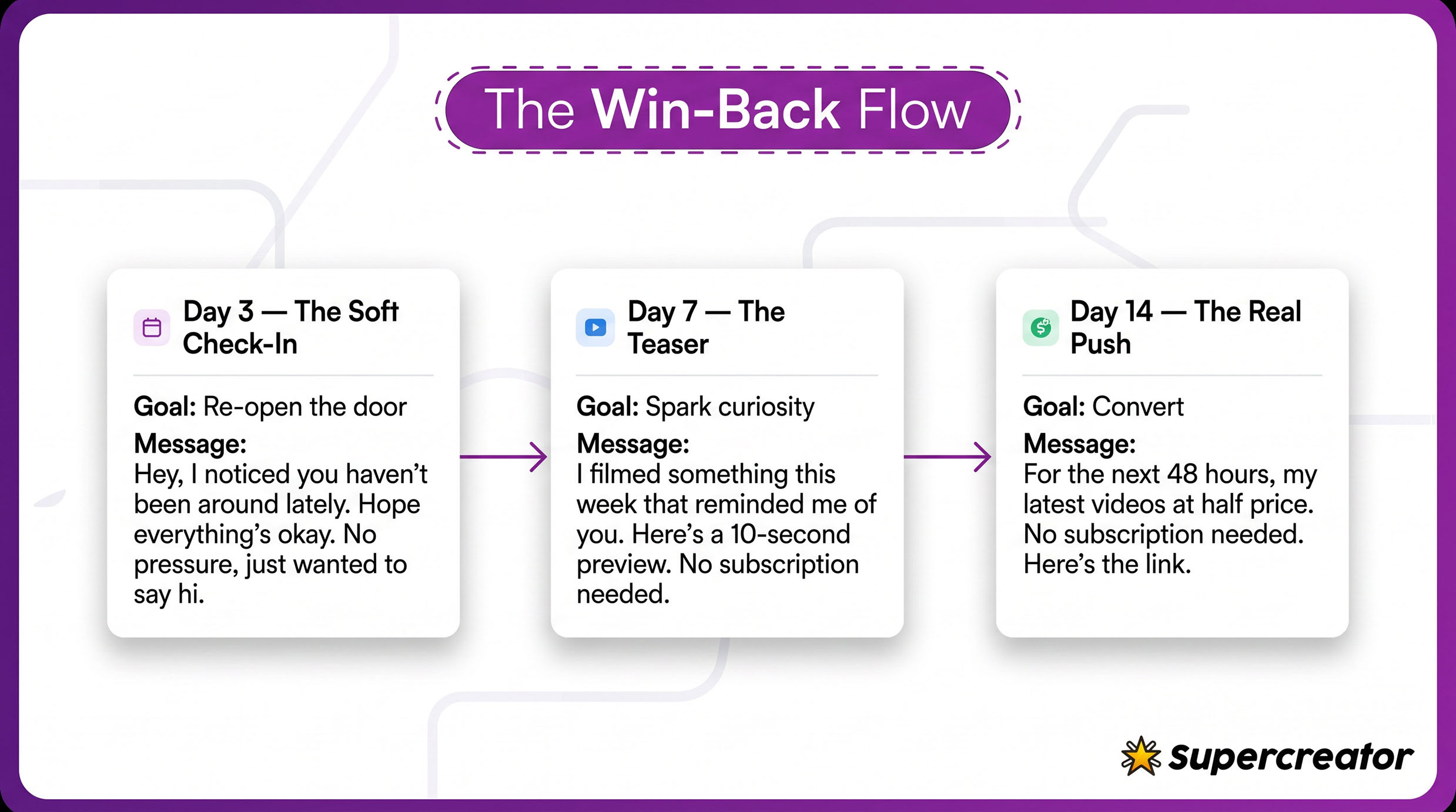
Day 3: The Soft Check-In
Show your existing fans that they’re more than a revenue source. So, remind them by using short, slightly curious messages, like “Hey, I noticed you haven’t been around lately. Hope everything’s okay on your end. No pressure, I just wanted to say hi.” Something short and simple like this can get the job done. Also, avoid adding links or PPV offers since you don’t want it to feel transactional yet.
Day 7: The Teaser
Did they reply to the check-in message? If not, give them a reason to open your message without asking for money. Here’s an example: “I filmed something this week that reminded me of 'make a reference to an old conversation or preference.’ Here’s a 10-second preview to remind you of those moments. No subscription needed." You may want to attach a short clip, too. The goal of the teaser is to re-ignite interest in your product.
Day 14: The Real Push
After the last two messages, your expired fans are probably interested in buying your content. Send a limited offer or direct PPV hook.
Here’s an example: "Miss having you around. For the next 48 hours, I'm sending my latest full videos at half price. You don’t need to subscribe; just unlock and watch. Here’s the link.”
Mixing Your Message Approach
The reality is that the soft conversational approach may not always work. Some fans respond well to friendly check-ins, while others appreciate a direct hook. You’ll never know what works unless you experiment with different approaches.
For example, a soft, conversational approach may work well for the first message after the fan’s subscription expires. It helps to lower the fan’s defenses and get them interested in your offers.
If the fan doesn’t respond to the first two win-back messages, you may try the direct approach, something like: “Look, you’re not subscribed anymore, but you clearly liked my content before. So, I’m offering you a one-time offer if you want to jump back in.” This approach is often effective, but if it still doesn’t work, you may want to stop wasting time on those fans. An OnlyFans agency can also come in handy in such scenarios.
Automating the Follow-Up Without Losing the Human Feel
Manually keeping track and sending messages to fans with expired subs can be a hassle. This strategy distracts you from active fans and more creative tasks, so it’s better to have an automation system that tracks and sends the right message flows to expired fans.
An OnlyFans bot can handle the follow-back automatically, and OnlyFans CRM tools like Supercreator allow you to set up win-back message flows, which get activated when fans fail to re-subscribe or reply within a set timeframe. Such tools also allow conditional logic that maps out a specific path based on the fan’s action. For example, you can set up the logic to send a follow-up message when a fan doesn’t reply within a set timeframe.
Measuring Whether It Is Actually Working
Some creators assume it’s not worth the effort to reactivate expired fans. But in reality, winning back expired fans can boost your PPV sales. Expired fans are not cold leads. They’re no stranger to your content and subscribed in the first place for a reason, so they’re more likely to be receptive to your offers. In most cases, all it takes is a three-message flow to get them buying your content.
You can track the performance of your win-back strategy using metrics like the reactivation rate and revenue per reactivated fan. The former allows you to determine the percentage of expired fans that come back to subscribe or buy a PPV, whereas the latter determines how much they spend within a month after re-engaging them. You can use these metrics to fine-tune your strategy.
The Fans You Ignored Are the Easiest Wins You Have Left
Your expired fans are warm leads who already know your content. So, take advantage of this familiarity and boost your earnings and growth. The best part is that it costs almost nothing to reactivate them. You just need the right message flow and strategy.
Why You Should Follow Even the Fans Who Left
OnlyFans is a subscription platform used by creators to publish exclusive content, communicate with fans, receive tips, and sell optional paid content. Subscribers use it to follow creators, access included posts, unlock pay-per-view content, and manage recurring subscriptions. Available features can vary by account and region.
With over 5,000 new signups daily and over 2 million creators, it’s clear OnlyFans is more than just a passing trend. But like any endeavor, there are right and wrong ways to approach it. This comprehensive guide shares everything you need to know before starting your own OnlyFans account. We’ll cover the basics of the platform, what to expect, tips for beginners, must-have equipment, and more.

What Is OnlyFans?
OnlyFans is a subscription-based social media platform where creators can earn money from users who subscribe to their content. Fans pay a monthly fee to access exclusive photos and videos from their favorite creators. This gives OnlyFans creators complete control over the content they produce and how much they charge.
The site is most known for adult content and has attracted sex workers and porn stars. However, OnlyFans also supports more mainstream creators, including fitness instructors, musicians, chefs, models, and more. Essentially, anyone can create an OnlyFans profile and monetize their skills, hobbies, or interests.
OnlyFans handles all payment processing and takes a 20% commission on creator earnings. Creators receive the remaining 80% of their subscription revenue through direct deposit every month. This hands-off monetization through subscriptions is a big selling point for OnlyFans creators.
What to Know Before Making an OnlyFans
Deciding whether OnlyFans aligns with your goals requires careful consideration. Here are some key facts to weigh before starting an account:
Once your content is out there, it's out there
This is rule number one to understand about OnlyFans. Any content you share, even in private messages, can potentially be leaked by subscribers. So, only join OnlyFans if you are fully comfortable with the idea of your content being permanently out there online.
Also, keep in mind that people in your real life—such as family, friends, or coworkers—could find your account. While OnlyFans allows you to block certain regions from accessing your page, total anonymity is difficult.
Success doesn't happen overnight
Viral OnlyFans creators who earn tens of thousands per month are the exception, not the norm. The average OnlyFans creator makes between $150-$180 per month. Your earnings potential is capped based on your following and marketing abilities.
Be realistic that it takes consistent effort to build a large subscriber base and referral network. Patience and persistence pay off when using OnlyFans as a revenue stream.
OnlyFans takes 20%
Yes, OnlyFans is not providing this out of the kindness of their heart, so 20% of all your revenue goes to them.
You need to pay taxes on earnings
Money generated through OnlyFans is taxable income. You are responsible for paying estimated taxes quarterly and reporting your OnlyFans income on your annual tax return.
For US residents: OnlyFans will issue you a 1099 tax form detailing your annual earnings. You must claim this additional income to stay compliant with IRS and state tax regulations.
You need to pay taxes on earnings
Money generated through OnlyFans is taxable income. You are responsible for paying estimated taxes quarterly and reporting your OnlyFans income on your annual tax return.
For US residents: OnlyFans will issue you a 1099 tax form detailing your annual earnings. You must claim this additional income to stay compliant with IRS and state tax regulations.
Decide your comfort level with content
While OnlyFans allows adult content, you control what you post. Consider if you want to stick with suggestive but not explicit (lingerie, bikinis, etc.) or more mature adult content.
Also, decide whether you will show full nudity or not, and your comfort level with requests from subscribers. Setting boundaries up front ensures a positive experience.
It requires consistent time investment
Effective OnlyFans creators post new content several times per week. You may need to dedicate 15-20 hours per week minimum, especially when launching your account. Set time for creating content, engaging with your audience, and promoting your page.
Understand the workload required and how that fits into your current schedule before joining OnlyFans.
What Do You Need to Create an OnlyFans Account?
The basics needed to start an OnlyFans account are simple:
- A valid email address
- Photo ID to confirm your age and identity
- Bank account information for payouts
However, creating high-quality content requires some additional tools and equipment.
Account setup tools
Having the right software makes managing your OnlyFans account much easier:
- Adobe Creative Cloud: Edit photos and videos with Photoshop, Premiere Pro, and more
- Canva: Easy thumbnail and graphics creation
- Facetune: For creating perfect selfies and pictures
- Supercreator: AI guidance to boost OnlyFans growth and sales
Equipment Needed for Creating OnlyFans Content
Having the right equipment dramatically improves your ability to produce high-quality content for OnlyFans consistently. Investing in basic gear gives you an advantage as a creator.
Here are the essentials every OnlyFans creator needs:
Cameras
A proper camera offers major upgrades over smartphone image quality. Consider these beginner-friendly options:
- Canon EOS Rebel T7i: Excellent 24MP image quality with intuitive interface
- Nikon D3500: Lightweight and compact 24MP DSLR perfect for travel
Ring Lights
Ring lights provide flattering, shadowless lighting for your shoots:
- Neewer 18” Ring Light: Large 18” size creates ultra-soft lighting
- Divinity 10” Bi-Color Ring Light: More portable 10” option with phone mount
Tripods
A tripod keeps your camera steady for clear, fixed framing:
- Magnus VT-300: Sturdy 57” tripod with smooth pan head movements
- Manfrotto Element MII: Lightweight carbon fiber tripod for portability
Microphones
External mics greatly improve sound quality over built-in camera mics:
- Rode VideoMicro: Compact shotgun mic that neatly mounts on your camera
- Blue Yeti Nano: Simple plug-and-play USB condenser mic
Backdrops
Use backdrops to customize your set and change up backgrounds:
- Savage Seamless Background Paper: Wrinkle-resistant rolls in various colors
- Neewer 5x7ft Backdrop Kit: Comes with crossbar stand and multi-colored backdrops
Other Recommended Additions:
- Reflector: Redirect natural lighting on your subject
- Lenses: Black Pro mist filters create an artistic look
The right equipment allows you to consistently produce exciting content that your fans crave. Don’t cut corners on production quality—invest in yourself to realize your full earning potential on OnlyFans. Read more on our OnlyFans equipment recommendations here
Props and costumes
Props, costumes, and accessories add creativity and variety to your content:
- Outfits and lingerie: Cosplay outfits, roleplay costumes, and sexy lingerie
- Makeup and masks: Character makeup or masquerade masks to disguise identity
- Set decor: Props like fruit, candles, pillows, whips, or handcuffs
Build up a selection of outfits and props tailored to your niche to keep your content fresh and exciting. Change up environments by using different backdrops and locations.
Dos and Don'ts for Starting an OnlyFans Account
Succeeding on OnlyFans means adopting the right strategies from the start. Here are some best practices to follow:
Dos
- Get creative: Experiment with different content formats to see what your audience responds to best – ASMR, Cosplay, workout videos.
- Choose a niche: Pick a content style that excites you personally. You can adjust over time: BDSM, The Girl Next Door, and sexy dancing. Having a focus makes you stand out.
- Learn platform features: use built-in OnlyFans tools like pay-per-view messaging, post-scheduling, and bundles to maximize earnings. Features like polls and shoutouts also help engagement.
- Be consistent: Post new content at least a few times per week to keep fans engaged and subscribing. Schedule shoots on designated production days so you always have a backlog of content.
- Promote across social media: Share OnlyFans teasers and promotions on Twitter, Instagram, TikTok, and other platforms. Promote heavily when starting to build initial momentum.
- Stay anonymous if desired: Use masquerade masks, avoid showing tattoos, and change your voice to disguise your identity. Shoot in non-distinct indoor locations if you want to remain unknown.
Don’ts
- Expect quick growth: Building a subscriber base and referral network takes very consistent effort over weeks and months. Avoid getting discouraged by slow initial traction.
- Ignore subscribers: Respond thoughtfully to comments, messages, and feedback requests from fans. Engagement and great customer service help retain subscribers.
- Overshare personal details: Never give out your full name, address, phone number, or other real-world identifying details. This protects your privacy and safety.
- Spam or over-promote: Avoid flooding social media with repetitive OnlyFans promotions. Mix in other content and don’t promote more than 1-2x per day maximum.
- Set a high subscription price: Price competitively based on your current following size and niche. Slowly increase your base subscription price over time as you gain more supporters.
Tips for OnlyFans Beginners
Just starting on OnlyFans? Use these expanded tips to set yourself up for success:
- Start with a paid account: Require an upfront subscription payment instead of offering content for free. This ensures followers are invested. Price is $5-$10 per month initially.
- Use bundles and promotions: Offer discounted 3- or 6-month subscription bundles. Run occasional sales like “50% off for the first month!” to incentivize longer commitments.
- Craft an engaging bio: Share a bit about your personality, interests, and what you offer fans. Use fun language and emojis. Include relevant niche keywords for discoverability. Read here for an extended guide.
- Welcome message: Write a message thanking new subscribers for joining. Give them a brief intro to you and an overview of your page.
- Post consistently 1-2 days per week: To prevent burnout, pick 1 or 2 days per week to batch shoot content. Create enough of a backlog to sustain regular posting for weeks.
- Leverage platform tools like scheduling: Use OnlyFans’ built-in scheduler to line up posts in advance. This makes staying consistent much easier.
- Promote heavily when starting: Share OnlyFans teasers and promotions on social media 1-2 times per day. Engage with followers and optimize your social profiles. See this article for promoting OnlyFans on different platforms.
- Remain faceless if desired: Wear masks, show only lips/lower half of face, and use creative framing or props to hide identity. Obscure or exclude tattoos.
- Provide value and stay engaged: Post new content frequently, go live consistently, respond to fans, offer promotions, and send occasional PPVs. Active accounts thrive.
Final Thoughts for OnlyFans Success
Starting an OnlyFans account provides incredible opportunities to take control of your career and monetize your passions. But treat it as a serious business venture, not a get-rich-quick scheme.
Success requires commitment, hard work, and, most importantly, the willingness to create content you feel proud of on your own terms. By laying the proper groundwork using the advice in this guide, your OnlyFans account is set up for long-term, sustainable growth.
Tools like Supercreator give you access to artificial intelligence and data insights to constantly improve. Feel empowered to explore your creativity, connect with fans, and maximize your earnings potential on OnlyFans.
What Is OnlyFans All About

You might want to reconsider if you think automation means posting less content or fewer interactions with fans. Automation is all about using systems to handle repetitive tasks, while you focus on what requires a personal touch.
OnlyFans automation requires more than one tool. As a creator, you’ll need multiple tools to handle different parts of your account. For example, you can use specific tools for aspects like content delivery, scheduling, and chat automation.
The right set of AI automation tools can change how you operate as a creator. These tools automate repetitive tasks, like assisting with DM replies and content distribution.
This guide explores the top AI tools you need to automate OnlyFans. Each tool has its own unique role, and when used together, they can turn your hectic manual tasks into a smooth, scalable operation.
1. Supercreator: The Revenue Engine

You can consider Supercreator the brains of your OnlyFans automation. The platform acts as the engine that turns all the aspects of your account into income.
While other tools help you create and distribute, Supercreator focuses on what happens after fans arrive in your inbox. The platform lets you set up automations for repetitive chat scenarios, such as welcome and win-back messages. It also tracks fan behaviors and spending habits, sequences offers, and helps reduce missed revenue opportunities. Plus, Supercreator automatically notifies you when the conversation needs a human touch, especially during chats with high-value fans.
Features
- Automates chat flows: Fans receive customized automated replies based on their spending habits and past preferences. The message flows may cover common scenarios like welcome and win-backs.
- Tracks fan behavior: Supercreator logs every fan interaction, including their preferences, most purchased content, online activity, and total amount spent.
- Resells proven content: Your top-performing PPVs and bundle offers get delivered to fans who have yet to see them. This feature removes the need to constantly create fresh content, as existing content is reused for new fans.
- Maintains structured message funnels: Supercreator uses message flows to move fans from entry offers to premium content. The flows may adapt based on spending habits and engagement.
- Connects analytics to monetization: Supercreator not only reports analytics data, but also lets you use it to map out your next strategy.
Pros: Built specifically for OnlyFans monetization. Ties analytics directly to chat automation. Scales well for agencies managing multiple accounts.
Cons: The most powerful features (Message Flow, AI chatter) are locked behind the $99 plan. Pricing is per account, so costs scale with your roster.
Pricing: Free (CRM Lite, up to 10 accounts) / $15/account/month (CRM Premium) / $99/account/month (Super AI, includes Message Flow and full automation) / Enterprise pricing available for 20+ accounts.
2. GPTease: AI for Sales Conversations and Scripts
GPTease uses AI technology to help creators with repetitive conversations, such as welcome messages and follow-ups. It can create a natural-sounding response to DMs from fans. Plus, it offers specific replies by considering factors like the fan’s preference, your unique tone, and your current offers. It also comes with ready-made scripts and sequences to handle almost any situation.
Features
- Chat scripts: GPTease offers various chat scripts to handle different situations. For example, you can implement a win-back script if a fan went quiet and you need to re-engage without sounding desperate.
- Sales prompts: GPTease structures pitches that convert by considering the fan’s preferences, hours spent online, and spending habits.
- Promotional sequences: It features various ready-to-use sequences, such as teasers, reveals, follow-ups, and last-chance offers.
- Pricing conversations: GPTease helps you navigate pricing conversations without sounding transactional or awkward.
Pros: No content restrictions, so NSFW scripts and mass message copy work without workarounds. Good for bulk script generation.
Cons: Copy and scripts only; no account connection, no fan behavior tracking. You'll still need a separate tool for chat management and monetization.
Pricing: $39.99/month for unlimited access.
3. Sozee: AI for Content Variation and Expansion

Sozee is an AI content studio built specifically for creators who monetize visual content. The core idea is simple: Upload reference photos of yourself, and Sozee generates new images in different scenes, outfits, and locations. It's best used for content variation between real shoots, not as a full replacement.
For OnlyFans creators, that means you're no longer limited by how often you can physically shoot. You can generate a full month of content in an afternoon, fulfill custom fan requests on demand, and keep your feed active without burning out.
Features
- Generating content from your likeness: Upload reference photos, and Sozee places you in different scenes, outfits, and locations. Results vary by prompt and reference quality.
- Image and video in one platform: Sozee handles photos, short videos, and voiceovers, so you're not juggling multiple tools for different content types.
- No technical setup required: There's no model training or learning curve. Upload, prompt, generate.
- NSFW content supported: Built with monetizing creators in mind, so it supports the type of content that actually drives revenue on OnlyFans.
Pros: Removes the dependency on physical shoots for content variation. NSFW supported natively. Agency plan handles multiple creator likenesses under one subscription.
Cons: Credit-based model means heavy users burn through their allocation quickly. Output quality depends on the consistency of your reference photos.
Pricing: Starter $14.99/month (~30 AI images) / Creator $59.99/month (~150 AI images) / Agency $149.99/month (~450 AI images, 3 character slots, 5 team seats).
4. ChatGPT or AI Copilots: Your Operations Manager

ChatGPT or AI copilots function like a personal assistant. They basically help to remove the bottleneck of content planning. With a simple prompt, creators can structure a month’s worth of content and map out promotion strategies. The key advantage is that you can refine the prompt to create more specific results. These tools save you hours spent planning out content.
Features
- Creating content calendars: ChatGPT makes it easy to turn your ideas into practical content calendars, freeing you from the ongoing hassle of organizing themes.
- Brainstorming campaign ideas: ChatGPT offers fresh ideas when trying out new campaign ideas. It may generate multiple approaches that you can test out, from different hooks to CTAs.
- Drafting replies to inactive fans: You never run out of ideas for re-engaging fans on your OnlyFans. The AI tools generate variations of follow-up messages that you can quickly adapt and personalize.
- Organizing promotional flows: These tools help you arrange your messages in a logical order, saving you time and effort in planning. They automatically sequence message scripts from teasers to reveals to follow-ups.
- Structuring offers: They help to frame your pricing bundles and scarcity so that they resonate with the target audience.
Pros: Versatile and cheap; useful for planning, scripting, and brainstorming across every part of your workflow.
Cons: Content restrictions limit NSFW use cases. No native connection to your OnlyFans account or fan data, so outputs need manual context every time.
Pricing: Free / $20/month (Plus).
5. Buffer: Scheduling and Automation

Your OnlyFans automation stack doesn't stop at the platform itself. The feeder channels (Instagram, TikTok, X) drive the subscribers who end up in your DMs. Tools like Buffer keep that promotional funnel running on a schedule, so fresh traffic keeps arriving while you focus on chat monetization inside Supercreator.
What this tool actually helps with is keeping your promotional presence consistent across platforms like Instagram, TikTok, and X. Instead of figuring out what to post and when every single day, you map it out once and follow the plan.
Features
- Content calendar planning: Map out themes, campaigns, and promotional posts weeks in advance so you're never scrambling for ideas.
- Cross-platform social scheduling: Schedule promotional content across your social channels from one place, with captions tailored per platform.
- Reduced daily friction: Set your posting plan once and follow it. Less time spent deciding what to do, more time spent actually doing it.
Pricing: Free plan available (up to 3 channels) / paid plans from $6/month.
Pros: Keeps your off-platform promotional presence consistent without daily effort. Low cost and easy to set up.
Cons: Does not post directly to OnlyFans. Drives traffic to your page but has no impact on what happens in the DMs.
Also worth considering: Later for visual content scheduling and Notion for mapping out content calendars and campaign flows.
How These Tools Work Together
These tools handle specific parts of your OnlyFans automation so nothing falls through the cracks.
Supercreator is the layer that ties everything together, tracking fan behavior, sequencing offers, and turning conversations into revenue. The other tools feed into it: scheduling tools drive traffic to your page, Sozee and ChatGPT handle content and planning, and GPTease supports chat scripts. Everything flows toward monetization.
Automating an OnlyFans account requires using the right set of tools in the best sequence. So, build your automation system using these tools and let it run while you focus on more creative tasks.
Top 5 AI Tools to Run Your OnlyFans on Autopilot

How To Use Data to Sell More While Creating Less Content on OnlyFans

How to Monitor Your Chatter’s Performance

With over 377.5 million registered users, OnlyFans is one of the most significant players in the adult content subscription industry. Total gross transactions on the platform reached $7.2 billion in 2024, up 9% from the previous year.
So, how many creators are on the platform?
OnlyFans has a huge number of creators. By the end of 2023, OnlyFans statistics say there were 4.1 million creators on the platform, a 22.2% year-on-year increase. The figure continues to grow, as seen in February 2025, when approximately 179,000 creators submitted requests to join the platform.
Within the last few years, OnlyFans has positioned itself as more than an adult content subscription platform. It’s now regarded as a digital subscription platform with services including fitness, cooking, music, and other SFW categories. The following section further explores the platform’s growth trends, earnings, and demographics.
Key Stats at a Glance
- 377.5 million registered users as of end of 2024
- 4.6 million creators as of end of 2024
- $7.2 billion in gross revenue in 2024
- $5.8 billion paid out to creators in 2024
- Top 1% of creators earn 33% of all platform revenue
- OnlyFans takes a flat 20% commission on all transactions
OnlyFans Platform Overview and Growth Statistics
OnlyFans was launched in 2016 as a subscription-based social media platform by British entrepreneur Tim Stokely. The platform spent its early years building infrastructure before entering an explosive growth phase, which saw its user counts and earnings skyrocket.

Early growth phase (2016 to 2019)
OnlyFans used the first three years to quietly establish itself as a major adult content subscription platform. By 2019, the platform had approximately 13.5 million registered users and around 348,000 creators. Annual revenue sat below $250 million while net revenue was $49.9 million, which was quite impressive when compared to alternative platforms.
Pandemic acceleration (2020 to 2021)
OnlyFans had its growth surge during the COVID-19 lockdown. Due to a worldwide shortage of on-site jobs, the platform saw a rise in the number of creators from 348,000 to 1.61 million, a 363% increase between 2020 and 2021.
User growth followed a similar jump. OnlyFans ended 2020 with roughly 85 million registered users, then more than doubled to 188 million by the end of 2021.
Post-2022 stabilization or expansion
Since the growth surge during the pandemic, OnlyFans has experienced steady growth in all metrics. The platform had 305 million registered users and 4.1 million creators by the end of 2023. In the same year, OnlyFans processed $6.6 billion in gross transactions, with creators earning $5.3 billion of that total.
OnlyFans investors have also benefited from this consistent growth in earnings. According to Bloomberg, Leonid Radvinsky, who acquired a 75% stake in 2018, received $338 million in dividends in 2022 alone. As of 2021, he has earned more than $1 billion in dividends.
OnlyFans is now estimated to be worth upwards of $5.5 billion, according to recent reports about a potential sale to an investor group.
OnlyFans User Statistics and Demographics
OnlyFans user stats are necessary data for creators and agencies looking to scale. They help you determine user demographics, like age, location, and online hours.
Who uses OnlyFans?
According to filings from Fenix International, OnlyFans had 377.5 million registered users by the end of 2024. This shows a 24% increase from the 305 million users reported at the end of 2023.
Monthly traffic has also consistently increased, as the platform recorded approximately 468 million monthly visits by December 2024.
OnlyFans leans towards the young and tech-savvy demographic, as a significant portion of the website traffic is from users between the ages of 18 and 34. For example, 36% of the monthly traffic was from users between the ages of 25 and 34 in February 2025 — meaning most users are in their peak spending years and respond well to personalized, conversational content.
In contrast, only 10% of the users are between 45 and 54 years old.
The age distribution suggests that OnlyFans appeals more to digital-savvy users who are more comfortable with subscription models. For creators, it means creating content that appeals more to the younger demographic.
OnlyFans' subscriber base is overwhelmingly male, as 79% of monthly traffic comes from male users. The gender imbalance exists because women make up 70 to 84% of content creators on the platform.

Where are these users located?
The United States dominates the list of top monthly visits. According to Statista, the U.S. made up 130.63 million of the monthly traffic in September 2025. The United Kingdom comes in a distant second with 23.74 million visits during the same month. Users in Mexico and Germany made up 15.6 million and 13.6 million visits to the platform, respectively. OnlyFans also receives significant traffic from countries like Brazil and Canada.
Note that monthly traffic is gradually evolving. For instance, other regions had a higher growth rate in the number of registered users than the U.S. in 2025. In the same year, the U.S. user count only grew by 2%, while Mexico and Asia saw a 19% and 28% growth, respectively.
How much do users spend?
Average spending varies widely. While casual users may spend $15–$25 per month across multiple creators, a small percentage of high-value fans drive the majority of revenue through tips and PPV purchases.
However, it’s quite difficult to determine the average subscription price. Most successful creators use tiered pricing or hybrid models that combine subscriptions with PPVs, thus making it impossible to calculate the statistic.
How Many OnlyFans Creators Are There?
As of December 2023, there were 4,118,000 creators on OnlyFans. The figure has consistently increased, as the platform revealed that 195,000 creators had submitted applications in February 2025.

To put this figure in context, the creator count grew by 22.8% between 2022 and 2023 alone. This means the number of creators is projected to have surpassed the 5 million count as of February 2026.
Now, this is where it gets interesting: the user growth rate has consistently outperformed the rate at which creators are joining the platform. OnlyFans recorded a 24% year-on-year increase in user growth between 2023 and 2024, which is slightly higher than the creator count growth rate.
This means the ratio of creators to total users has slightly decreased, which can increase earning potential, but only for creators who can capture attention and convert traffic effectively.
So, what does this mean for competition?
First, the demand for quality content rises as more users sign up on the platform. However, competition is slightly skewed towards creators with larger followings or visibility on the platform. So, new creators would rely heavily on marketing on external tools like Reddit and Twitter. They could also consider diversifying into less-explored niches to capture a niche audience.
OnlyFans Earnings Statistics
Beyond the media hype, OnlyFans earnings statistics paint a different story. The stats reveal that only a tiny fraction of creators earn the vast majority of revenues, while others earn modest income.

OnlyFans generated $6.63 billion in gross revenue and distributed $5.3 billion to its creators in 2023. More recent estimates suggest the platform may have paid more than $20 billion since it launched.
However, the earnings are not evenly distributed, as the top 1% take home a huge chunk of the total earnings. Top creators can earn up to $100,000 per month in tips and PPVs alone.
For example, Sophie Rain, a top creator, publicly revealed that she earned over $101 million lifetime on the platform (self-reported).
The estimated average earnings are around $180/month, though the median is likely much lower due to income inequality. To put this in context, let’s use these stats to outline the income inequality on OnlyFans:
- The top 1% of creators earn 33% of all platform revenue. This means the top 1% received $1.75 billion out of the 5.3 billion total payout in 2023.
- Creators in the bottom 50% earn less than $100 monthly. In fact, this was the case for about 2 million creators in 2023.
So, what drives earnings, and how do some creators earn so much?
Keep in mind that only 40% of creator revenues come from monthly subscriptions, with the remaining 60% coming from single purchases such as PPVs and tips. OnlyFans takes a 20% commission on all transactions, while creators retain the remaining 80%. The commission rate is constant, irrespective of the creator’s earning level.
OnlyFans Revenue and Business Model Statistics
OnlyFans processed $7.2 billion in gross transactions (GMV) in 2024, up 9% from $6.63 billion in 2023. After paying creators, the net platform revenue was $1.4 billion. Pre-tax profit for the year was $684 million, up 4% from the previous year.
According to the Economic Times, OnlyFans generates $37.6 million in revenue per employee, making it one of the most profitable businesses in the world. This figure far exceeds global corporations like NVIDIA ($3.6 million per employee), Apple ($2.4 million per employee), Meta ($2.2 million per employee), and Alphabet ($1.9 million per employee).
The platform is able to stay profitable and increase earnings by using a revenue-sharing business model. It takes a 20% commission on all transactions, including monthly subscriptions, PPV content, DMs, and tips. In this business model, the commission rate is constant, irrespective of the creator’s earnings.
Besides the revenue-sharing model, the increasing number of creators has also contributed to the platform’s growth. There’s a direct correlation between upticks in revenues and the number of registered creators. For example, the number of creators went up by 365.5% between 2020 and 2021. Likewise, the platform saw a 65.4% increase in revenue within the same timeframe.
Leonid Radvinsky, the current owner of OnlyFans, acquired a 75% stake in the company and has earned up to $1.8 billion in pre-tax dividends since 2021.
Note that OnlyFans’ business revenue-sharing model is also used by competitors, like Fansly and Patreon. However, these competitors do not have a fixed commission rate. For example, Fansly takes between 5% and 12% commission based on the creator’s category.
Key OnlyFans Trends and Market Insights
OnlyFans has come a long way since the pandemic boom. The stats show a business that is evolving in response to market pressures and creator strategies. Here are some of the significant trends shaping the platform:
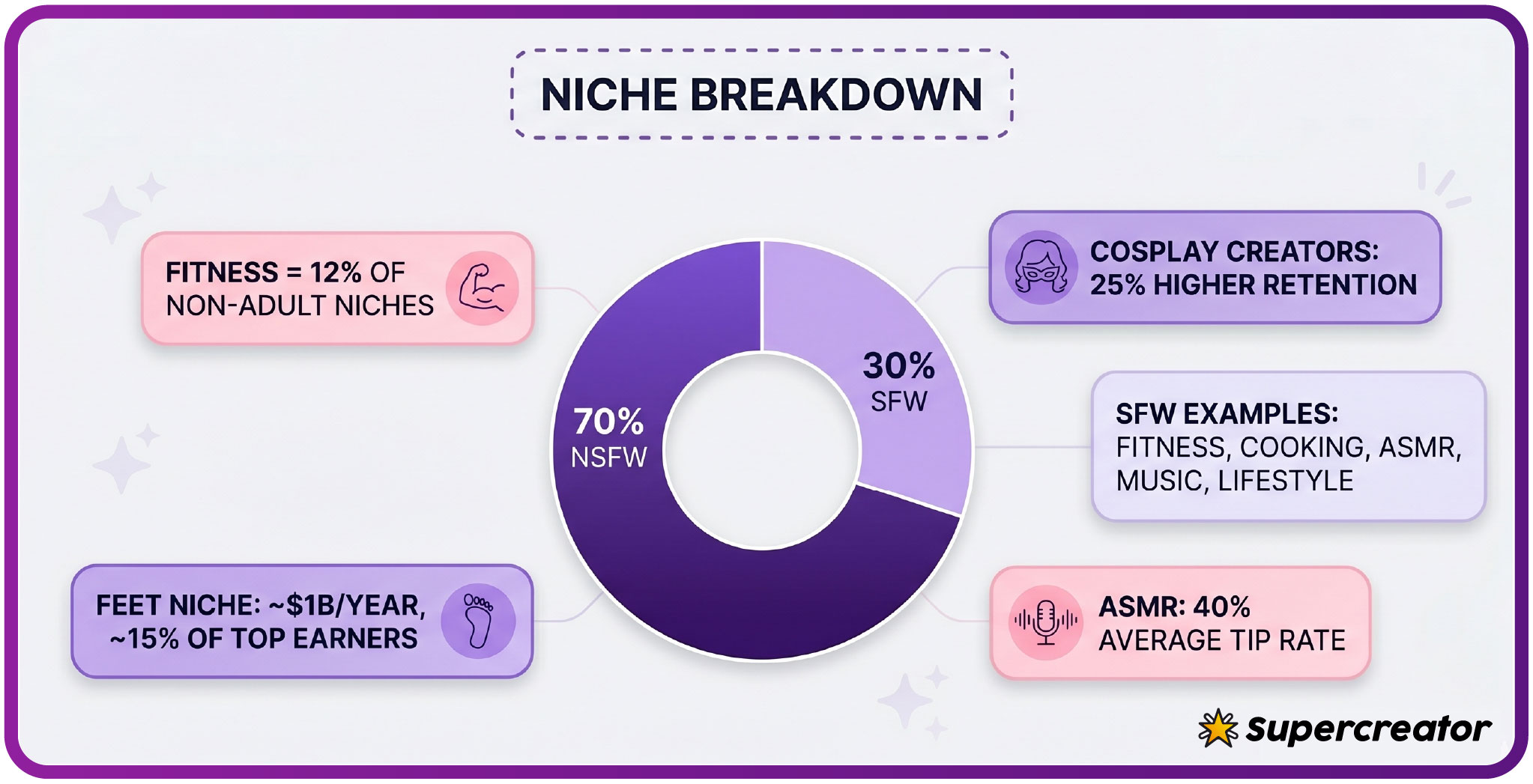
Growth in niche categories
Did you know that the feet pics niche alone is estimated to generate over $1 billion per year?
That stat is not a fluke, as there's been a gradual shift from NSFW content niches to SFW. Cosplay creators enjoy 25% higher retention rates than most creators in adult niches. Non-adult niches like fitness and cooking are gradually growing and taking up more space each year. For example, fitness content now represents 12% of non-adult niches, while ASMR content has an average 40% tip rate in comparison with other niches.
Increase in agencies or management firms
These firms basically help creators to better manage their accounts. Agencies now oversee creators similarly to how talent agencies manage actors, taking care of everything from scheduling their shoots to handling marketing efforts. In addition, this trend has also given rise to a whole new job description called “chatters.”
Chatters help to handle DMs for creators and can earn between $750 and $1,000 per month in lower-cost regions, and $1,500 to $4,000+ in the US and UK.
The job role requires more than casual conversations, as chatters are required to meet performance and sales targets.
For accounts with high message volume, many agencies and creators rely on AI chatter tools to handle the load.
Shift towards non-adult niches
OnlyFans continues to deliberately push into non-adult niches. It now actively recruits creators from cooking, music, fitness, and lifestyle niches. An example is OnlyFans' recent partnership with Winter Olympics athletes in 2026. The platform invited fans to follow their journeys and BTS content on the platform. While 70% of the creators are still in the NSFW niche, the next few years might bring in more exposure to less-popular niches. Also, this shift is fast becoming a necessity since the adult content niche has become more of an inconvenience to investors and potential buyers.
Mobile vs desktop usage trends
OnlyFans has never had a mobile app for its core content due to app store restrictions on adult material. However, users mostly access the platform via mobile browsers. Case in point: 89% of OnlyFans traffic in Brazil comes from mobile browsers.
What These OnlyFans Statistics Mean for Creators and Agencies
According to stats, the competition is fiercer, earnings are not evenly distributed, and there’s still space for more growth as a creator or agency.
About 5 million creators are now competing for attention, while only a fraction takes home meaningful income. The top 1% captures 33% of all earnings, so the earning pot is smaller for new creators. One way to maximize earnings is to focus more on less-explored niches, external marketing, and custom content, and keep an eye on OnlyFans analytics to optimize your strategy.
Another solution is to target the international market, as it's rapidly expanding. So, consider developing content tailored to specific locations and adjusting your online hours to align with your target audience's time zone. These stats also show that creators and agencies must create systems to adapt and thrive on the platform.
OnlyFans Statistics: Key Trends, Growth Insights, and User Demographics

OnlyFans and Just For Fans have emerged as the digital stage for influencers, artists, and adult entertainers seeking to monetize their content. If you’ve ever contemplated which platform will provide the best return on investment for your sultry cooking videos or scandalous workout routines, look no further.
This guide will compare OnlyFans and Just For Fans, offering insights to help you make the most informed decision for your unique brand of entertainment. 🌟

Short Intro to OnlyFans
OnlyFans, founded in 2016, is the content subscription platform that took the world by storm – and we’re not just talking about the weather.
The platform allows creators to monetize their content through subscriptions, ensuring that Aunt Karen won’t be getting a free peek at your exclusive posts. 😉
With OnlyFans taking a modest 20% commission, creators from various fields – including fitness, cooking, and yes, adult entertainment – have flocked to the platform in pursuit of cold, hard cash.
Short Intro to Just For Fans
Not to be outdone, Just For Fans (JFF) entered the scene in 2018, thanks to adult film star and entrepreneur Dominic Ford. While OnlyFans plays coy about its association with adult entertainment, JFF embraces it wholeheartedly.
JFF takes a 20% commission on subscriptions, but offers additional revenue streams and features designed with adult performers in mind, like a store for selling physical items and seamless integration with other adult platforms.
Compare and Contrast: The Good, the Bad, and the Naughty
OnlyFans is generally the better choice for creators who prioritize audience scale, brand recognition, and access to a larger ecosystem of management tools. JustForFans may be better for adult creators who want searchable profiles, multiple subscription tiers, live cam features, an integrated store, and the possibility of an 85% payout on qualifying exclusive transactions.
Both platforms offer an 80% standard creator share, so the right choice depends more on audience, content type, and monetization strategy than the standard commission alone.
JustForFans vs OnlyFans Fees
OnlyFans and JustForFans both provide creators with 80% of standard sales. This means creators normally receive the same amount from equivalent fan spending.
JustForFans can pay eligible exclusive performers 85% on certain transactions, including tips, store sales, private media sales, and paid SMS. Creators should confirm which revenue types qualify before joining the exclusive program.
Content Policies
If you’re aiming for a diverse content portfolio, OnlyFans has your back, catering to creators from various industries. Meanwhile, JFF is the rebellious sibling with more lenient content policies, allowing for a wider range of explicit content. This means that while OnlyFans occasionally cracks down on explicit material due to payment processor pressure, JFF continues to let the good times roll.
User Interface
OnlyFans and JFF both boast user-friendly interfaces, but JFF’s is tailor-made for adult content, making it easier for creators in that niche to strut their stuff. OnlyFans, accommodates creators from various industries with a more generic UI.
Monetization Features
Both platforms support subscriptions, tips, and paid content, but JustForFans offers more adult-specific selling formats. JFF creators can use multiple subscription tiers, sell direct video downloads, offer private media, run paid SMS interactions, and list physical products in an integrated store.
OnlyFans focuses more heavily on subscriptions, tips, pay-per-view messages, and direct fan interaction. It has a larger ecosystem of third-party management and analytics tools, but it does not provide the same integrated physical-product store.
User Demographics
JFF’s user base primarily consists of adult content enthusiasts, while OnlyFans caters to a slightly broader audience mostly comprised of adult content consumers
Audience Size and Creator Discovery
OnlyFans has a much larger established audience, reporting 377.5 million fan accounts in its latest available company filing. However, a large audience does not automatically mean better internal discovery. OnlyFans creators commonly rely on platforms such as X, Reddit, Instagram, and TikTok to attract subscribers.
JustForFans has a smaller overall reach, but fans can search for performers and browse content using platform categories, profile search, and hashtags. This can make JFF useful for creators serving specific adult or LGBTQ+ niches.
OnlyFans therefore has the advantage in total audience scale, while JustForFans may offer more useful built-in discovery for some niche creators.
Success Stories on OnlyFans and Just For Fans: The Proof is in the Payout
OnlyFans: With creators like Mia Khalifa grossing $6.42M in one year and Bella Thorne grossing almost $11M (out of which $1M in 24 hours!) the potential is clear as day!
Tips & Strategies for Promoting Content on Just For Fans: The Road to Stardom
- Cross-promote on social media: Use your social media platforms to tease your exclusive content, making your followers’ mouths water and driving traffic to your OnlyFans or JFF page. Throw in occasional promotions to entice potential subscribers and make it impossible for them to resist.
- Engage with your audience: Make your subscribers feel like they’re part of an exclusive club by responding to comments, messages, and requests. This will not only keep them coming back for more but may even turn them into brand ambassadors, promoting your content to their own networks.
- Collaborate with other creators: There’s power in numbers, so join forces with other creators in your niche to cross-promote each other’s content and expand your reach. After all, what’s better than one content creator? Two content creators, of course!
Can Creators Use OnlyFans and JustForFans Together?
Creators can generally operate accounts on both OnlyFans and JustForFans, provided they are not enrolled in an exclusivity program or subject to another agreement that prevents cross-platform publishing.
Using both platforms can diversify revenue and reduce dependence on a single service. However, creators must manage separate content schedules, messages, subscriber relationships and policy requirements. Anyone considering JFF’s higher exclusive-performer payout should review the exclusivity conditions before publishing content elsewhere.
Which Platform Should You Choose?
Choose OnlyFans if you prioritize audience scale, mainstream brand recognition, and compatibility with a wider range of creator-management tools.
Choose JustForFans if you produce adult content and value built-in profile search, subscription tiers, live cam features, physical-product sales or the conditional 85% exclusive-performer payout.
For creators who can manage both platforms without joining an exclusivity program, using OnlyFans as the primary account and JustForFans as a secondary revenue channel may provide the strongest balance of reach and diversification.
Frequently Asked Questions
Does JustForFans take more than OnlyFans?
No, not under the standard payout structure. Both platforms currently give creators 80% of standard sales. Eligible JFF exclusive performers may receive 85% on certain transactions.
Which platform has better discovery?
OnlyFans has the larger total audience, but JustForFans offers more visible internal search and browsing features. OnlyFans creators commonly depend more heavily on external promotion.
How often does JustForFans pay creators?
JustForFans’ public help documentation states that creators can choose automatic weekly or monthly payouts after reaching a $50 minimum. Creators should confirm current schedules and available payment methods in their account.
Can you sell physical products on JustForFans?
Yes. JustForFans includes a store through which creators can sell physical products that they ship to customers. It also supports direct video downloads and private media sales.
Is JustForFans better for beginners?
OnlyFans may suit beginners who already have an external audience or want the most recognizable platform. JustForFans may suit adult creators who would benefit from profile search, niche discovery, subscription tiers, and an integrated store. Neither platform guarantees organic growth.
Just For Fans Vs OnlyFans

You’ve just spent hours creating content for your OnlyFans subscribers, and while you’re a pro at crafting the perfect post, time management isn’t quite your forte. Or perhaps you’ve asked yourself: “Can you schedule posts on OnlyFans?” Fortunately, there’s an OnlyFans posting schedule feature built right into the platform, and it can definitely come in handy.
-min.webp)
Why Scheduling Is Key for Creators
Taking advantage of the OnlyFans scheduling posts feature offers several benefits for OnlyFans creators:
Maintain consistency
Posting regularly is vital for keeping your fans engaged. Your followers subscribe to your content because they love what you offer. By scheduling content in advance, you ensure there’s always new material popping up in followers’ feeds, even when you’re pressed for time or not feeling very creative. This consistency is key to building loyalty.
Optimize time management
Trying to manually post quality updates day after day can quickly lead to burnout. Scheduling blocks of content at once is a saner approach that makes balancing OnlyFans and other priorities more viable long term. Instead of rushing to post content daily, you can set aside a day or two to create all your content for the week or month and then schedule it.
Vary content types
Scheduling posts for different days and times lets you easily mix up your content format. Think “Mystery Monday” or “Lingerie Thursday”. This not only keeps things fresh but also gives your subscribers something to look forward to.
Prevent creative blocks
By spreading out your content creation process and scheduling posts, you avoid the pressure of daily content creation, allowing your creativity to flourish without feeling rushed.
Interact with fans
With content scheduling on autopilot, you free up time previously spent posting to focus on engaging with fans. Respond to comments, answer questions, and be more present. You can use an OnlyFans AI chatbot to keep fans engaged when you’re offline.
Recommended Posting Frequency
When determining how often to schedule posts, aim for a cadence that meets your fans’ expectations while remaining sustainable. Here are some best practices:
- Content creation: Aim to create content a week or even a month in advance, depending on your content type. Build a backlog for dry spells when you can’t create new content.
- Scheduling frequency: Schedule your posts a week in advance or spread them throughout the month. Ideally, you should aim for one to three posts per day, adjusting based on the model, niche, and how your audience responds to volume. Spacing out posts keeps content flowing without overwhelming. Another important thing to consider is varying the content types you post. mix things up to keep your subscribers engaged. Post a mix of images, videos, and polls\questions. The right mix may be tricky to find at first. Experiment and see what works best. Remember that scheduling equals content batching plus revenue planning.
- Scheduling timing: Use analytics to identify your audience’s online patterns and schedule more content on key days when fans are most active. Build your schedule around when your audience is most active, with a slight bias toward evenings when users are more likely to engage. Weekends often perform differently, so they’re worth planning for rather than treating like weekdays. Test different posting times and track engagement patterns over time, then adjust your schedule based on what consistently performs best.
- Diversity is key: Introduce specific content days, like “Feet Friday” or “Sultry Sunday.” In between these scheduled posts, feel free to post unscheduled content. For instance, you can share spontaneous selfies, outfit pictures, or behind-the-scenes snippets to keep things lively and personal. Mix scheduled posts with real-time spontaneous updates.
- Maintain balance: Focus on consistency, but avoid overposting. Posting too frequently can overwhelm subscribers and reduce engagement per post. It can also reduce the perceived value of your content. Aim for a steady, sustainable schedule that keeps your audience interested without feeling repetitive or spammy. Keep in mind that consistency matters more than volume.
- Free and paid content: Remember, you can schedule both your free and paid content. The latter can be sent to your subscribers as a mass message.
- Beginner vs. advanced posting cadence: If you’re just starting out, aim for a manageable and consistent pace (typically one post per day or even a few times per week while you build a content library and understand your audience. As you grow, you can increase frequency to three posts per day, using a mix of content types (teasers, premium drops, interactions) to keep engagement high without overwhelming subscribers.
- Free vs. paid page differences: Free pages usually require higher posting frequency to stay visible and continuously attract new subscribers, often leaning toward the higher end of the daily range. Paid pages can prioritize quality over volume, with fewer but more valuable posts, since subscribers are already committed and expect premium content rather than constant updates.
Get into a routine that works for your niche and personal capacity. The goal is to stay consistent without burning out.
Step-by-Step: How to Schedule on OnlyFans
If you’re looking to start scheduling your content workflow. Here’s how to easily batch posts in OnlyFans:
1. Create content
First, generate the content you want to schedule. Brainstorm ideas, create videos, shoot photos, record audio, or whatever material aligns with your niche. Stock up on more content than you think you’ll need.

2. Write captions
Draft unique captions for each post. Provide context, ask questions, or tell a story. Write in your own voice to connect with fans.

3. Upload content
In the OnlyFans Post section, upload your photos, videos, and so on, as usual. Apply relevant hashtags or locations.

4. Tap the calendar icon
Below your content, tap the calendar icon to open post scheduling.

5. Pick a date and time
Scroll through the calendar to select the exact date and time to schedule the post.

6. Hit “schedule.”
Click on “schedule post,” and your post will now be scheduled to go live on the date and time you specified. Repeat the process for all content.

7. Manage queue
Check your Scheduled Content queue to organize and edit upcoming posts. Your content will post automatically on the dates and times you selected.

8. Edit scheduled posts
Before a scheduled post goes live, review the caption, media, tags, and timing to make sure everything is accurate. If something changes, update the post instead of letting outdated or incorrect content publish automatically.
9. Delete or reschedule posts if needed
If a post no longer fits your content plan, delete it or move it to a better time slot. Rescheduling helps you avoid overbooking, fix timing conflicts, and keep your weekly calendar balanced.
10. Schedule PPV messages clearly
When scheduling PPV messages, make sure the preview, price, and message copy clearly explain what the subscriber is paying for. Clear framing helps reduce confusion and makes the paid content feel intentional rather than random.
Tips for Choosing Ideal Posting Times
While scheduling content is straightforward, determining the best time to post on OnlyFans requires a bit more strategy.
- Analyze your OnlyFans analytics to identify when your fans are most active online. Posting during peak hours boosts visibility.
- Consider your fans’ time zones. Avoid scheduling posts in the middle of the night for the majority of your audience.
- Test different days/times and see which performs best by tracking engagement. Iterate based on what resonates.
- Combine scheduled and real-time content so fans get a mix of predictability and spontaneity.
- Use promotions or special content to encourage activity during slower periods and build new habits.
- Coordinate with other platforms to maximize exposure by cross-posting. Use platforms like X and Reddit as traffic drivers, not just content mirrors. Share teasers, short clips, or engaging hooks that lead users toward your OnlyFans, rather than posting full content natively. The idea is to tease content publicly and monetize privately.
- Track when your posts go live and how they perform each week. Logging timing alongside engagement and revenue helps you spot patterns and refine your schedule based on real data, not assumptions.
- A high number of likes doesn’t always translate to revenue. Pay attention to when your paying subscribers are most active and spending, and optimize your posting times around those patterns rather than surface-level engagement.
- To go deeper than surface-level engagement, an OnlyFans CRM can help you track when your highest-spending subscribers are active, so you can align your posting schedule with actual revenue patterns.
Weekly OnlyFans Posting Schedule Example
Monday: Re-engagement and light content
Start the week with something easy to consume, such as casual photos, short clips, or a quick update. This helps bring subscribers back into your content flow without overwhelming them.
Tuesday: Value-driven or themed content
Post more structured content, such as a themed shoot, curated set, or something tied to an ongoing series. This builds consistency and gives subscribers something to expect.
Wednesday: Interactive post
Use polls, questions, or DMs to engage your audience. Midweek interaction helps maintain momentum and can inform what you post later in the week.
Thursday: Teaser or preview content
Share a teaser for upcoming premium content or a weekend drop. This builds anticipation and encourages subscribers to stay active.
Friday: Premium or high-value content
End the workweek with your strongest content (exclusive sets, longer videos, or paid posts). Engagement and willingness to spend often increase going into the weekend.
Saturday: Behind-the-scenes or casual content
Show a more relaxed side: behind-the-scenes clips, day-in-the-life posts, or informal updates. This adds personality and strengthens the connection with your audience.
Sunday: Recap and soft promotion
Wrap up the week with a recap, highlights, or a reminder of available premium content. This is also a good time to promote bundles or re-share top-performing posts.
Common Posting Mistakes to Avoid
Scheduling content that violates platform rules
Even if a post is scheduled, it still needs to comply with OnlyFans guidelines. Content that breaks the rules can be removed after publishing, and repeated violations may lead to restrictions on your account.
Relying only on scheduling without reviewing posts
Scheduling is useful, but it’s not “set and forget.” Double-check captions, media, and timing before posts go live to avoid mistakes that can impact engagement or require manual fixes later.
Posting at inconsistent times
Irregular posting makes it harder to build audience habits. Scheduling helps, but it should support a consistent posting pattern rather than random timing.
Ignoring performance data
Posting regularly isn’t enough if you’re not tracking what works. Failing to review engagement metrics can lead to repeating low-performing content instead of improving your strategy.
Not adapting content for different formats
Captions, media type, and timing all affect performance. Reusing the same format without adjustment can limit reach and engagement over time.
Relying on algorithmic reach
OnlyFans does not boost posts algorithmically like social media. Assuming your content will be “pushed” to subscribers can lead to poor timing and missed engagement opportunities.
How Scheduling Fits Into Your Overall Content Strategy
It supports consistency, not replaces strategy
Scheduling helps you post regularly, but it doesn’t decide what to post. Your content plan (what you create, how often, and why) still comes first.
It helps you plan content in advance
Instead of posting day-to-day, scheduling lets you batch content and map it out over time. This makes your output more structured and less reactive.
It creates room for real-time interaction
By scheduling core posts ahead of time, you free up space to respond to messages, engage with subscribers, and post spontaneous content when needed.
It reduces last-minute mistakes
Planning and scheduling content in advance gives you time to review captions, media, and timing, lowering the risk of errors when posts go live.
It works best alongside performance tracking
Scheduling should be adjusted based on what performs well. Reviewing engagement data helps you refine timing, content types, and posting frequency over time.
Does OnlyFans Have a Post Approval or Rules System?
OnlyFans does not use a traditional “pre-approval before publishing” system for every post, but it does have strict rules and an active moderation process behind the scenes. Most content goes live immediately when you publish or schedule it, without waiting for manual approval.
That said, every post is still subject to automated and manual review. Content is scanned by moderation systems, and anything that triggers flags, whether due to policy violations, unclear context, or sensitive elements, can be temporarily blocked or taken down for review.
If a post is flagged, it may be hidden while a human moderator reviews it, and repeated issues can lead to delays, restrictions, or account penalties.
In practice, this means:
- You can schedule and publish content freely
- But all content must comply with platform rules
- And enforcement happens after publishing, not before
So while OnlyFans doesn’t operate like platforms with strict post approval queues, it still enforces a rules-based system through continuous moderation.
More Time Creating, Less Time Posting
While OnlyFans offers creators unparalleled monetization opportunities, managing all the moving pieces of content, community, and business operations is its own full-time job. Using tools like scheduling to systemize portions of the workflow is essential for maintaining sanity and success long-term. The time saved from batching content can now be invested into honing your craft, connecting with your niche, and unlocking new revenue streams.
Platforms like Supercreator can help bring structure to this process, offering insights into when your audience is most active and making it easier to optimize your posting schedule over time. Instead of guessing, you can base your timing and scheduling decisions on actual performance patterns.

Planning Ahead With an OnlyFans Posting Schedule

From celebrities to influencers to everyday creators, OnlyFans offers a way to monetize content by building a loyal fanbase. While only a tiny fraction of creators make it to the very top tier, examining the top OnlyFans earners provides valuable inspiration for any creator looking to grow their account.
In this article, we will look at 14 of the highest-earning OnlyFans creators. Understanding how these top celebrities and influencers built their subscriber base, priced their content, and promoted themselves gives insight into possible strategies for success.
We’ll also provide tips on how any creator can maximize their OnlyFans income using the right tools and techniques. While reaching the highest earning tier may seem out of reach, it should motivate you to aim for that top 1%.
Top 14 OnlyFans Earners
The highest-paid creators historically included major celebrities like Cardi B, along with influencers and adult industry stars. By leveraging their existing brand and social media followings, these creators have built huge subscriber bases, paying monthly fees ranging from $5 to $50 to access exclusive content. Let’s look at some of the top OnlyFans earners and how they built their presence on the platform.
Disclaimer: Earnings and subscriber numbers listed below are estimates based on media reports, creator statements, and historical performance during the peak OnlyFans era. OnlyFans does not publicly verify creator income, and many accounts fluctuate in activity or revenue over time.
1. Sophie Rain

Age: 20s
Subscription fee: $10-$15 per month (varies by promo)
Estimated earnings: Reported tens of millions in total lifetime earnings (estimates based on media coverage)
Content type: Lifestyle, suggestive, non-explicit
Sophie Rain is widely cited as one of the highest-earning OnlyFans creators despite not posting explicit content. Her success comes from massive engagement, viral visibility, and a strong parasocial strategy that converts attention into subscriptions and paid messages. She is often referenced as proof that explicit content is not required to reach top-tier earnings on the platform.
2. Gemma McCourt

Age: 32
Subscription fee: Free and $30 per month
Estimated earnings: Estimated high six-figure to seven-figure annual income during peak periods
Content type: Glamour photos and explicit adult content
Gemma McCourt is a UK-based influencer who successfully transitioned her Instagram following into a high-performing OnlyFans account. Her content combines polished glamour shoots with explicit material, supported by frequent promotions and subscription bundles. Gemma is often cited as an example of influencer-led growth translating into strong monetization on OnlyFans.
3. Bhad Bhabie

Age: 23
Subscription fee: $23.99 per month
Estimated earnings: Historically reported tens of millions in total earnings
Content type: Adult glamour and premium content
Bhad Bhabie became one of the most famous OnlyFans success stories after launching her account shortly after turning 18. While current earnings are likely lower than her initial peak, she still appears in top-earner summaries due to her record-breaking launch and continued fan demand.
4. Mila Mondell
Age: Mid-20s
Subscription fee: $20 per month
Estimated earnings: Estimated seven-figure annual income based on historical media reports
Subscribers: 478.8K
Content type: Glamour and adult photos/videos
Mila Mondel is a British model who built a loyal OnlyFans audience through consistent posting and direct fan engagement. She uses subscription bundles, discounts, and free trials to convert new followers, while maintaining high retention through frequent interaction. Her approach reflects a creator-first monetization strategy rather than celebrity-driven traffic.
5. Jameliz Benitez Smith
Age: Early-20s
Subscription fee: $19.99 per month
Estimated earnings: Estimated high six-figure monthly revenue (unverified)
Content type: Glamour and adult-leaning content
Jameliz Benitez Smith has gained rapid popularity through viral content and strong engagement metrics. Her OnlyFans earnings are frequently estimated by influencer tracking sites, placing her among the platform’s top modern performers driven by visibility and fan conversion.
6. Dannii Harwood

Age: 43
Subscription fee: Free and $12.99 per month
Estimated earnings: Historically reported a seven-figure annual income during peak demand
Content type: Explicit photos/videos, custom fan requests
Dannii Harwood is an established adult performer who has built a large and stable subscriber base on OnlyFans. Her earnings are driven by high posting frequency, personalized content, and paid fan requests. This consistent, volume-based approach has kept her among the most reliable earners in adult-focused OnlyFans rankings.
7. Megan Barton Hanson

Age: 31
Subscription fee: $20 per month
Estimated earnings: Estimated high six-figure to seven-figure annual income during peak activity
Content type: Glamour and explicit adult content
Megan Barton Hanson rose to fame after appearing on Love Island and leveraged her mainstream exposure to build a premium OnlyFans presence. Her account blends glamour modeling with explicit content, promoted heavily through her large Instagram following. She remains a strong example of reality TV fame converting into subscription-based revenue.
8. Belle Delphine

Age: 25
Subscription fee: $35 per month
Estimated earnings: Reported a high six-figure to low seven-figure monthly income during peak demand
Content type: Cosplay, fetish/kink-themed photos and videos
Belle Delphine is one of the most distinctive creators to monetize internet culture on OnlyFans. Known for her highly stylized cosplay and fetish-focused content, she operates at a premium price point with a smaller but extremely engaged subscriber base. Her success is driven by viral marketing, scarcity, and strong brand identity rather than mass volume, making her a standout example of high-ARPU (average revenue per user) monetization on the platform.
9. Riley Reid
Age: 34
Subscription fee: $24.99 per month
Estimated earnings: Estimated multi-million annual income during peak and sustained high six-figure months
Content type: Explicit adult photos/videos, premium fan interaction
Riley Reid is one of the most commercially successful adult performers to transition to OnlyFans. With an established global fanbase, she monetizes heavily through subscriptions, PPV messages, and exclusive content drops. Her earnings are driven by brand longevity, high conversion rates, and strong repeat buyers rather than viral traffic alone.
10. Lana Rhoades
Age: 29
Subscription fee: $24.99 per month
Estimated earnings: Historically reported multi-million monthly income during peak periods
Content type: Lifestyle, glamour, exclusive personal content
Lana Rhoades is frequently cited as one of the highest-earning creators in OnlyFans history. Leveraging massive name recognition, she built an enormous subscriber base quickly and monetized through both subscriptions and premium content. Although her activity level has fluctuated, she remains a benchmark example of top-tier earning potential on the platform.
How We Calculate OnlyFans Earnings
The truth is... There are no official income data regarding how much your favorite creators bring in at the end of the day. So, how do we come about these figures?
We can estimate and calculate their earnings via a series of clues like media interviews, third-party reports, and estimated subscriber counts. Let’s explore these clues in detail and how we came about these figures:
Media reports and publicly shared statements: Creators drop a few hints here and there regarding how much they earn on the platform. We are able to deduce the earnings via statements made on media platforms, including social media.
OnlyFans financial reports: Fenix International, OnlyFans' parent company, publishes an annual income report, which gives us a fair idea of the average earnings. For example, OnlyFans reported 7.2 billion as gross revenue for the 2024 fiscal year. Since the platform had 4.6 million active creators in that year, this means the average earning rate is $1,560. So, creators who earn above this amount are well above average earners on the platform.
Subscription fees + PPVs + Tips: We also estimate a creator’s earnings by considering the total number of subscribers and multiplying them by what they charge per subscription or PPV. To calculate the total subscription fee, we simply multiply the subscriber count by the subscription fee. However, we can only estimate the PPV earnings since not only subscriptions pay for such content.
Note that a creator’s earnings may fluctuate due to factors like promotions and sales from PPV content. Creators are more likely to earn higher during promotions. The number of content releases and seasonal trends may also affect the earnings of OnlyFans creators.
OnlyFans Earnings by Percentile
You’ll often come across OnlyFans creators using tags like “top 1%” or “top 10%.” So, what does it mean? This means the creator’s earnings within a year fall within a specific bracket. The top 0.1% earn upwards of $90,000 and capture a major share of revenues generated on the platform. You’ll often find celebrities and viral stars in this earning bracket.
Keep in mind that earnings on OnlyFans are not static. So, you may experience weeks or months with high or low earnings. There are often spikes in PPV earnings during weekends and seasonal months. On the other hand, earnings from PPVs might fall during weekdays. So, a top 0.1% might have extremely low months but remain in the earning bracket due to a few strong months.
Percentile rankings for OnlyFans creators might fluctuate due to factors like low-quality content, bans, or bad engagement rates. Think of it as a live leaderboard in which creators move up or down the board over a set period.
How to Make the Most from OnlyFans
While becoming a top 0.1% OnlyFans earner is exceedingly difficult, any creator can still build a successful account and a dedicated subscriber base on the platform. Let’s explore some tips to maximize your OnlyFans income potential:
Offer Subscriptions and Paid Content
The baseline for earning on OnlyFans is to offer exclusive content that fans pay a subscription fee to access. Most creators charge $5 to $20 monthly, though you can go higher or lower. Ensure you post consistently throughout each month to give subscribers value for their fee.
Strategically Price Your PPVs
Finding the optimal pricing for your pay-per-view content takes some experimentation. A tool like Supercreator’s Pricing Suite gives you AI guidance on pricing based on each fan’s spending habits and willingness to pay more.
You can price more conservatively for new fans. Then, increase prices over time once they become regular paying subscribers. Offer bundle discounts for multiple PPVs purchased.
Choose a Distinct Niche
Find a niche that fits your personal brand and interests. Popular options include fitness, glamour modeling, sex education, cosplay, music, and more. Lean into your niche when creating content and messaging with fans. This helps attract the right audience and allows commanding higher prices.
Pre-Schedule Content
Preparing content in advance saves time and ensures you post consistently. Using a content calendar and scheduling posts for the full month in advance. Create content batches in a single session that you can use for both your feed and PPV content.
Promote Your Account Correctly
Promote your OnlyFans tactfully on social media like Instagram, TikTok, and Twitter. Do not spam promote it; instead, focus on subtly working it into your posts and bio.
Hashtag niche-relevant keywords and locations to make it easier for potential interested subscribers to find your account. Partner with other creators for cross-promotions.
Leverage Tools like Supercreator
Supercreator makes managing your OnlyFans a lot easier, helping you work smarter, not harder. With automated chatting, you can engage with your fans without getting bogged down by constant DMs. It sends the right messages to the right people, keeping everything personal without the extra effort.
On top of that, access management helps you easily control who sees what content, so you’re always in control of your subscriptions. Supercreator also gives you real-time insights and AI recommendations to make sure you’re pricing and posting in a way that maximizes your earnings. It’s all about simplifying your day-to-day and letting you focus on the things that matter.
Final Words
The top OnlyFans earners represent a tiny fraction of accounts on the platform. But their strategies and tactics can inspire any creator looking to maximize their own earnings potential. While reaching the true top tier is difficult, consistently implementing best practices helps inch you closer to that goal.
Remember, you do not need millions of subscribers or charge $50 a month to build a successful OnlyFans account. Find your niche, offer quality exclusive content, engage with supporters, and promote wisely. Leverage tools to work efficiently. With the right approach, you can steadily grow your OnlyFans subscriber base and income over time, with the top earners as inspiration to shoot for the stars.
Top 14 OnlyFans Earners in May 2026

How the Supercreator’s Creator Report Helps You Track and Scale Revenue Performance

How to Scale OnlyFans Account Management to 50+ Accounts Without a Huge Team
But what happens outside those platforms?
That's the problem Rallo set out to solve.
Rallo focuses on AI-powered digital twins that engage fans through voice and video anywhere on the web, extending creator experiences beyond traditional platforms.
The team behind Rallo believes creators shouldn't have to be personally available for every interaction.
Their vision is to give every creator a digital twin that can hold voice and video conversations with fans 24/7. Available through a simple link that can be shared anywhere online, these AI twins help creators stay accessible, expand their reach, and create entirely new fan experiences beyond platform boundaries.
From Enterprise AI to the Creator Economy
Rallo wasn't originally built for creators.
The company started as an enterprise AI platform designed to power conversational AI across chat, voice, and video. Long before most companies were experimenting with basic chatbots, the team had already built multi-modal AI systems capable of handling real-time interactions across multiple formats.
The founders brought decades of experience building technology businesses.
CEO Tyler Frederick spent over 25 years building large-scale platforms handling millions of interactions. Co-founder William King is a serial entrepreneur who has repeatedly spotted major technology shifts before they became mainstream. Chairman John Duffy built 3Cinteractive into one of the country's leading mobile engagement companies and earned recognition from Forbes and Ernst & Young.
Together, they had built technology for businesses. Then they discovered a much bigger opportunity.
The Moment Everything Changed
The pivot happened after a client suggested using the platform for content creators.
The idea was straightforward: if businesses could use AI agents to communicate with customers, why couldn't creators use AI versions of themselves to engage with fans?
The team decided to test it. The pilot produced results that surprised even them. More than 40% of fans who purchased credits returned to buy again. There were zero refunds and zero chargebacks.
The conclusion was obvious: fans weren't treating AI twins as a novelty. They genuinely enjoyed interacting with them and were willing to pay for the experience repeatedly.
That experiment became Rallo Engage.
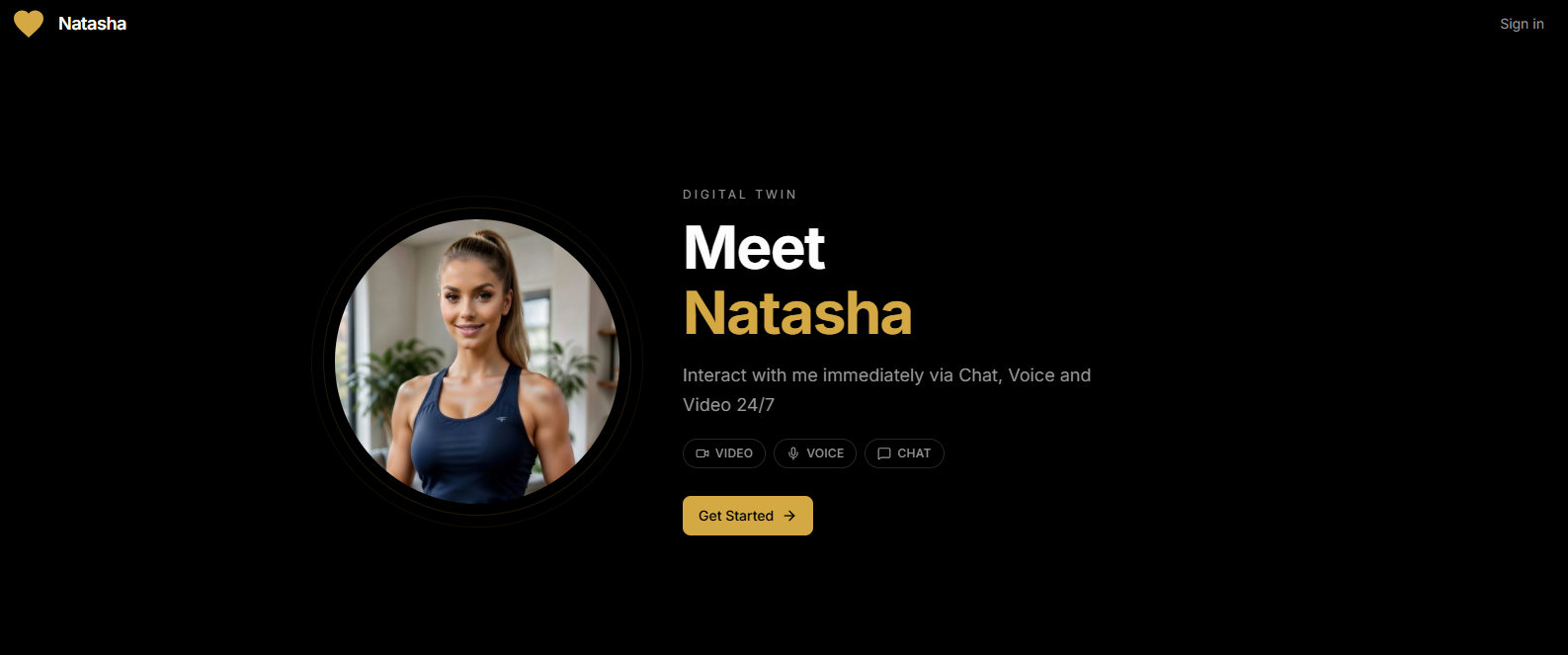
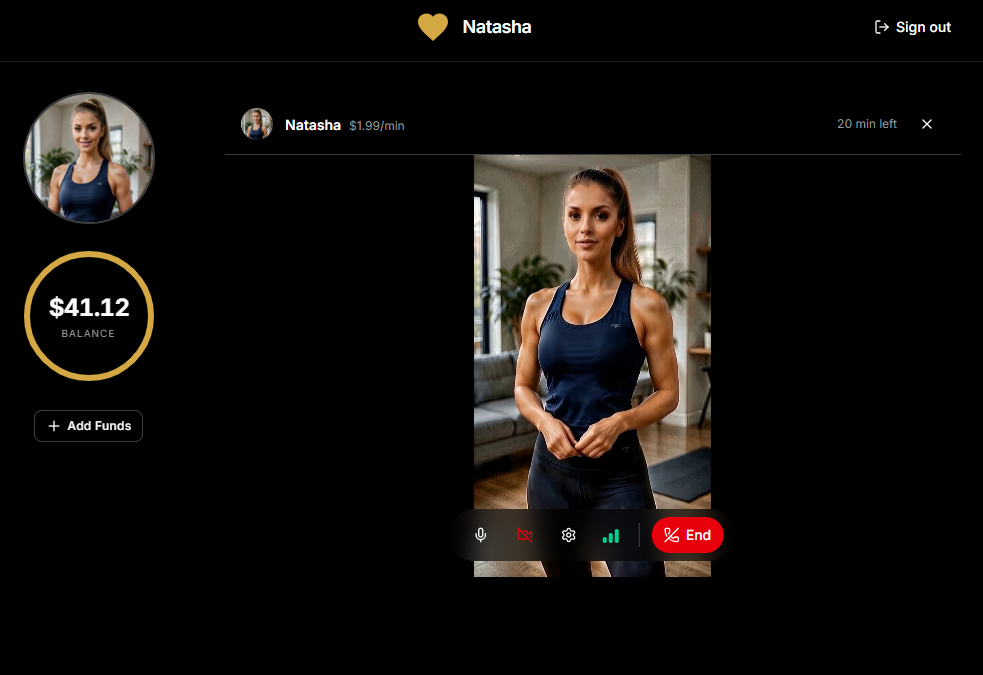
What Rallo Actually Does
Most AI tools solve a single problem. Rallo focuses on two.
First, it helps creators produce content at scale. A creator's AI twin can generate text, images, and videos in their style, using their likeness, voice, and personality. Instead of creating everything manually, creators can use their twin to dramatically increase output without increasing workload.
Second, it creates an entirely new way for fans to interact with creators. The creator's twin stays live 24/7 through a single shareable link that can be added anywhere online. Fans don't need a specific platform or app; they can simply open the link and start interacting.
What makes Rallo unique is the format. Fans can chat with the twin, jump into a voice call, or even have a real-time video conversation. Whether the creator is filming, traveling, or offline, fans can still access an interactive version of them from anywhere on the web.
Why Fans Are Paying for AI Twins
The team quickly learned that different interaction formats create different types of value.
Chat is often the starting point because it's easy and familiar.
Voice creates a stronger emotional connection. Hearing a creator's voice feels significantly more personal than reading text.
Video is where the experience becomes truly unique. Fans can have face-to-face conversations with an AI version of their favorite creator, creating an interaction that doesn't exist on most platforms today.
But technology alone isn't enough. A successful twin needs to feel authentic. It needs to speak the way the creator speaks. Use the same vocabulary. Share the same energy. Understand what topics are off-limits and what boundaries should exist.
The closer the twin feels to the real creator, the more valuable the experience becomes.
What Makes Rallo Different
Most off-platform AI tools focus on either content creation or fan interaction, but not both. Rallo combines them in a different context: off-platform, via a shareable link.
Rallo's AI Twin isn't limited to a single platform or format. The same twin that generates content can also hold live voice calls and real-time video conversations with fans anywhere on the web, through a simple shareable link, with no platform integration required.
The Biggest Shift Creators Haven't Realized Yet
According to the Rallo team, the creator economy is about to experience a major mindset shift.
Today, most creators still think of their time as the product. If they're not filming, posting, replying, or engaging, revenue slows down.
AI changes that equation.
A trained AI Twin doesn't replace a creator's presence on their platforms; it extends their identity to every other corner of the web. It's the version of the creator that fans can reach when there's no platform to go to.
The creators who understand this early will build very different businesses than those who continue trading hours for income.
Lessons Learned Along the Way
Building Rallo wasn't easy.
The team had to solve multiple difficult problems simultaneously: realistic content generation, conversational AI, payment infrastructure, creator trust, and the rapidly changing rules surrounding AI-generated likenesses.
One of their biggest surprises wasn't technical. It was a distribution.
Early outreach efforts relied heavily on cold messages to creators. Despite strong pilot data and a compelling offer, the response rate was almost nonexistent.
The lesson was simple. Great products don't automatically overcome poor channels. Creators are overwhelmed with unsolicited pitches every day. Building trust through relationships, referrals, and proof turned out to be far more effective than trying to reach more people.
What's Next
Over the next year, the company plans to expand beyond fan engagement.
One of the most anticipated releases is Rallo Studio, a new AI content engine designed to let creators generate fully produced videos featuring their AI Twin.
Creators will be able to write a script, choose a setting, and generate videos using their own likeness and voice without stepping in front of a camera.
Long-term, Rallo is building toward a single AI identity that can generate polished video content and hold real conversations with fans, anywhere, in any format, without requiring a platform.
The Real Question Nobody Is Asking
The conversation around AI often focuses on capabilities:
- How realistic can AI become?
- How much content can it generate?
- How human can conversations feel?
The Rallo team believes the more important question is who benefits financially.
If AI is trained on a creator's identity, voice, personality, and audience relationship, should most of the value go to the platform or the creator?
Rallo's answer is clear. Creators should own the majority of the value created by their digital twins. Because the future of AI in the creator economy isn't just about what AI can do. It's about who gets paid when it does.
Curious about Rallo or wondering if it's the right fit for you? Get in touch with the Rallo team at info@rallo.ai. They'll be happy to answer your questions.
How Creators Are Monetizing Their AI Twins Beyond OnlyFans
.png)


