


.png)
But that system breaks the moment you add a second chatter, a second model, or more than a few dozen active fans. At that point, you need software built for the job, not a workaround. That's what an OnlyFans CRM is for.
This guide covers what an OnlyFans CRM actually does, what to check before you buy one, and how to match the right tier to where your account or agency is today.
What Is an OnlyFans CRM?
OnlyFans doesn't give creators or agencies a way to manage multiple chatters, track fan value, or automate replies. There's no built-in team dashboard and no fan history beyond a basic chat thread. A CRM (customer relationship management platform) fills that gap. It securely connects to your OnlyFans account and gives you a single place to view fan history, run chat tools, manage your team, and track revenue.
Here's why that fan history matters more than it sounds like it should: For many successful creators, PPVs, tips, and paid messages generate as much, or more, revenue than subscriptions. Your subscriber count isn't the real business. The DMs are. A CRM that only shows you subscriber numbers misses the bigger picture, and that's exactly what a chat-first CRM is built to fix.
What an OnlyFans CRM Should Actually Do
A CRM built for OnlyFans needs to cover four jobs well. Miss one of these and you'll end up patching together multiple tools with a spreadsheet again.
Fan History and Purchase Tracking
Every fan should have a profile: what they've bought, how much they've spent, what they responded to, and any tags your team has added. Without this, a new chatter picking up a conversation is starting without context, and blind chatters send the wrong offer to the wrong fan constantly.
Chat Automation and AI Chatter
This is where the CRM earns its keep on volume. AI chatter tools handle repetitive replies, bump messages, and win-back sequences so your human chatters aren't spending hours on fans who were never going to spend much. Supercreator's own data on chat activity across agency accounts puts a healthy messages-per-hour range at 50 to 70 for a human chatter. A CRM should surface that number automatically, not leave you counting messages by hand at the end of a shift.
Team and Access Management
If more than one person touches an account, you need role-based logins, not a shared password sitting in a group chat. Secure access management lets you add or remove chatters without ever handing over the actual OnlyFans credentials, which matters both for security and for keeping the account in your name, not a former employee's browser session.
Analytics and Revenue Reporting
You need to see revenue per chatter, per account, and per campaign in one dashboard. Analytics built for chatter management should show you where money is coming from and where a chatter is quietly underperforming, not just a top-line revenue number that hides both.
Comparison: What You Actually Need Depends on Your Setup
A solo creator and a 15-model agency are buying two different products, even if the software is the same. Here's how the priorities shift.
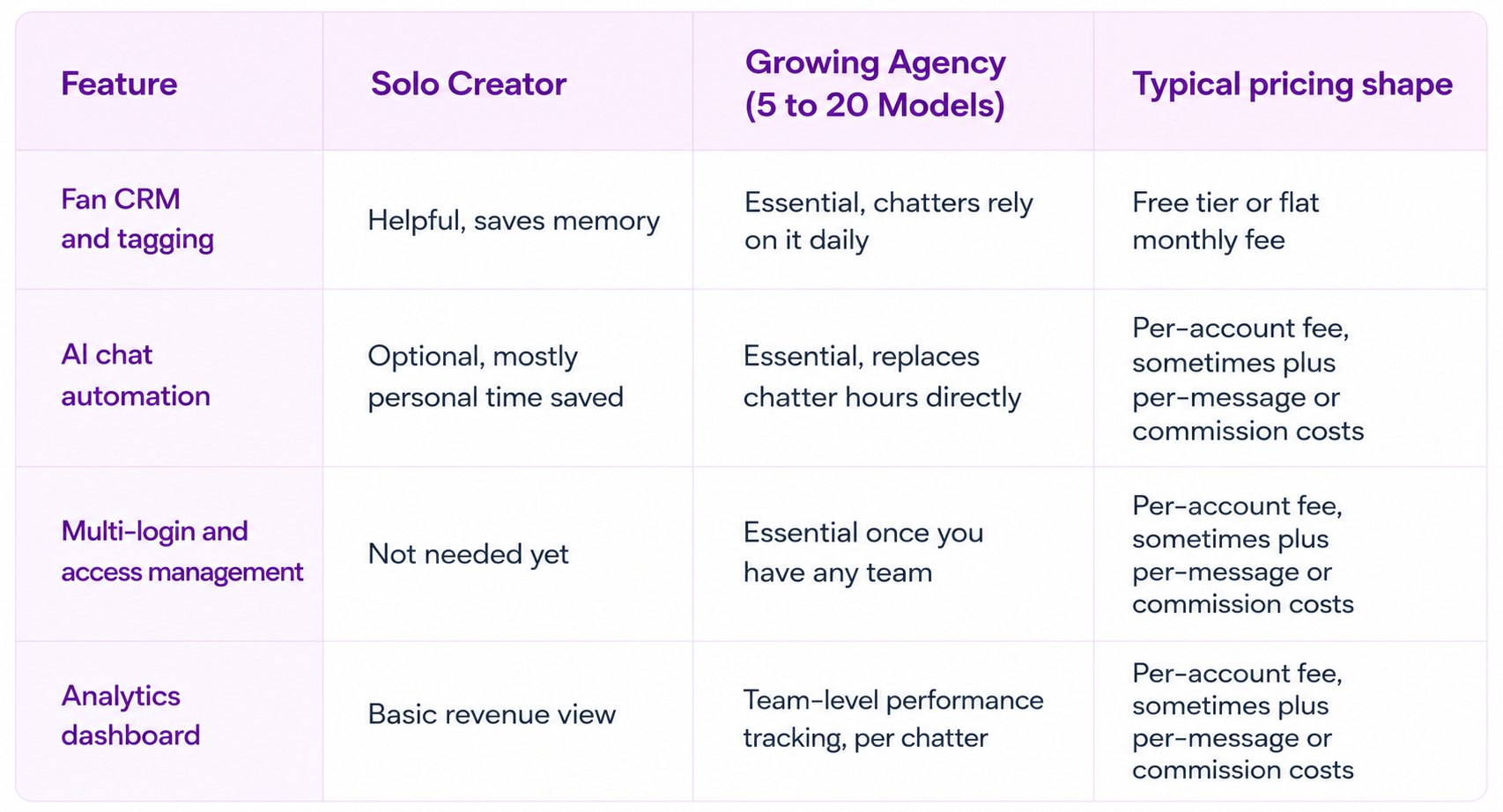
If you're solo, the CRM is mostly about not losing track of your own fans. If you're running a team, it's an operations tool first and a chat tool second.
How to Choose the Right OnlyFans CRM
So, how do you actually pick one? Run through these four questions before you commit.
Does it connect without asking for your password to be stored insecurely? A CRM should use secure, simulated access rather than storing your raw OnlyFans login. If a tool asks you to hand over credentials with no explanation of how they're protected, that's a red flag, not a minor inconvenience.
Does the pricing model match your volume? Some platforms charge per message sent plus a commission on AI-driven sales, on top of a base account fee. That model rewards efficiency at low volume, but here's the catch: as your message count climbs into the tens of thousands a month, per-message costs stack up fast, and a flat per-account fee can end up cheaper. Run the math on your actual monthly message volume before you assume the cheaper-looking plan stays cheaper.
Does it support your team's size today, not just where you'll be in a year? Buying enterprise-tier access management for a 2-person operation wastes money. Buying a tool that caps out at 3 accounts when you're already managing 8 wastes time migrating later.
Can you test it before committing? A free tier or trial period tells you fast whether the interface actually fits how your chatters work. If a platform won't let you try before you buy, ask why.
Common Mistakes When Buying an OnlyFans CRM
Picking based on price alone. The cheapest plan often locks the automation and analytics features you actually need behind a higher tier. Check what's included before comparing the sticker price.
Skipping access management until it's a problem. Agencies that start with shared logins usually add proper access controls only after a chatter has left but still has access to the account. Set this up before you need it, not after.
Ignoring the setup process. A CRM with a detailed fan bio, persona, and script setup takes real time to configure correctly. Rushing this step is the most common reason AI chatter performance disappoints early on. Budget a real afternoon for setup, not twenty minutes between chats.
Judging automation by day one results. Performance usually improves as you refine your persona, scripts, products, and automation settings. Judging it after 48 hours tells you almost nothing about how it performs after a month.
If you want platform-by-platform breakdowns rather than a buying framework, Top OnlyFans CRM Tools Compared for Agencies and Managers and Best OnlyFans CRM & Automation Tools for Sales and Engagement line up specific platforms feature by feature.
Final Words
An OnlyFans CRM isn't an optional add-on once you're managing more than a handful of fans or more than one chatter. It's the difference between guessing at what's working and actually seeing it. Start with what your setup needs today, not the feature list that sounds impressive, and the right tier follows naturally.
If you're running an agency and losing hours to shift schedules and shared logins, Supercreator's OnlyFans CRM puts your whole team, fan history, and revenue tracking in one dashboard, with Izzy handling the repetitive chat volume your team shouldn't have to.
- One dashboard for fan history, chats, and revenue across every model
- Role-based access so chatters never touch your real login
- AI chatter that picks up the repetitive conversations automatically
- Message Library for saving and reusing your best-performing scripts and PPVs
- Activity & Message Logs for full visibility into who did what, and when
- Auto-Translation so language never costs you a sale
- Fan Lists and Exclusion Lists to control exactly who gets automated and who doesn't
- Inbox Copilot to help your team draft faster replies without leaving the chat
Book a demo and see how it fits your operation.
If you're managing your own account solo, start on the free CRM Lite tier, no credit card required, and turn on AI chat automation whenever you're ready to hand off the repetitive replies.




.png)

