


.png)
No, that's not a reason to distrust every vendor. It's a reason to compare the actual features against your actual operation before you commit a chat team to one system.
This is a straight, tool-by-tool look at the platforms agencies and creators use to run OnlyFans management day-to-day: what each one is genuinely good at, where it falls short, and a criteria table at the end to help you weigh them against your own setup.
What This Software Actually Does
OnlyFans management platforms extend the native OnlyFans inbox with tools designed for creators and teams. Depending on the platform, these can include individual staff access, fan profiles with spending and purchase history, reusable scripts, more advanced mass messaging, chatter analytics, automation, and AI-assisted or autonomous chatting. They do not replace OnlyFans; they provide an additional management layer around it.
Supercreator
Best for: creators and agencies that want AI covering real chat volume, not just the busywork around it.
Supercreator is built around Izzy, an AI chatter that handles full fan conversations rather than just suggesting replies for a human to send. Izzy can independently handle routine conversations and lower-priority fans based on the agency’s configuration, while human chatters can focus on VIPs, sensitive conversations, and custom requests. More than 25,000 creators and agencies use the CRM, with over 6,000 actively running Izzy.
Features:
- Izzy AI chatter handles full conversations, not just suggested replies
- Role-based multi-login access management
- Fan CRM with spend history and segmentation
- Chatter and account performance analytics
- Auto-translation for multilingual fan bases
Where it falls short, honestly: the AI-first approach is the wrong fit for agencies whose whole model is built around fully human, high-touch chatting with no automation at any tier. If that's the operating philosophy, a CRM-only tool without an AI layer built to run conversations may feel like a better match.
Infloww
Best for: teams that want the widest feature coverage in one dashboard.
Infloww built its CRM specifically for the adult-content creator space rather than adapting a general-purpose tool. That focus shows in how much of the day-to-day workflow it covers in one place: fan messaging, a fast chatting mode called Messages Pro, and a growing set of AI automations layered on top of the core CRM. It is one of the more established products in the OnlyFans CRM category and supports multiple creator platforms.
Features:
- Dedicated OnlyFans and adult-platform CRM
- Messages Pro for faster, streamlined chatting
- AI automation tools for repetitive tasks
- Data security and platform-compliance focus
- 24/7 support
Where it falls short: breadth comes with a learning curve. Infloww covers a broad set of workflows, so smaller teams should use the trial period to determine whether they need that breadth and how long onboarding will take. Agencies looking for an AI that independently manages extended sales conversations should confirm the current scope directly with Infloww. For a closer side-by-side, see how Supercreator compares to Infloww.
CreatorHero
Best for: creators and agencies looking for an all-in-one management platform with strong human-chatting workflows.
CreatorHero has expanded beyond its earlier extension-based experience. It now offers a broader management platform with desktop and browser access, team management, messaging automation, analytics, tracking, vault tools, and AI features. Its chatting tools remain focused on helping teams work faster inside a centralized workflow.
Features:
- Chrome extension; works inside the native OnlyFans inbox
- Fan spend shown directly on the chat list
- Script autocompletion with folder organization
- Vault media labeling and duplicate-send prevention
- Personalized mass messages to currently online fans
Where it falls short: as an extension rather than a standalone platform, it leans more toward speeding up human chatting than replacing volume with automation, and role-based access and analytics are lighter than what a larger multi-model agency typically needs.
See the full Supercreator vs. CreatorHero comparison for the detailed breakdown.
OnlyMonster
Best for: agencies prioritizing centralized account access and multi-account workflows.
OnlyMonster leans into centralized management of multiple accounts, including an anti-detect browser-like system designed for centralized multi-account access for teams managing several creators at once, alongside AI-assisted reply suggestions and centralized analytics.
Features:
- Browser and desktop access
- Team roles, permissions, and shift scheduling
- Chatting tools and messaging automations
- Creator, fan, revenue, and social-media analytics
- Tracking and marketing insights
- Vault and content-management tools
Where it falls short: like several tools in this space, detailed pricing isn't published upfront, which means budgeting requires a sales conversation before you can compare it cleanly against tools that do list pricing. Compare it directly against Supercreator here.
Other Notable Tools
FansMetric combines chatting, analytics, team management, and marketing attribution, with particularly detailed tracking for promo links, chatter work hours, message volume, and earnings. It's a strong candidate for agencies that prioritize acquisition attribution and operational reporting alongside inbox management. See how it compares to Supercreator.
Fans-CRM currently offers free access to tools including centralized messaging, automations, content management, and team roles. This makes it financially accessible to creators and smaller agencies, although users should independently evaluate its security documentation, support, integrations, and data-export options before connecting a revenue-generating account.
How to Choose the Right Platform
Dedicated vs. general CRM. A tool built specifically for OnlyFans understands things a generic CRM never will: PPV pricing logic, vault content, and platform-specific compliance risk. Every tool covered here is purpose-built for this category, which is exactly why a generic sales CRM isn't on this list at all.
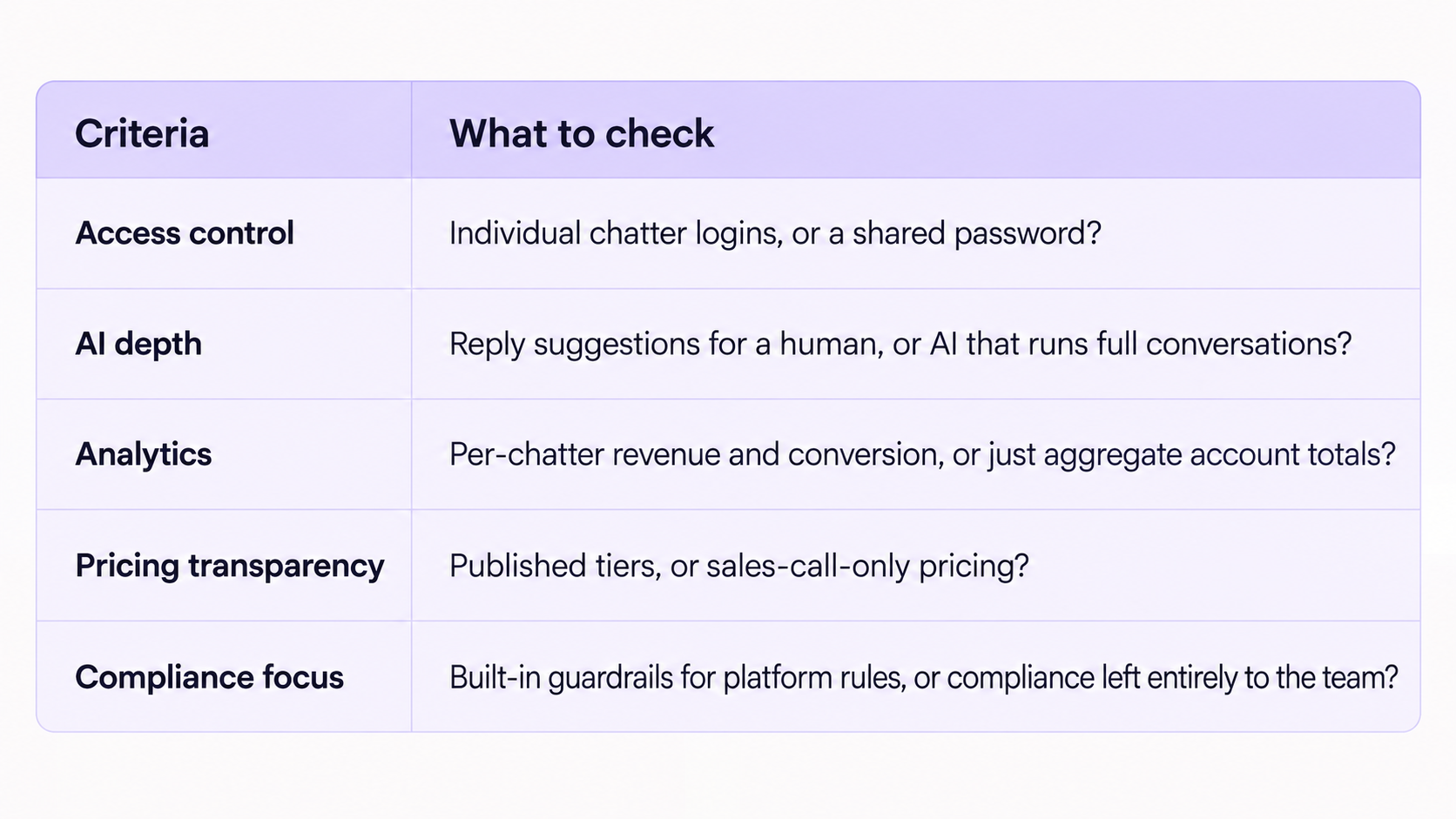
Security and access control. This is the single most important line item and the easiest one to skip past on a sales call. Ask specifically whether chatters get individual logins with permission levels, or whether the tool still requires sharing the actual OnlyFans password. Shared passwords create significant and avoidable security risks, including weak accountability, difficult access revocation, and greater exposure when a team member leaves. Prefer platforms that provide individual logins, role-based permissions, access logs, and prompt revocation. Also check whether the platform stores the OnlyFans password, supports two-factor authentication, keeps audit and message logs, encrypts data, allows straightforward access revocation, and publishes clear data export and deletion policies, and ask whether it has undergone any independent security audits.
Use this table as a starting framework, then confirm current details directly with each vendor before you commit:
The Mistakes That Cost Money When Switching Platforms
Switching without checking data portability first. Before migrating, confirm which fan notes, tags, purchase records, scripts, media labels, and analytics you can export from the old platform and import into the new one. Do not assume the two systems use compatible formats.
Signing an annual contract before a real trial. Avoid committing to an annual plan until the platform has been tested with representative chat volume, team roles, and account workflows. The discount only matters if the system works for the operation.
Ignoring the learning curve on total cost. A cheaper tool that takes a chat team two extra weeks to get fluent on isn't actually cheaper once lost conversion during that ramp-up gets counted.
Not confirming who owns the data on exit. Ask upfront what happens to fan notes, tags, and history if the agency leaves the platform. Some tools make this easy. Others don't, and finding out at the point of leaving is the worst possible time.
See How Supercreator Compares on Your Own Numbers
The right platform depends on where your actual bottleneck is: chat volume, access security, analytics, or compliance risk. If volume is the constraint and you want to see how an AI chatter that runs full conversations fits into a real chat team, book a demo, and we'll walk through it against your current setup. If you're a solo creator wanting to try the CRM and Izzy on your own account first, you can start for free. For the category basics, this breakdown of what an OnlyFans CRM does and how to choose one is a good next stop.





.png)

