


.png)
Managing multiple accounts is a different problem than managing one account well. It's not about content or fan engagement anymore. It's about who has access, how they get it, and how cleanly they can move between accounts without breaking something.
This guide covers the two ways agencies actually solve this, how to set up access without handing out your real passwords, and the account-switching workflow that keeps a chat team moving during a shift.
What "Managing Multiple Accounts" Actually Involves
Once you're past one account, three problems show up whether you notice them or not: account isolation (keeping each profile's login, activity, and identity separate), team access (giving chatters and managers the right level of entry without sharing your actual credentials), and switching speed (how fast someone can move between accounts during a shift without logging in and out repeatedly).
Get any one of these wrong, and it shows up as a real cost. Shared logins mean you can't tell who did what when something goes sideways. Slow switching means chatters spend shift time navigating instead of chatting. Poor isolation between accounts increases the odds that a problem on one profile spills into another.
Two Primary Approaches Agencies Handle This
Most agencies land on one of two approaches, and they solve the problem differently.
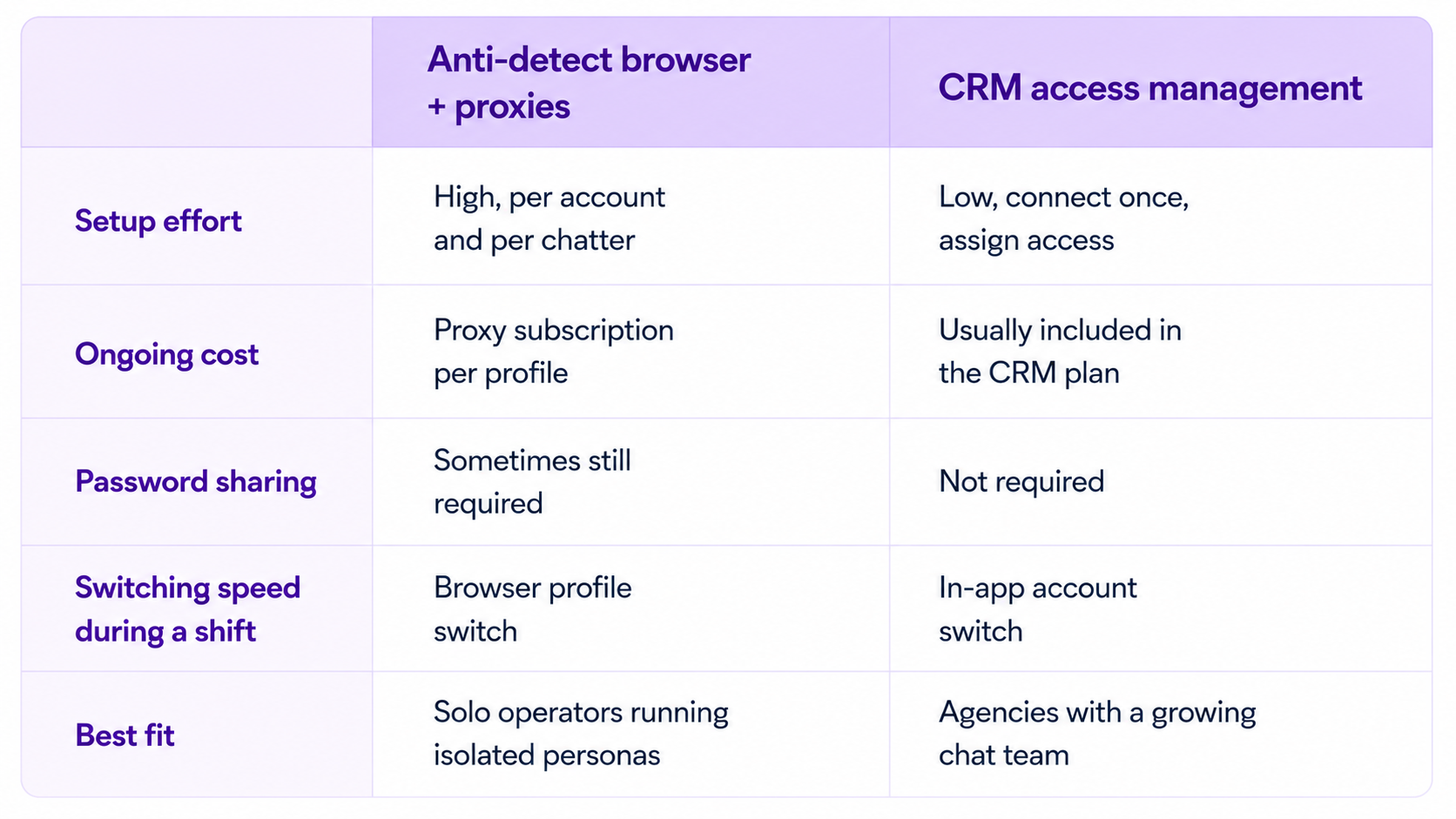
Anti-detect browsers with dedicated proxies. This is the manual route: a separate browser profile and a unique residential proxy per account, each with its own fingerprint, so each browser profile presents a separate browser environment with its own cookies, fingerprint characteristics, and typically its own residential proxy. It works, but it places the burden of isolation entirely on you. You're managing proxy subscriptions, browser profiles, and credential sets by hand, and every new account or new chatter means setting the whole stack up again.
CRM-based access management. This route focuses on centralized access management instead of requiring every chatter to maintain separate browser profiles. Chatters get access to specific accounts without ever seeing your OnlyFans password, and switching between accounts happens inside one interface instead of a browser profile switch. Supercreator's access management layer works this way: an admin connects the account once, then assigns team members without handing over credentials at all.
Neither approach is wrong. The proxy-and-browser route gives you more control if you're deliberately running many isolated personas. The CRM route is faster to set up and easier to hand off to a growing team, which is why most agencies past a handful of accounts move toward it.
*Regardless of which approach you choose, make sure it complies with OnlyFans' Terms of Service and any agreements you have with the creators you manage. Access management tools should improve security and team workflows, not bypass platform policies
Setting Up Access Without Sharing Passwords
Whichever route you choose, the same principle holds: nobody on your team should ever need your actual OnlyFans login. A few things to get right from the start.
Register each account with its own credentials. A distinct email and phone number per account keeps them separate at the platform level, which matters regardless of which access method you're running on top of it.
Add each account individually to your access management tool. An admin connects the account once, and from there team members get access through the platform rather than the real login. This is the step that actually removes password sharing ƒ
Set roles before you add people, not after. Decide who's an admin, who's a manager, and who's a chatter before you start onboarding, so nobody ends up with more access than their role needs by default.
Chatter Permissions: Who Should See What
Not every chatter needs to see everything. A chatter working a single account's DMs doesn't need visibility into revenue reports across your whole roster, and a new hire shouldn't have the same access as someone who's been running your top account for a year.
Role-based permissions solve this by tying access to the job, not the person. The exact permissions depend on the software you're using, since different CRMs expose different permission models. A chatter role typically gets chat access to their assigned accounts only. A manager role adds visibility into performance data and the ability to reassign chatters. An admin role keeps full account connection and billing control. Setting these up inside your CRM means a chatter leaving doesn't require you to change any actual OnlyFans passwords, since their access was never tied to the real login in the first place.
Account Switching During a Shift
A chatter working three accounts in one shift shouldn't be logging out and back in three separate times. The workflow that actually holds up:
Accounts get added to the workspace once by an admin, and from there, chatters see every account they're assigned to inside a single sidebar or account switcher. Moving from one conversation to another is a click, not a login screen. If a chatter's shift covers accounts with wildly different volume, faster switching means less dead time between conversations, and dead time is the thing that actually costs revenue on a busy shift.
If your team is still logging in and out of separate browser sessions to cover multiple accounts, that's usually the first sign it's time to move off the manual setup and into a proper access management layer.
Common Mistakes When Managing Multiple Accounts
Sharing one password across the whole team. This is still the most common setup mistake, and it's also the hardest one to unwind later, since you'd need to rotate the password every time someone leaves. Set up role-based access from day one instead.
Giving every chatter full account access. Broad access feels convenient at first and turns into a real risk the moment a chatter leaves on bad terms or a mistake happens, and nobody can trace who made it.
Treating account switching as a minor inconvenience. Slow switching adds up across a full shift and across a full team. If chatters are losing meaningful time navigating between logins, that's lost chat volume, not just an annoyance.
Adding automation before access is sorted. Chat automation helps once your team structure is solid, but bolting it onto a setup with shared passwords and unclear roles just adds another layer of confusion on top of an already fragile system.
If you want the deeper walkthrough on multi-login software specifically, Best Way to Manage Multiple OnlyFans Chatters and Accounts Worldwide covers that in more depth. And once you're past a handful of accounts and thinking about scaling without adding headcount, How to Scale OnlyFans Account Management to 50+ Accounts Without a Huge Team picks up from there.
Final Words
Managing multiple OnlyFans accounts well isn't about finding a clever workaround. It's about setting up access once, correctly, so growth doesn't mean more risk every time you add an account or a chatter.
If you're managing several accounts and a growing chat team, Supercreator's access management sets up role-based permissions and account switching without distributing your OnlyFans credentials to every chatter.
- Connect each account once, assign chatters without handing over credentials
- Switch between accounts in one interface instead of separate browser logins
- Remove a chatter's access instantly if they leave, with nothing to rotate
Book a demo to see it set up on your accounts, or start free if you're just getting your first few accounts organized.




.png)

