


.png)
Quick Answer: How Do You Onboard a Chatter in Supercreator?
Onboarding a new chatter in Supercreator takes seven days, moving from access and orientation to independent work on live accounts. The agency sets up accounts and permissions first, then the chatter learns the fan data, calibrates to the creator's voice, and starts on low-value fans before handling PPV and full shifts. Rushing this is the fastest way to create problems that take weeks to fix.
The seven-day path in short:
- Before day 1: admin adds accounts to the Console, sets role-based permissions, sends the invite
- Days 1 to 2: access, orientation, and learning the fan data layer
- Day 3: voice and tone calibration against the creator's best messages
- Days 4 to 5: first live messages on low-value fans, then PPV and upsell training
- Days 6 to 7: independent shift with monitoring, then a structured review and sign-off
Onboarding your next chatter? Set up their permissions in the Console before you send the invite.
Key takeaways:
- Get the agency side ready first: add each OnlyFans account to the Console, set role-based permissions per chatter, then send the invite. Chatters never see login credentials.
- Days 1 to 2 are for orientation and reading the fan data layer in the CRM, not messaging. Do not put a chatter on a live account on day one.
- Day 3 is voice calibration. Have them draft ten sample replies against the creator's best-converting messages before anything goes live.
- Days 4 to 5 introduce live messaging on low-value fans, then PPV and upsell mechanics. Keep mass messaging supervised.
- Day 6 is a monitored independent shift; day 7 is a structured review and week-two scope, not another shift.
- Set benchmarks before go-live: response time under 15 to 20 minutes, message quality over volume, and PPV conversion tracked per chatter, per account, per week.
The 7-Day Chatter Onboarding Framework
Bringing a new chatter into an OnlyFans agency is where operations can quietly fall apart. The tools are set up, the accounts are connected, but nobody documented what the chatter is actually supposed to do on day one. They start cold, make avoidable mistakes, and the agency spends the next two weeks cleaning up instead of scaling.
Let’s walk through a day-by-day framework for onboarding a new chatter through Supercreator in seven days, from first access to working independently on live accounts.
Before Day 1: What the Admin Needs to Do First
The chatter cannot do anything until the agency side is ready. Before you send anyone an invite link, make sure these are in place.
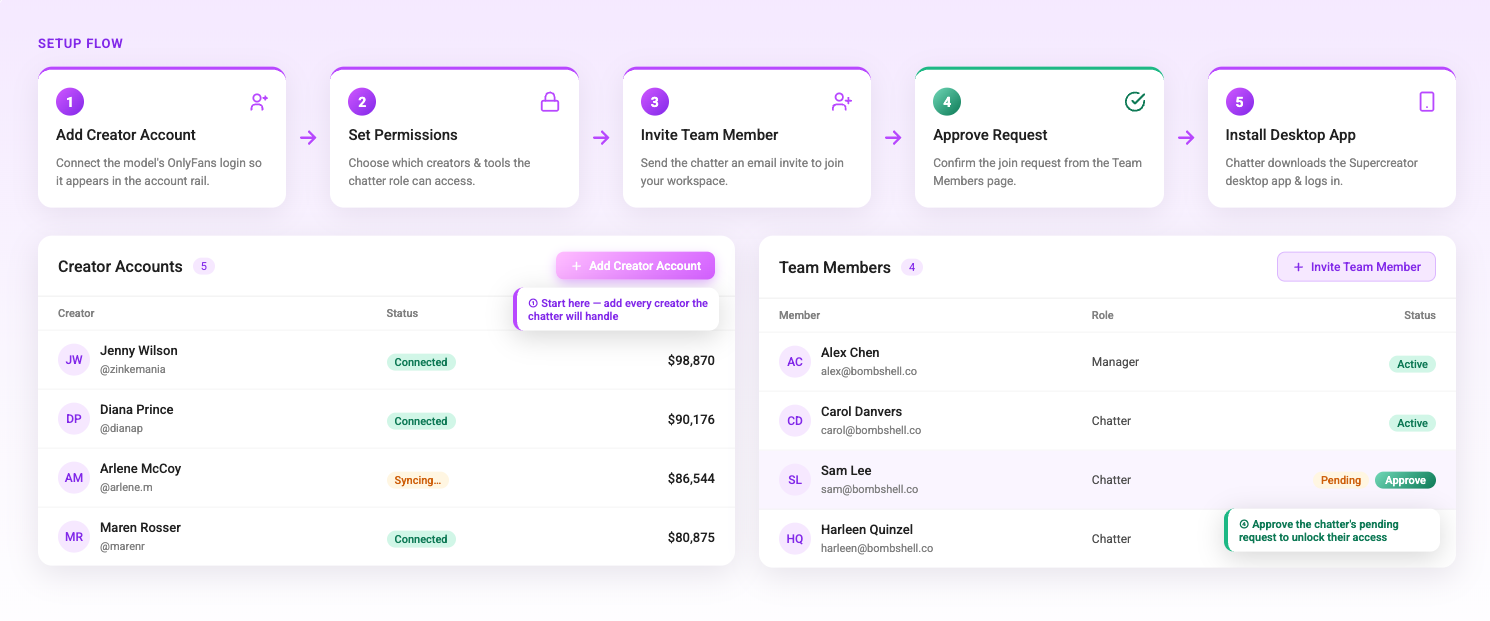
Every OnlyFans account the chatter will work on needs to be added to the Supercreator Console individually. Each account requires its own login and password — you cannot switch between accounts within the same OnlyFans profile using the Desktop app. Log in to each account through the Supercreator app, go to the Accounts section, enter the OnlyFans username, and click Add Account. The account needs to show as Connected before anyone else can access it.
Once accounts are added, set the permissions for that chatter before you send the invite. Decide which accounts they have access to, what actions they can take, and what they cannot touch. Supercreator has role-based permissions, so locking this down before the chatter joins means they land in a controlled environment, not a wide-open one.
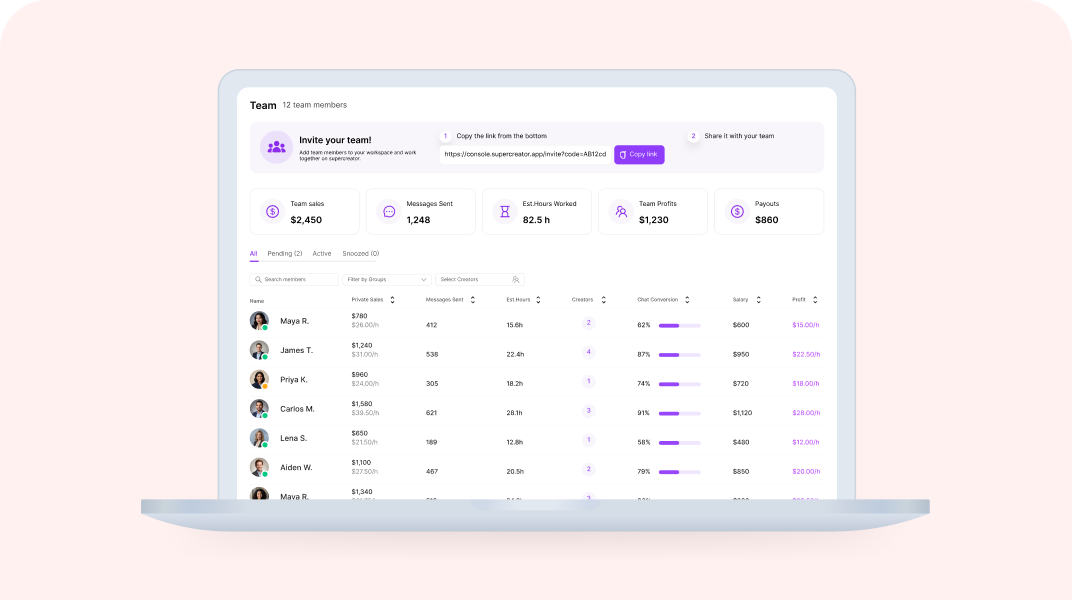
Then send the invite link. The chatter signs up with their email or Google account, and you approve their request from the Team Members page. One license per OnlyFans creator. Unlimited chatters can be connected to the same account.
Day 1: Access and Orientation
The chatter receives the invite link, creates their account, and installs the Supercreator Desktop app. They need to sign in using the same email address associated with their Supercreator account in your workspace. This is a common point of confusion that is worth flagging explicitly before they start.
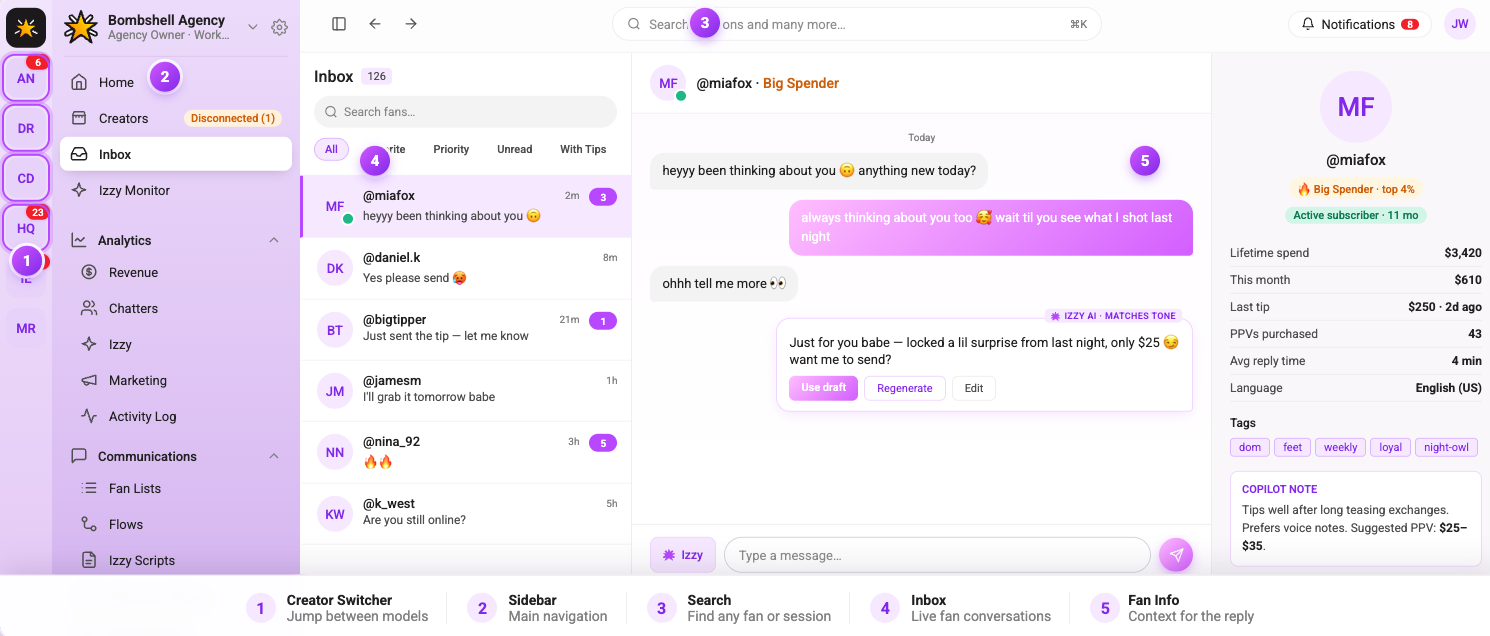
Once they are in, their first session should be orientation only. Show them the layout. Walk them through which accounts they have access to, how to find a fan's chat history, and where fan data lives. Do not put them on a live account on day one. The goal is familiarity, not production.
If the account is not showing up in their sidebar, it means the admin has not assigned it to them yet. This is worth troubleshooting before the orientation session so it does not eat up time.
Day 2: Learning the Fan Data Layer
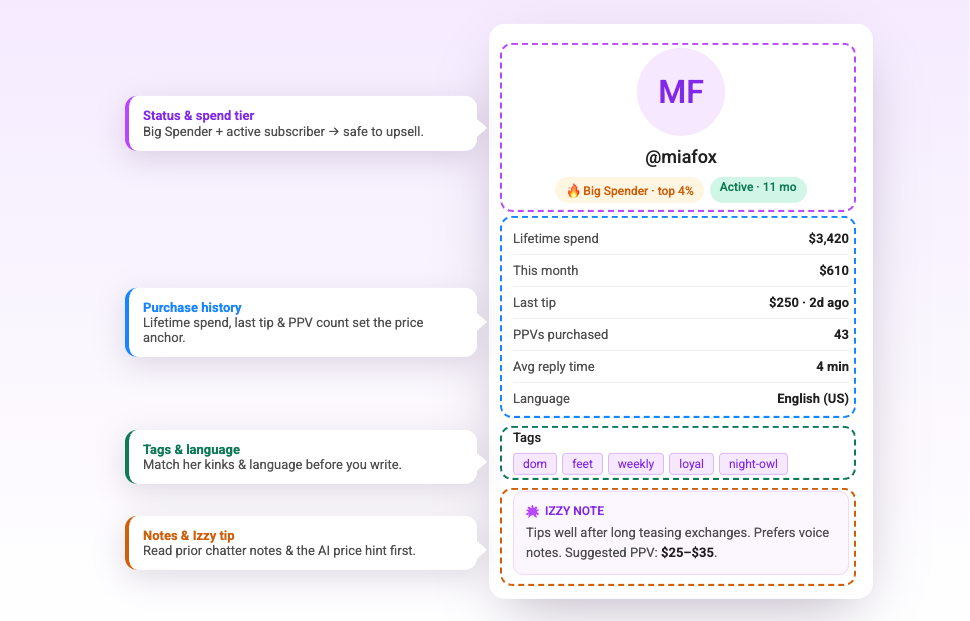
Before a chatter sends a single message, they need to understand how to read a fan. Supercreator surfaces each fan's purchase history, chat history, total spend, and content preferences before you open a reply window. This is what separates a targeted message from a generic one.
On day two, have the chatter spend time in the fan profiles without messaging anyone. Ask them to identify: who the top spenders on the account are, which fans have gone quiet in the last 30 days, and which content types are generating the most tips. This is an exercise in reading the data, not acting on it yet.
The OnlyFans CRM is where all of this lives. Getting comfortable with fan segmentation early means the chatter will send better messages from week one rather than defaulting to blasting everyone with the same offer.
Day 3: Learning the Voice and Tone
Every creator has a specific way they communicate with fans. A chatter who sounds nothing like the creator breaks the illusion immediately and damages trust with subscribers who have been on the account for months.
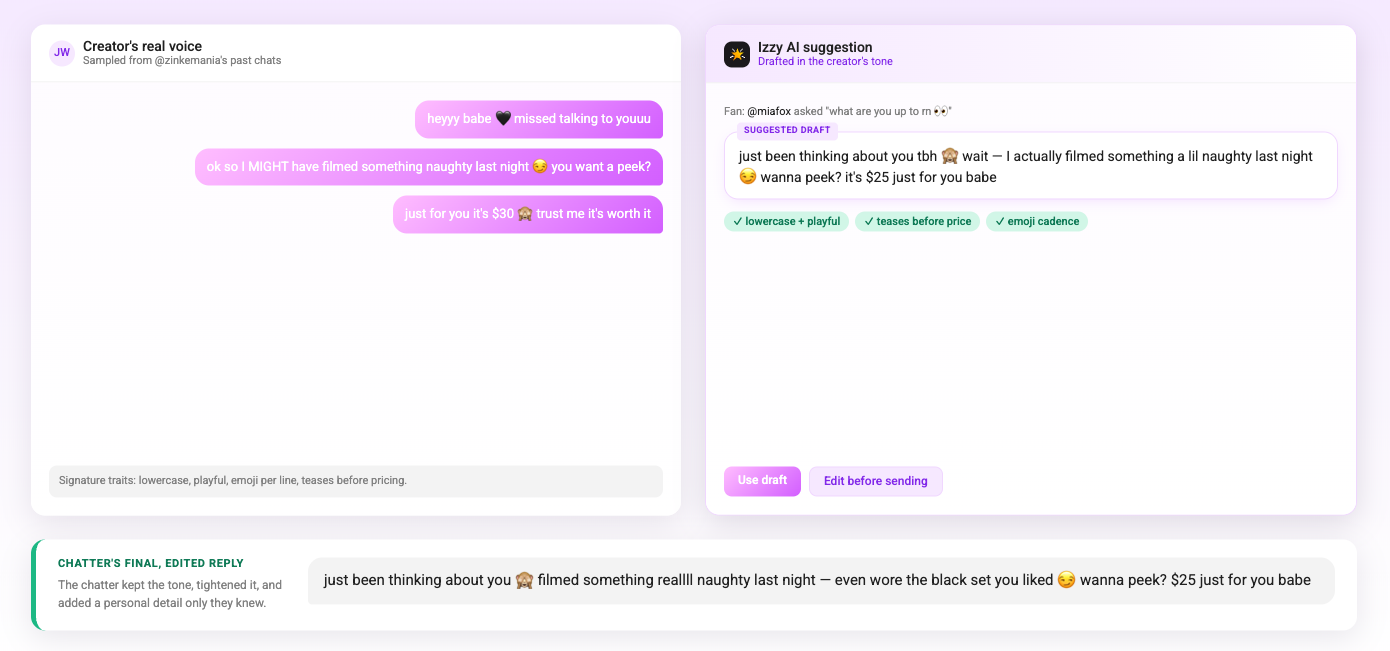
Day three is about tone calibration. Have the chatter read through a sample of the creator's existing messages, especially the ones that generated tips or PPV purchases, which are the most instructive. Then have them write ten sample responses to common fan messages without sending any of them. Review the drafts together and give specific feedback on where the tone is off.
The OnlyFans AI chatbot is configured to mirror the creator's voice, which gives the chatter a reference point. The AI's suggestions are a baseline that the chatter should be able to match and build on. If their drafts are consistently below the quality of the AI's suggestions, that is a training flag worth addressing before they go live.
Day 4: First Live Messages
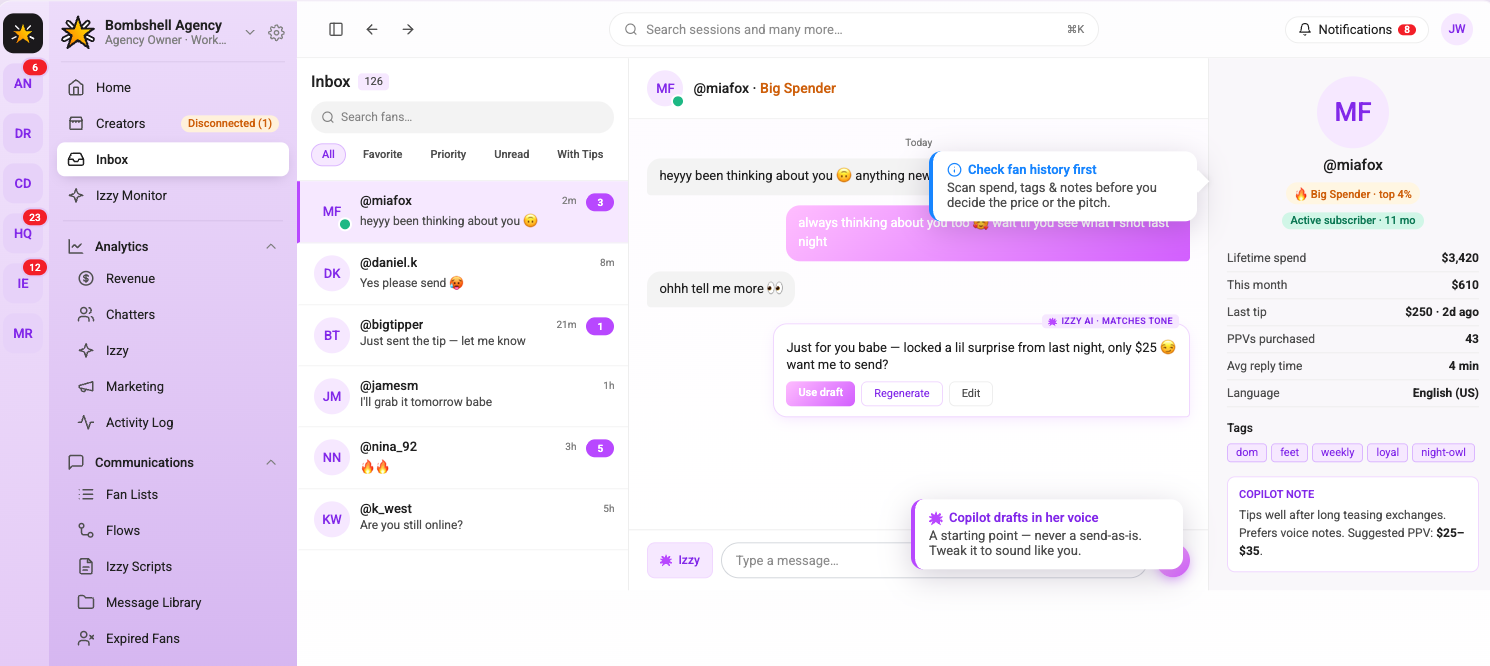
The chatter sends their first real messages on day four, but with guardrails. Start them on lower-value fans only; not the top spenders, not anyone in an active sales conversation. Let them handle routine responses, answer common questions, and send a few re-engagement messages to fans who have gone quiet.
Monitor the session closely. Review every message they send on day four. Look for tone inconsistencies, missed upsell opportunities, and whether they are using the fan context that Supercreator surfaces before replying. Give feedback the same day while the conversations are fresh.
The OnlyFans bot handles automated touchpoints like welcome messages and re-engagement sequences in the background. Make sure the chatter understands which interactions are automated and which require their direct input, so they are not duplicating messages that are already going out automatically
Day 5: PPV and Upsell Training
Handling routine messages is one skill. Selling is another. Day five is dedicated to PPV and upsell conversations: how to read when a fan is close to purchasing, how to pitch without being transactional, and how to follow up after a PPV goes unseen without coming across as pushy.
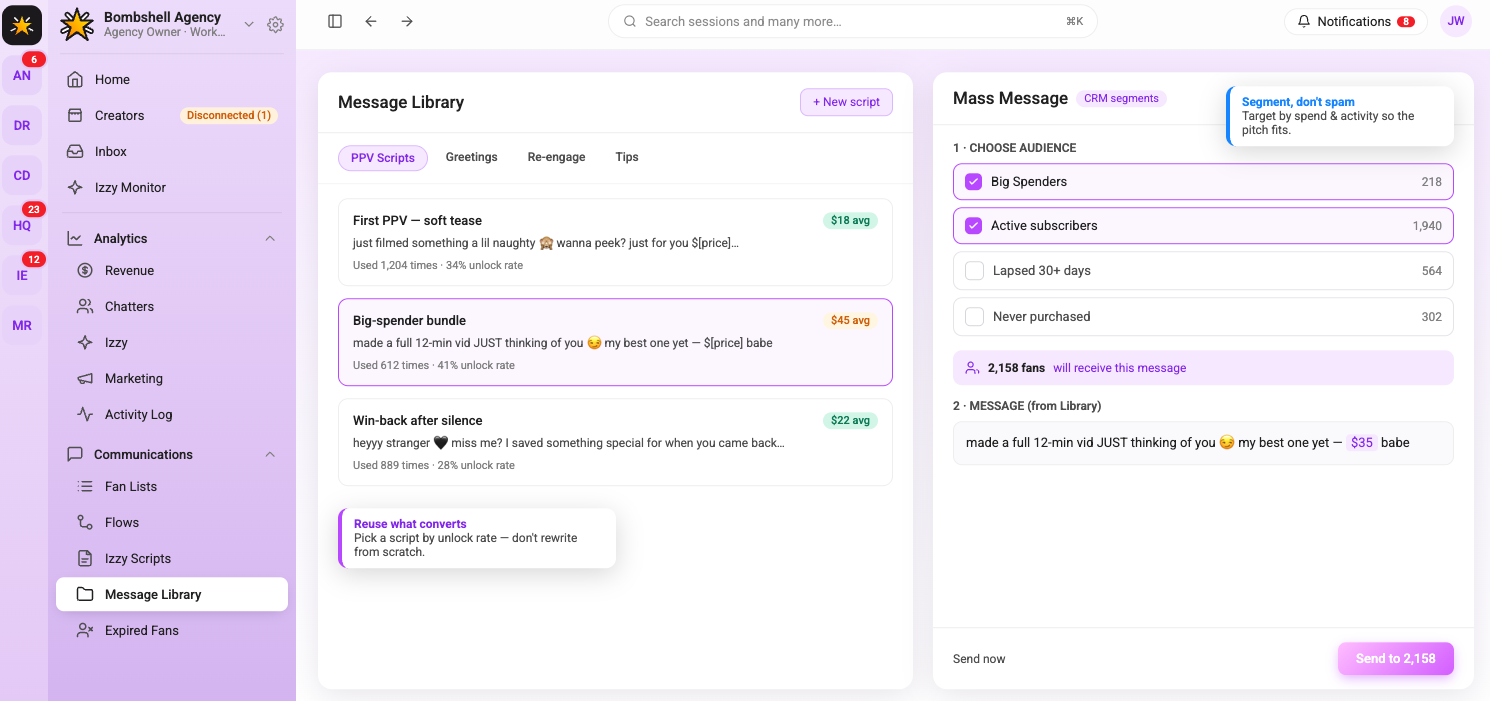
Walk through the agency's PPV scripts and mass message templates. Explain the logic behind each one, like why this offer goes to this segment, what the expected conversion rate is, and what a good response to a decline looks like. Role-play a few scenarios before the chatter tries it on a live fan.
This is also the point to introduce mass messaging. Show the chatter how to build a segment in the CRM, how to write a mass message, and how to track the results after it sends. Do not let them send a mass message independently on day five (that comes later). The goal today is understanding the mechanics.
Day 6: Independent Work With Monitoring
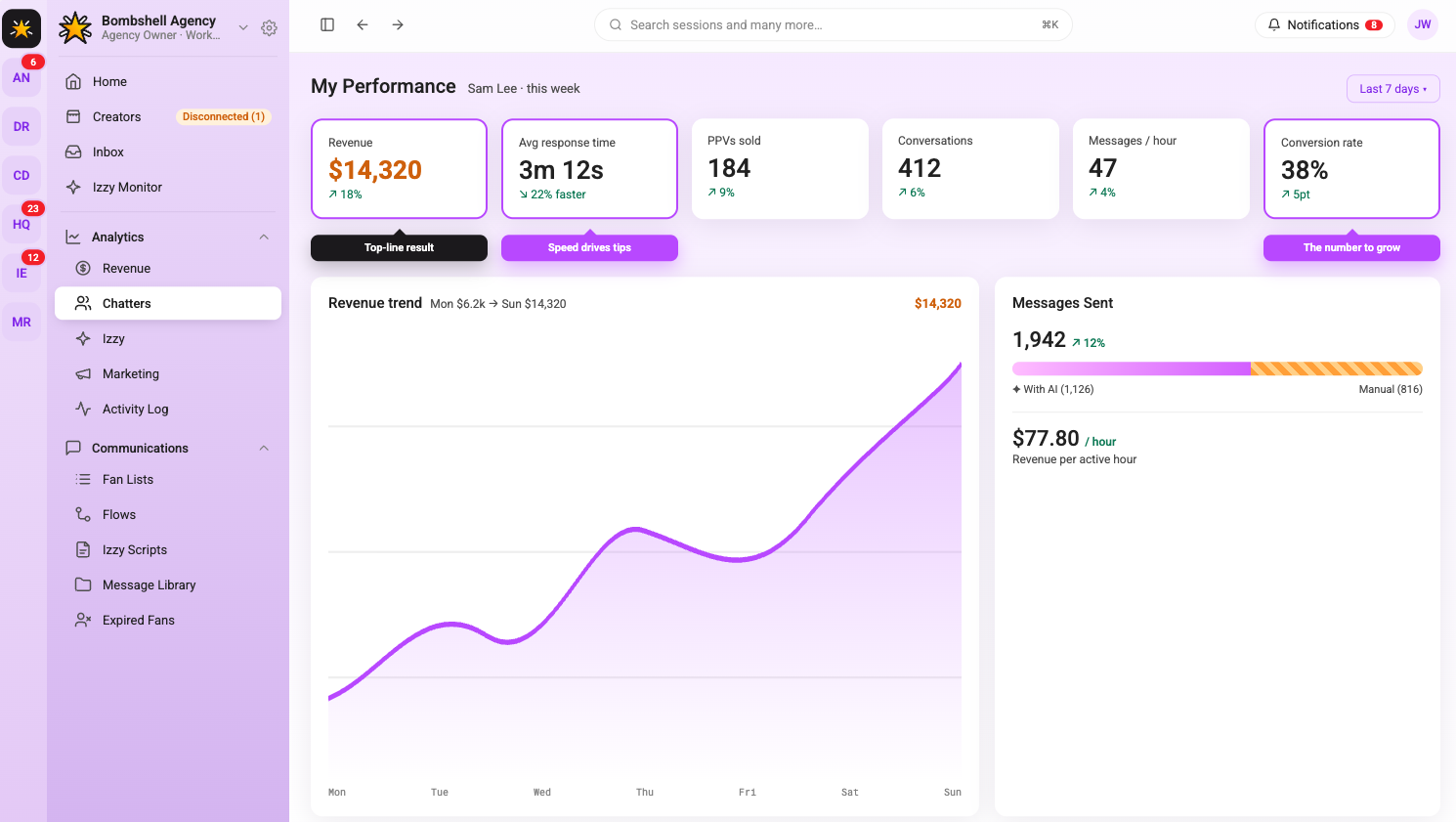
By day six, the chatter works a full shift independently on their assigned accounts. They handle routine messages, re-engagement, and PPV pitches without step-by-step supervision. The admin monitors performance through the analytics dashboard rather than reviewing every individual message.
Check the chatter's metrics at the end of the shift: messages sent, PPVs pushed, conversions generated, and response time. Compare against the account's baseline from before they started. These numbers are not the full story on day six (one shift of data means nothing), but they establish a starting point for the week two review.
Flag anything that looks off: response times over 20 minutes, PPV open rates significantly below the account average, or fan complaints. Address these specifically before the chatter's next shift, not in a general debrief.
Day 7: Review and Sign-Off
The final day of onboarding is a structured review, not another live shift. Sit down with the chatter and go through the week: what went well, what the metrics show, where the tone still needs work, and what they are not yet cleared to handle independently.
Agree on a clear scope for week two. Some chatters are ready to handle mass messages independently after seven days. Others need another week on single-fan conversations before they are trusted with account-wide sends. Be specific about what is and is not in their lane.
Set a two-week check-in to review performance metrics again. Onboarding does not end on day seven; it transitions into ongoing performance management. The first seven days are about getting the chatter operational. The following weeks are about making them consistent.
What Good Chatter Performance Looks Like
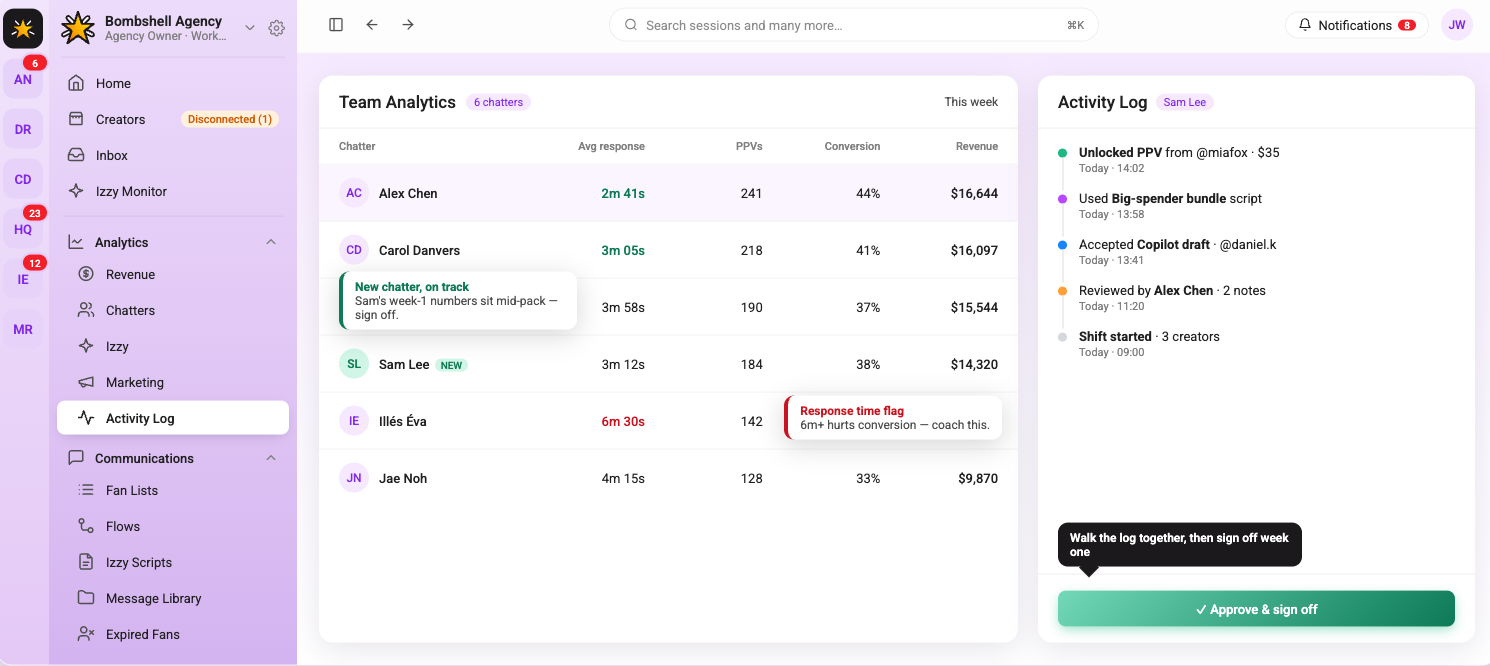
Agencies that onboard chatters without defining what success looks like end up with inconsistent results and no way to diagnose why. Before a chatter goes live, establish the benchmarks they are being measured against.
Response time is the most basic metric. Fans who wait more than 15 to 20 minutes for a reply are less likely to convert on a PPV offer. Message quality matters more than volume. A chatter sending 200 generic messages a shift is less valuable than one sending 80 targeted ones with a strong conversion rate. PPV conversion rate and tips generated per shift are the numbers that connect chatter performance directly to revenue.
Track these per chatter, per account, and per week. The analytics layer in Supercreator makes this visible without manually pulling data from multiple places. Agencies that monitor this consistently know which chatters are worth investing in and which need more coaching before they scale them to additional accounts.
A Seven-Day Onboarding That Sticks
Rushing a chatter through setup and dropping them on a live account is the fastest way to create problems that take weeks to fix. Seven days is enough time to get someone operational, calibrated to the creator's voice, and comfortable with the tools (if each day has a clear purpose).
The framework above is not a rigid script. Adjust based on the chatter's background. Someone who has worked with another agency's tools will move faster through the technical setup and spend more time on tone calibration. A brand new chatter needs more time on day four before they are ready for PPV conversations on day five.
The goal by day seven is a chatter who can handle a full shift with light supervision and knows exactly where their boundaries are. Everything after that is performance management, not onboarding.




.png)

