


.png)

Quick Answer: How Do You Set Up Izzy AI?
Setting up Supercreator's AI means connecting Izzy to your account, training her on your real chat history, and defining her rules before she goes live, so she automates routine fan conversations while your high-value fans still get a human. The whole setup takes a few hours when done properly, and the quality of that setup is what decides whether Izzy sounds like you or like a generic bot.
The setup in six steps:
- Connect Izzy to your OnlyFans messages, sales data, and fan profiles
- Train her on your voice with real chat history, your bio, and your product library
- Set the rules: which fans she talks to, when she is active, and how she escalates
- Turn on supporting automations: Flows, Bumps, and re-engagement sequences
- Review in preview and cap her volume before full rollout
- Monitor the dashboard and adjust from the data, not assumptions
Ready to hand off the repetitive inbox work? Set up Izzy and keep your top fans human.
Key takeaways:
- Izzy handles live fan conversations; Supercreator's Flows, Bumps, and Automations handle the triggered sequences alongside her. They cover the volume side and the high-value side together.
- The setup determines everything. Train Izzy on real chat history, fill out your bio, and load your product library so she knows what she is selling.
- Set the rules before she goes live: which fans she talks to, when she is active, and her escalation and moderation behaviour. Vague rules produce vague output.
- Review in preview and cap her chat volume before full rollout, then expand once you trust the tone and escalation.
- Keep high-value fans, custom requests, and emotionally complex conversations with a human. Izzy routes them rather than handling them.
- Refresh her training, product library, and escalation thresholds regularly. Check the dashboard weekly; a month of data shows real patterns.
How Supercreator's AI Automates Fan Conversations
Replying to fans takes time. A lot of it. For creators managing hundreds of active subscribers, keeping up with DMs while also producing content becomes a genuine operational problem. Izzy handles live fan conversations, including replies, personalized selling, and ongoing engagement, while Supercreator's automation tools handle re-engagement campaigns and follow-up sequences.
This is how to set her up and use her properly.
What Izzy Does
Izzy is Supercreator's AI chatbot, built specifically for OnlyFans fan communication. She syncs with your messages, sales data, and fan profiles, so every recommendation she makes is based on each fan's actual behavior rather than a generic script.
She can handle a high volume of conversations simultaneously, reply in multiple languages, identify which fans are likely to spend, and flag high-value conversations for human attention. Izzy handles the inbox volume that does not need your attention, so you can focus on the conversations that do.
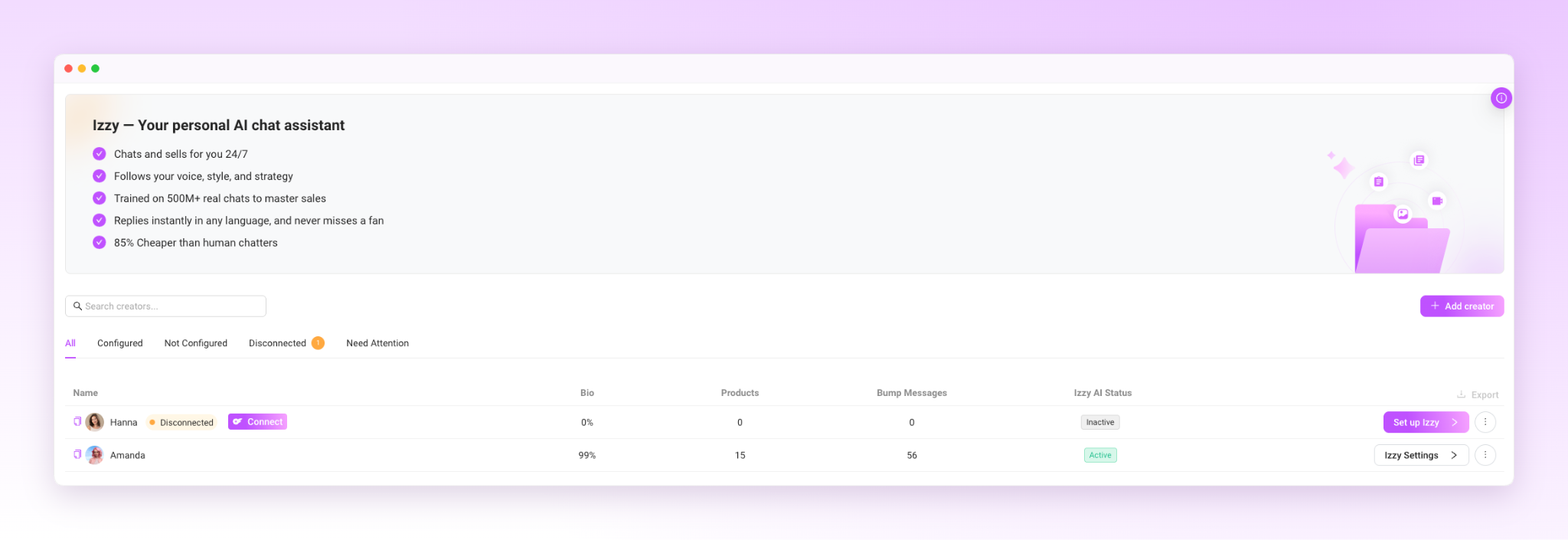
Step 1: Connect Izzy to Your Account
Izzy syncs directly with your OnlyFans messages, sales data, and fan profiles when you activate her. This connection allows her to personalize responses based on what each fan has purchased, how long they have been subscribed, and how they typically engage.
Before activating her, make sure the OnlyFans settings that can limit her performance are turned off. The Supercreator help center documents which settings need to be adjusted. Skipping this step means Izzy cannot message certain fans even when she is active.
Step 2: Train Her on Your Voice
This is the step that determines whether Izzy sounds like you or sounds like a chatbot.
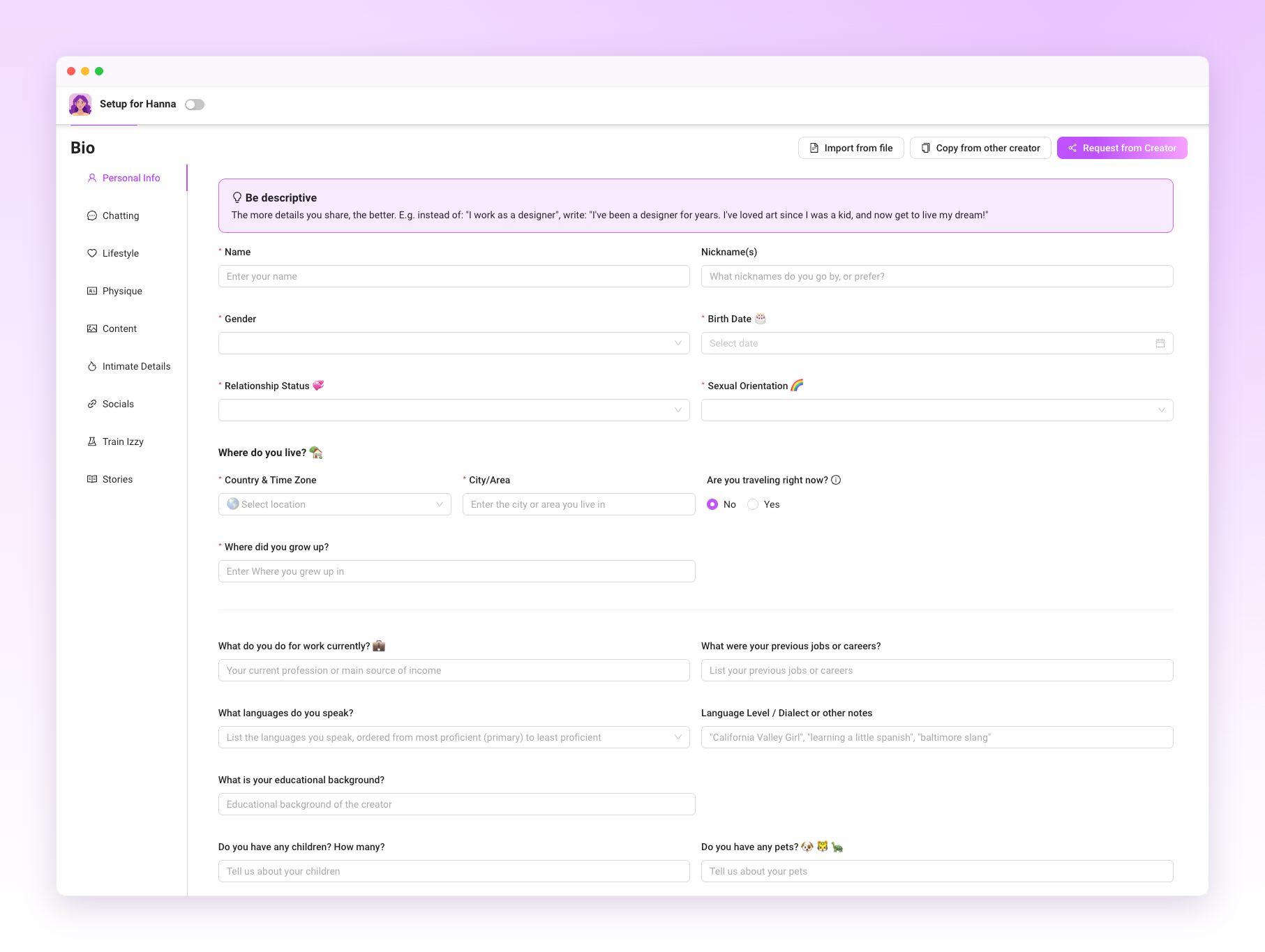
During onboarding, Izzy analyzes your existing chat history, tone, common phrases, and the emojis you use regularly. The more high-quality chat history Izzy can learn from, the better she can match your tone and communication style.
Beyond tone, fill out your creator bio in the Izzy setup and add your content and products to her library. Izzy needs to know what she is selling and what details to reference when fans ask questions. Keeping your products and content library up to date helps Izzy recommend the right content and create more relevant upsell opportunities.
One important detail: Write your setup instructions in the language you want Izzy to communicate in primarily. This gives her clearer guidance for matching your tone.
This helps her responses feel natural in that language rather than translated.
Step 3: Set the Rules Before She Goes Live
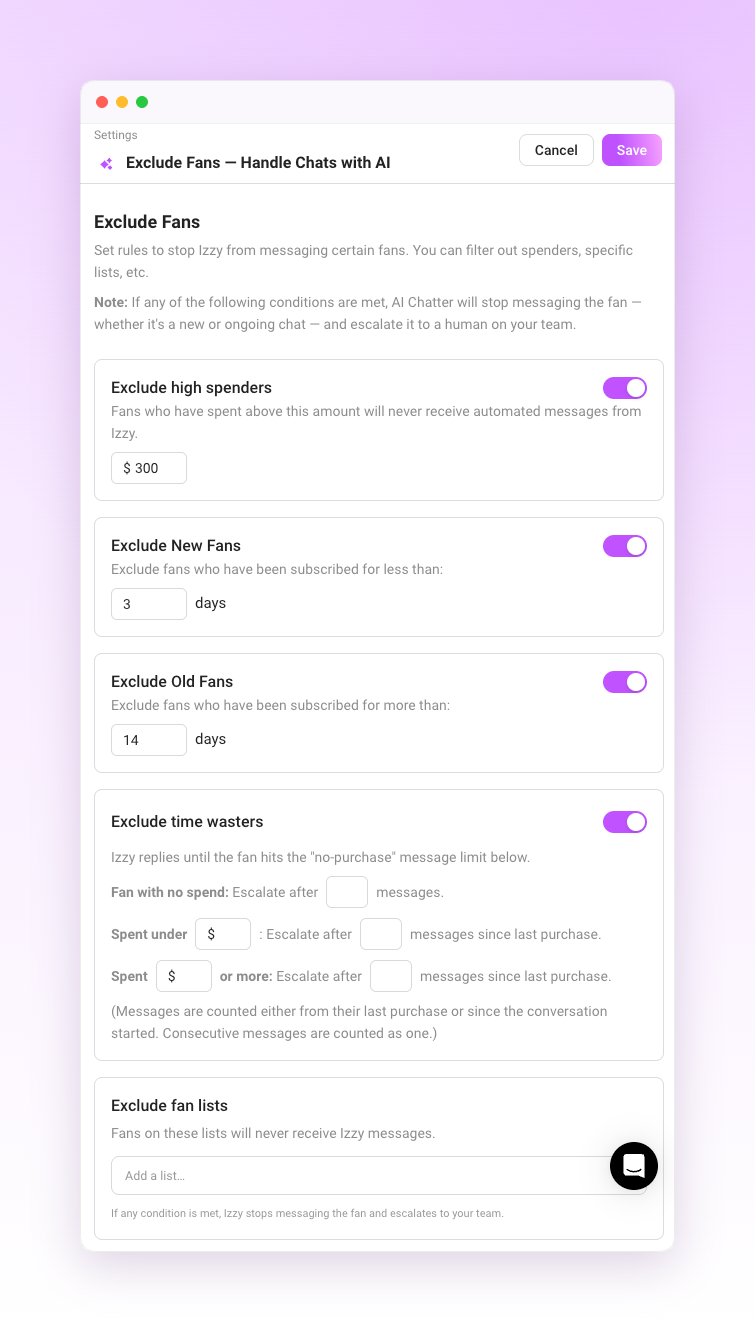
Izzy operates inside whatever parameters you define. Before activating her, decide:
Which fans does she talk to? You can exclude specific subscribers or entire Fan Lists from Izzy or automation entirely, which is useful for top spenders or fans you manage personally.
When she is active, you can set a schedule so Izzy handles the inbox during off-hours while you take over during your working hours.
How she should respond to specific scenarios. Configure conversation rules, exclusions, moderation behavior, and escalation settings before enabling Izzy.
Getting this right upfront is what keeps the account safe and the fan experience consistent. Izzy follows the rules you set. If the rules are vague, the output will be too.
AI disclosure: If you use Izzy to communicate with fans, make sure your account complies with OnlyFans' current AI disclosure requirements. Add the required AI disclosure to your profile before enabling AI conversations, and review it periodically to ensure it stays up to date.
Step 4: Turn On the Automations That Support Izzy
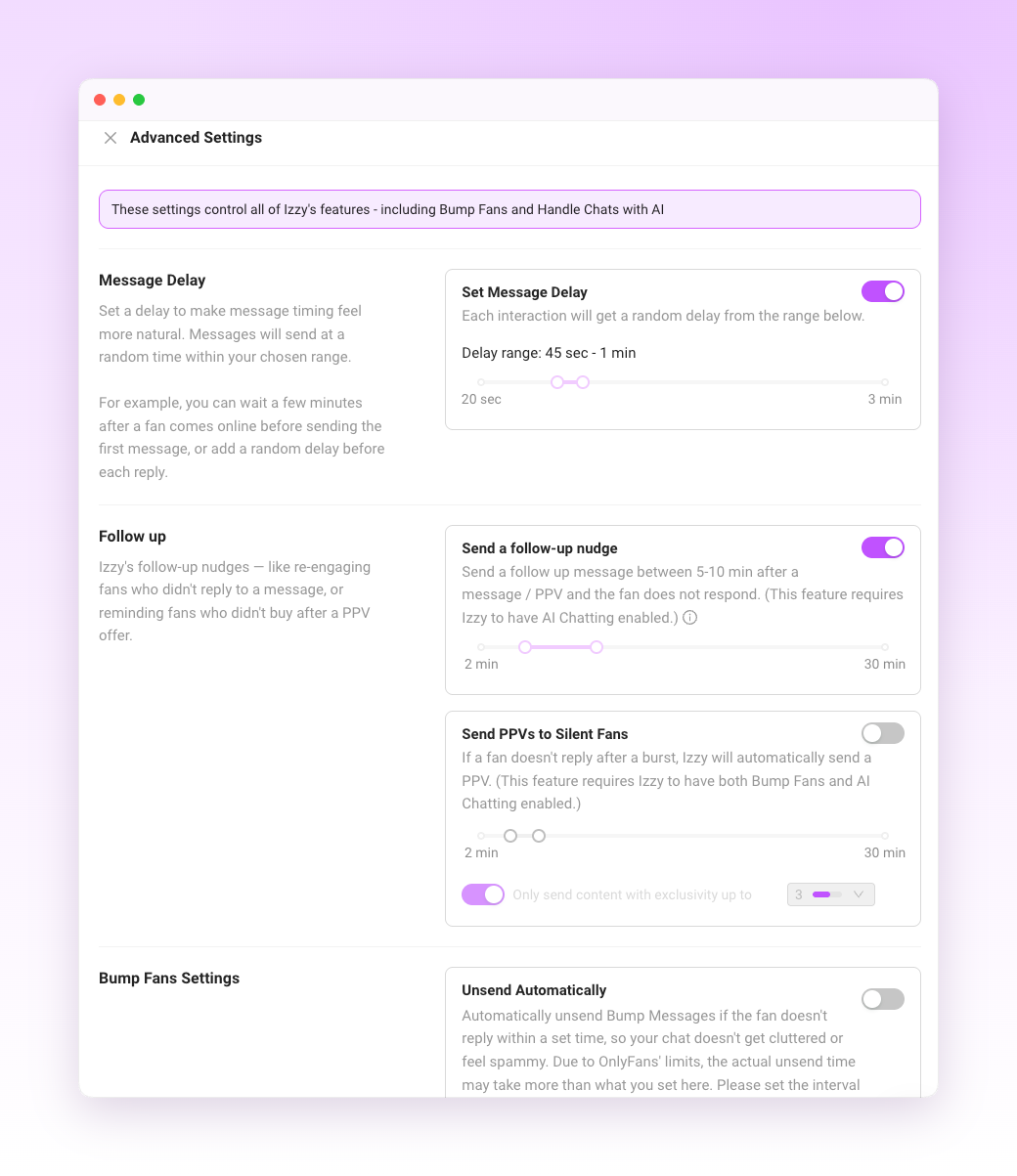
Izzy handles live conversations, while Supercreator's Flows, Bumps, and Automations handle the triggers that run alongside those conversations.
Flows send sequences of messages based on fan behavior: a welcome sequence when someone subscribes, a follow-up after a PPV purchase, and a re-engagement message after a period of inactivity. Bumps resurface content or offers in conversations that have gone quiet.
These automations work best when they’re tailored to specific fan segments rather than sent to everyone. A new subscriber and a fan who has been with you for a year and has spent significantly need different messaging. Fan Lists, Segments, and CRM data tell you which fans belong where and how much they've spent across your workspace, so the automations deliver the right message to the right person at the right time.
Step 5: Review Before You Go Live
Supercreator lets you preview Izzy's conversations during onboarding before she is active on your account.
You can also set a limit on how many chats Izzy handles initially. Starting with a smaller volume lets you check her output in real conditions without the full inbox being managed by AI before you are confident in how she sounds.
Common things to check in the preview:
- Does the tone match yours?
- Is she referencing fan history correctly?
- Are the upsell suggestions appropriate for the fan she is talking to?
- Are the escalation triggers working so that high-value conversations are being flagged rather than handled automatically?
Adjust anything that feels off before you expand her access.
Step 6: Monitor and Adjust from the Dashboard
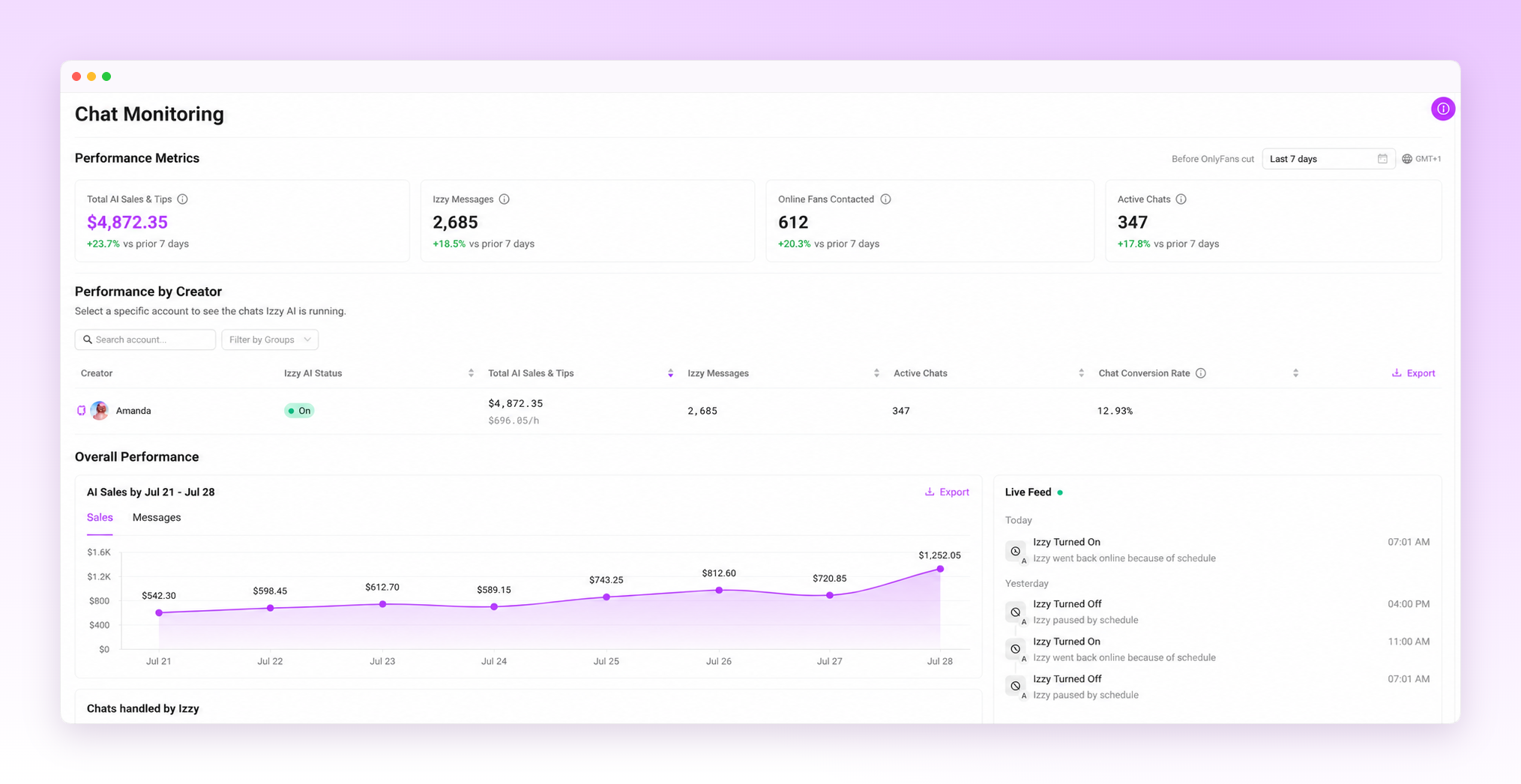
Once Izzy is live, the dashboard lets you monitor conversations, performance, and key revenue metrics associated with AI-managed chats. This is where you track whether the setup is working and where you make adjustments.
The OnlyFans CRM layer underneath this tracks each fan's full history, spending patterns, and engagement data. Izzy uses available CRM context when generating responses, which is one of the differences between her and a human chatter who may not have time to review an entire conversation history before replying.
Check the dashboard regularly in the first two weeks. Look at which fan segments are converting, which types of messages are generating the most revenue, and whether any conversations are being escalated that probably should not be or handled automatically when they should have been flagged. Adjust Izzy's settings based on what the data shows rather than assumptions.
When to Take Over Manually
The fans worth managing personally are the ones spending consistently above average, the ones making custom content requests, and the ones who have been with you long enough that they expect a real connection. Consider escalating these conversations using Izzy's escalation rules rather than managing them with AI.
Beyond high-value fans, any conversation that feels emotionally complex, sensitive, or outside the normal patterns Izzy is trained on should be reviewed personally. Izzy is not equipped to handle every scenario, and the moderation system flags messages that involve prohibited topics. Anything that gets escalated using Izzy's escalation rules needs a human decision.
What Creators Actually Get Back
The practical outcome of a well-configured Izzy setup is time. Fans get faster responses, including at hours when you are not online, and those responses are shaped by their full conversation history rather than just the current thread. You get back the hours that were going into repetitive inbox management.
What changes operationally: the conversations that needed a human still get one, because Izzy is routing them rather than handling them. The conversations that do not need a human are handled consistently, at any hour, without burning out a chatter or eating into your content creation time.
The setup takes a few hours to do properly. After that, the adjustment is ongoing, but still light.
Getting the Most Out of Izzy
A few things that separate well-configured accounts from ones that underperform:
- Update her training data regularly. Your voice evolves. Refresh Izzy's training periodically as your tone, products, or messaging evolve.
- Add new content and products to her library as you create them. Izzy cannot recommend or upsell content she does not know exists.
- Review escalation patterns. If high-value fans are not being flagged or are waiting too long for human attention, adjust the thresholds.
- Check the dashboard weekly. One week of data means very little. A month of data shows patterns worth acting on.
Izzy Works When the Setup Does
A poorly configured Izzy produces generic output that erodes fan trust. A well-configured one handles the volume of a growing account while keeping conversations personal and consistent.
The difference is almost entirely in how seriously you take the setup steps. Upload real chat history, define your rules clearly, protect your high-value fans, and keep the training current. Do that, and Izzy helps save time, improve consistency, and give you more room to focus on high-value conversations.
Other Features Worth Knowing About
Inbox Copilot lets you prioritize which conversations to open first, using tags like Urgent Priority, Hot Buyer, New Subscriber, and Expired.
If you communicate with fans in multiple languages, enable Auto-Translation so incoming and outgoing conversations stay natural without manual translation.
Izzy also has access to total fan spend across your workspace, giving her more context when personalizing responses and recommendations.





.png)

