




.png)
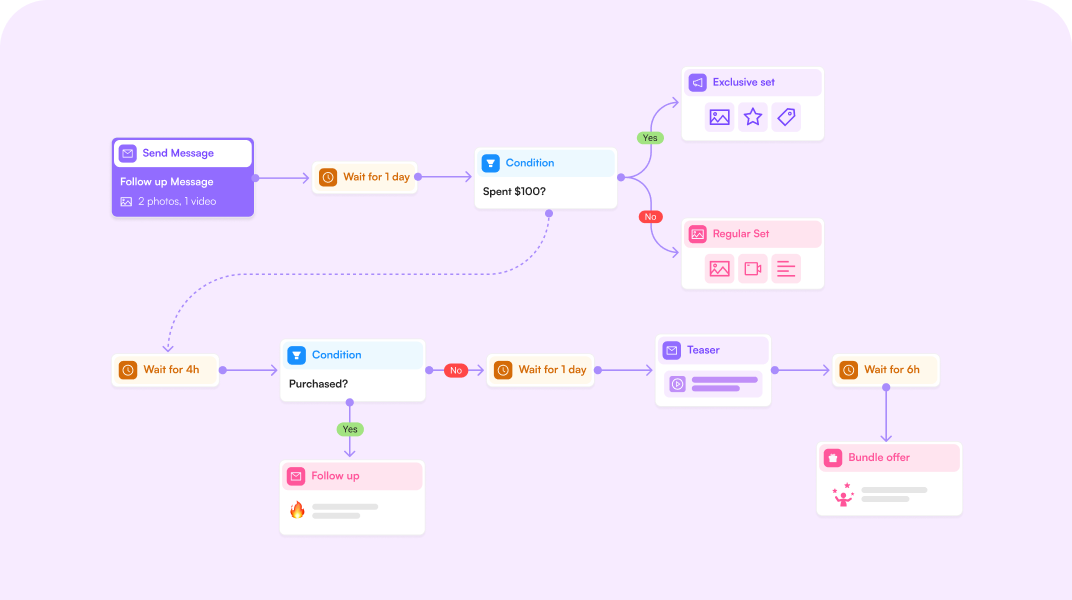
With the right message flow, you can automate your conversations and build a system that guides fans from the first welcome message to their first purchase. It also helps maintain a consistent conversation style even when you’re unavailable. Plus, you’ll avoid sending the same message or mixing up replies.
This article will walk you through building your first flow and how you can use it effectively once it’s live. So, let’s explore all you need to know about message flows for OnlyFans.
What Message Flows Are and Why They Matter
Message flows are automated sequences of direct messages designed to maintain conversations and build relationships with fans. Message flows send different messages based on triggers, fan actions, and predefined conditions.
For example, it can send a special offer to someone who just unlocked a PPV or a “we miss you” note to a fan whose subscription is about to expire.
Keep in mind that message flows are not the same as mass messaging. The latter sends a generic broadcast to everyone at once, while message flows personalize messages using fan data such as username, spending behavior, or previous actions. These flows also allow you to delay replies, giving the impression of a more natural conversation. The best part of flows is that you always know what each fan has seen without manually tracking it. In other words, it tracks messages sent to fans and prevents accidentally sending the same messages more than once.
How Message Flows Work in Supercreator
Message flows in Supercreator basically help to deliver the right message based on the fan’s replies and online activity. Every flow is made up of three core elements: triggers (entry rules), nodes, and exit conditions.
Triggers
This is the starting point of a message flow. It activates a message flow when a fan takes a particular action. For instance, you can set up a message flow to trigger when fans subscribe to your page. The trigger becomes activated when the fan subscribes or sends the first message.
Other triggers become activated when fans haven’t renewed their subscriptions within a set timeframe, for example. Note that Supercreator allows you to set up triggers for different scenarios.
Nodes
These are checkpoints that fans must pass through in a message flow. In Supercreator, you can set up different nodes to enhance the chatting experience. The nodes include time delays, messages, and conditions.
- A time delay controls how long the flow waits before sending the next message. Chats feel natural when there are time delays between replies. You can set time delays from a few minutes to days.
- Message nodes contain fields for adding texts and uploading PPV offers. The node also allows you to personalize messages by adding the fan’s name. It even allows for customization, such as enabling AI-assisted pricing suggestions and rules like “don’t send this if the fan already purchased the media.”
- Also referred to as "logic," condition nodes set the direction of the conversation based on predefined rules, such as whether a fan replied, purchased content, or triggered a tag. When setting a condition, the nodes may create a “branch” in the conversation path in the message flow.
Destination
This marks the end of a message flow. The message flow reaches this point when the fan has taken specific actions, such as requesting or purchasing a PPV offer, or when they’ve spent a specific amount.
Supercreator’s message flows may adapt and respond based on the fan’s actions, reply time, and spending behavior within a defined timeframe.
How To Set It Up
Setting up a message flow in Supercreator is quite straightforward. Here’s how to do it:
1. Create a new flow
- Click on the “Automation” dropdown menu in your dashboard and select “Message Flows.” The next page will show three different options: “Build your own flow,” “Expired Fans Flow,” and “New Subscriber Funnel.”
- For this section, you’ll be creating a flow from scratch. Select the “Build your own flow” option.
2. Set your entry rule or trigger
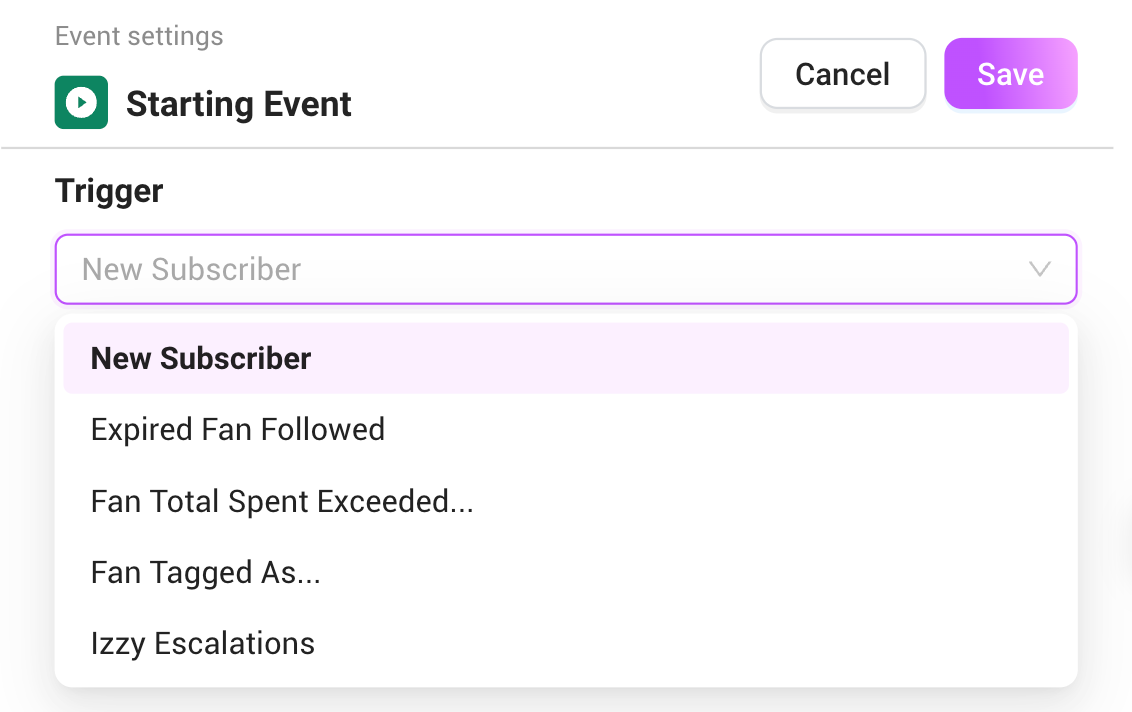
- Supercreator’s Message Flow currently offers four triggers: New Subscriber, Expired Fan Followed, Fan Tagged As…, and Fan Total Spent Exceeded.
- Click on “New Subscriber” to begin the chat flow.
3. Build your opening sequence by adding your first nodes
- Select the “+” icon next to the trigger box.
- Choose “Time Delay” and set it to your preferred taste. It feels natural if your welcome message comes in a few minutes after a fan subscribes.
- Click “+” again and select “Message” to bring up a new window.
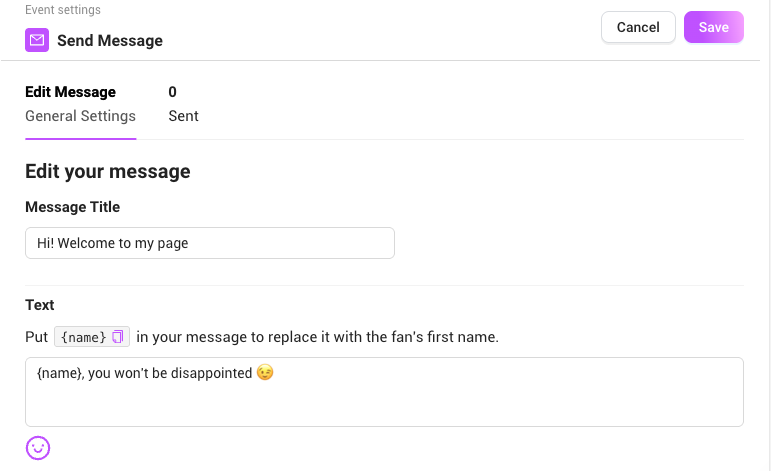
- Input “Welcome 1” in the Message Title field.
- Next, fill in the text field by adding “hey [name].” Message Flow will automatically replace the “name” with the fan’s username.
- Click the “+” and select “Message” again. This time, name it “Welcome 2” and fill in the text by adding something like, “What brought you to my page?”
4. Add conditions to the nodes
- Select “Conditions” after clicking the “+” icon.
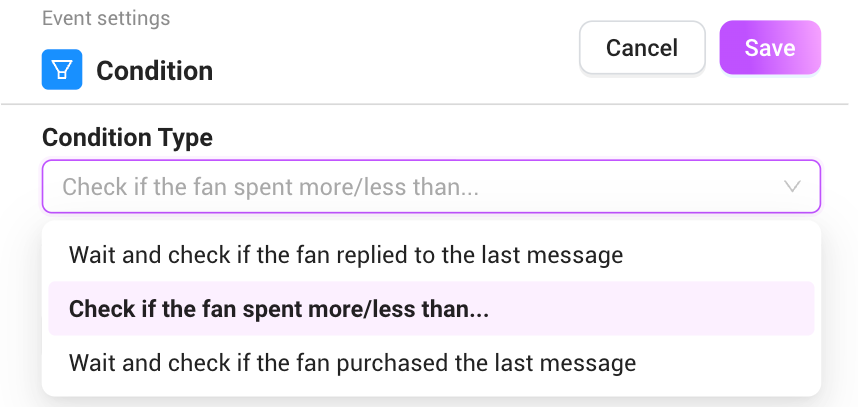
- Set the condition to “Wait and check if the fan replied to the last message.”
- Set the wait time to one hour or longer, depending on your preference. The flow will pause for the set timeframe. The condition statement will create a branch with two paths: “True” (if the fan replied within the set timeframe) and “False” (if they didn’t).
5. Determine what happens on each path
- Click on the “+” icon beside the True path and select “Merge.”
- Connect the false path to a new message node. In the text, write something like, “Hey there, do you want to chat?” Then, connect the message node to the same merge node to bring both paths together.
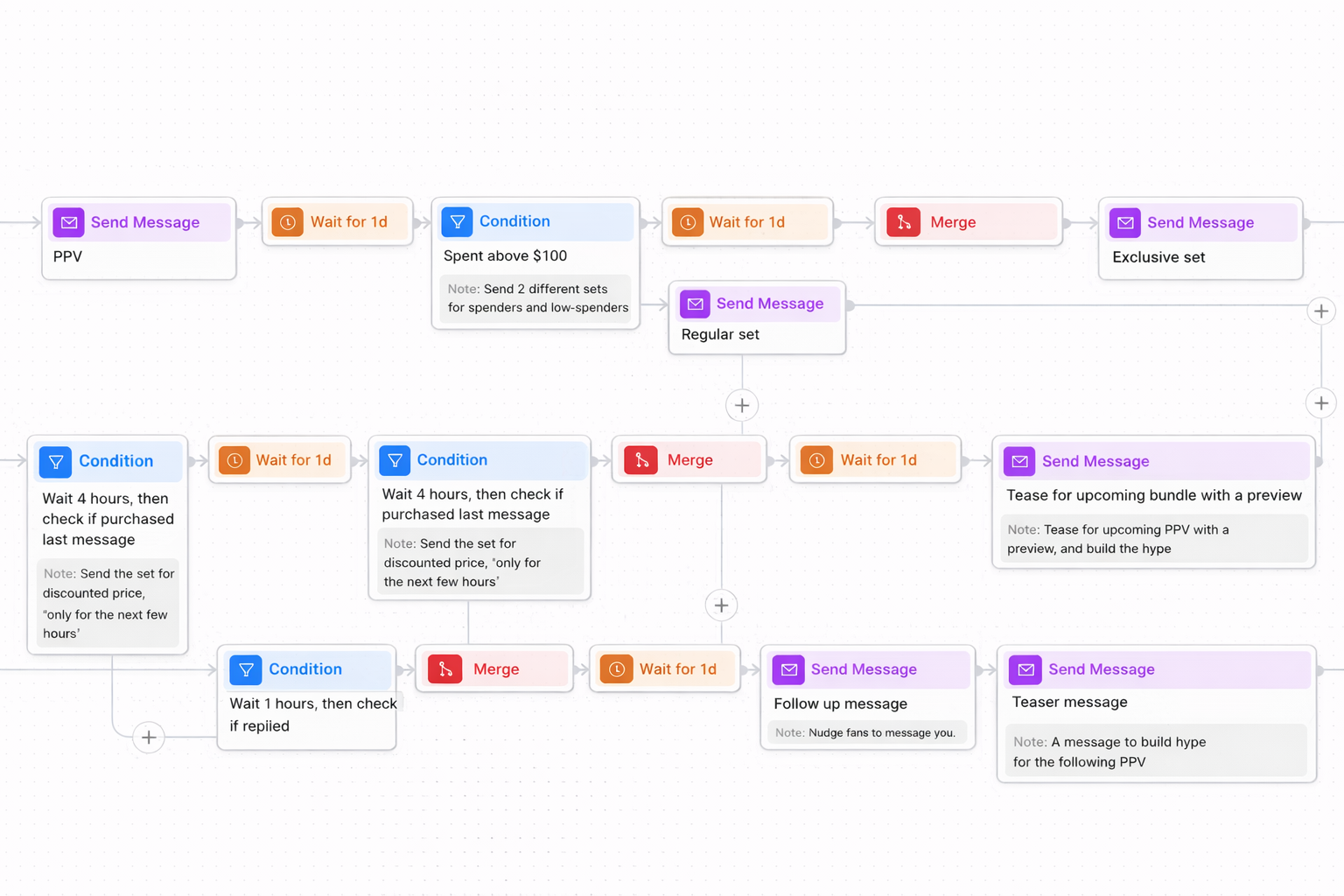
6. Schedule a Follow-Up PPV
- This step is optional, but it often improves conversions. So, set the time delay for a day.
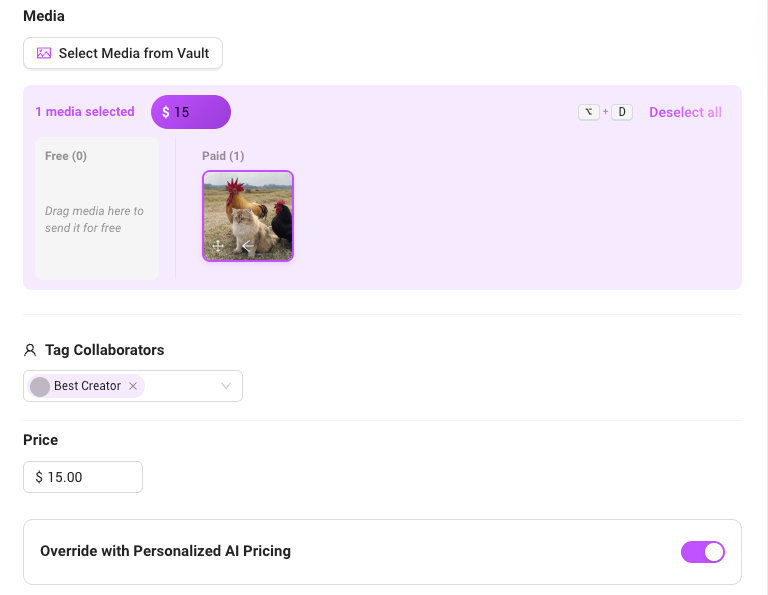
- For the next node, select “Message” and title it "PPV." Click on the media field to upload a preferred picture or video.
7. Set an Exit Rule
- To access the Exit Rule, click the gear-like icon in the top right corner of your message flow.
- Set conditions like “Exit if a fan is a super fan” or “Exit if a fan spent in total more than.” For the latter option, you are to set the preferred total amount in the field.
Best practices for designing high-converting message flows:
Congratulations! You’ve just set up your first message flow. However, this is only the first step. Next, you’ll need to optimize your flows to protect your time, get better sales conversions, and create loyal fans.
Start with the content you already know sells
You don’t want to use the trial-and-error system for every fan that subscribes to your page. So, it’s alright to design a flow that contains your best-performing content.
Another rule is not to send all your best-performing content at once. You want to gradually release content to your fans for two reasons: you don’t want to overwhelm them, and you want to get maximum profit from that content. A fan who sees all your top content at once has little reason to stay subscribed for the next month.
So, start with your best content and switch it up with a new, untested one once in a while. Bring up your best content again when interests or chat activities are dwindling. A well-optimized flow ensures your fans see your best work at a natural pace, saving you the stress of constantly creating new content.
Build a first-month content experience for every fan
The first 30 days are critical for building a strong fan relationship. This period sets expectations and establishes buying habits. In addition, it often determines whether a fan becomes a long-term supporter.
So, how do you get it done? Create a message flow that nurtures your fans for the first 30 days. The flow should contain your best welcoming sequence and your most engaging PPVs.
Supercreator’s Message Flow is also designed to work with Izzy, our OnlyFans AI chatbot. The bot helps to fill in the gaps and to personalize conversations.
Most importantly, pay attention to the timing. Your message flow should automatically trigger the moment they subscribe. Each fan sees a specific message sequence based on the time they sign up. This means a fan on day 15 isn’t seeing the same content as another on day 5.
Apply proven marketing automation patterns
There’s no need to reinvent the wheel. So, it’s okay to refer to familiar marketing automation in systems like email onboarding, SaaS product tours, and e-commerce drip campaigns.
Like all marketing systems, your message flow should follow a clear path from soft to strong offers. Start with a warm welcome message sequence to introduce your services, use teaser content or other incentives to build a connection, and then gradually introduce PPVs or other custom offers. As you can see, it’s not so different from a typical marketing automation system.
Test pricing inside your flows
Your fans have different financial capacities, and your pricing should reflect this. You may start setting prices based on factors like how you’ve been chatting and the amount spent by the fan within a set timeframe.
For example, your welcome message flow may contain low-budget offers, which can increase as the fan spends more cash and time with you. Long-time fans may be willing to spend more, so you may increase your prices accordingly. Meanwhile, you can offer discounts to attract fans with expired subs.
The best part is that the Supercreator Message Flow allows you to set up AI pricing. You’ll find this option in the message node. The AI feature suggests PPV pricing based on factors like the fan’s total spend, activity level, and the length of the content.
Design for silent fans
Some fans prefer browsing and buying without chatting. This doesn’t mean that they’re not interested in your offer. So, design a flow that caters to this audience. Your flow should focus more on teasers and other incentives that get them interested in buying your content. For example, you can structure your flow such that the first few welcome messages are followed up with a good CTA and teaser content for the PPV offer.
Note: You can identify the silent fans based on the delay time in replies and the content of the message. Silent fans may send one-word replies and take an immediate interest in your content.
Use triggers to react to behavior
A well-optimized message flow should be able to react to a fan’s last action. This makes the chat authentic and improves your chances of building deeper bonds and making more sales. Here are examples of behavior-based triggers:
- Follow-ups after a purchase: Your message flow should automatically send a “thank you” or ask for feedback after fans unlock content. This makes them feel appreciated and more likely to make another purchase.
- Discounts after fans repeatedly refuse to make a purchase: if a fan doesn’t unlock a PPV after seeing it a few times, your flow should resend it later with a “last chance” discount.
- Stopping offers after a fan converts: An optimized message flow uses an exit rule to stop sending a specific PPV offer the moment a fan buys it.
Most importantly, your flow should contain content and offers that are relevant to the fan’s interests. This strategy is often needed after you’ve built a relationship with the fan.
Use automation to protect your time
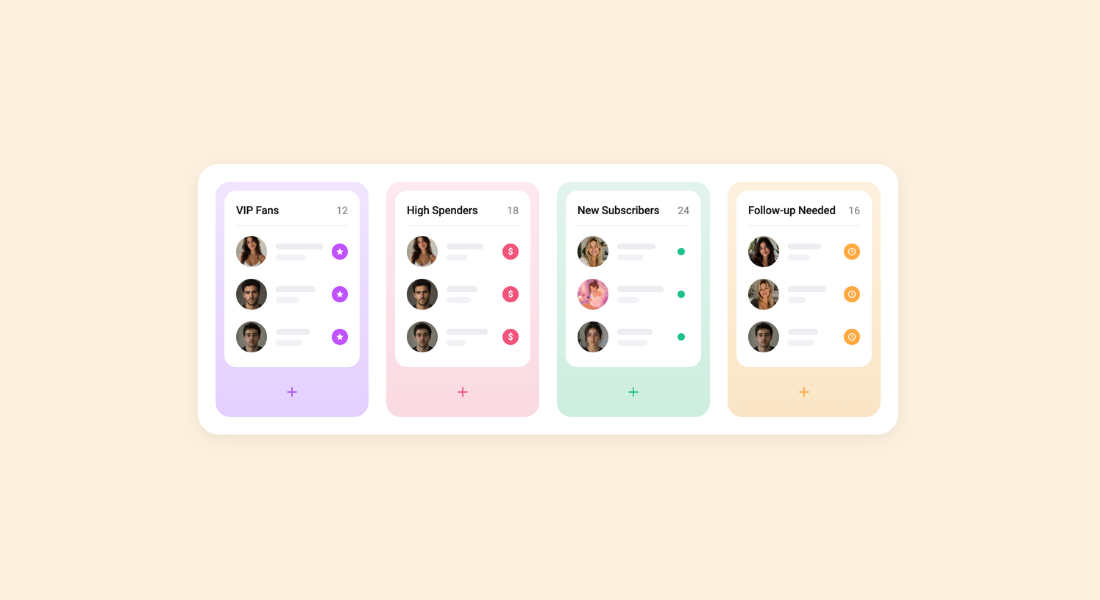
Use message flows and OnlyFans bots to save you from predictable, repetitive tasks. For example, message flows can take over the welcome message sequence by sending a personalized message within a few minutes of getting a new subscriber. Message flows are also great for resending offers if a fan didn’t open a PPV. In contrast, bots will handle chats from low-value fans and push the whales to the top of the inbox for your immediate attention.
Note that chat automation does not replace human input. Instead, it makes you more productive and efficient in managing your account. With message flows, you get to direct a major chunk of your attention to closing expensive custom requests and forming bonds with top-spending fans.
From Manual Messaging to Structured Automation
As an OnlyFans creator or agency, a message flow does not replace your personality or creativity. It helps to upgrade a scattered inbox into a structured one that best portrays your story. Simply put, it guarantees every fan meets the same consistency and connection.
An OnlyFans CRM like Supercreator allows creators to turn existing content into a system that runs consistently in the background. It helps eliminate repetitive tasks and allows you to focus on creating content or interacting with high-value fans.




.png)
