




OnlyFans Academy

.png)
OnlyFans has grown from a niche content-sharing platform into a billion-dollar industry, providing creators with a way to monetize their content directly. With its subscription-based model and various earning opportunities, the platform has attracted millions of users worldwide. This article breaks down how OnlyFans generates revenue, how creators can maximize their earnings, and how AI tools can grow your income streams (without adding more to your plate).
Overview of OnlyFans Revenue
OnlyFans’ financial success has been driven by its unique approach to content monetization. Unlike traditional social media platforms, it allows creators to earn directly from their audience through subscriptions, pay-per-view content, and tips. But how much revenue does the platform actually make, and what trends are shaping its future?
How Much Revenue Does OnlyFans Make?
Recent reports indicate that OnlyFans generates billions in revenue annually. In 2022, the platform reported over $5.6 billion in total revenue, with a significant portion coming from subscription fees. The company takes a 20% cut from creators' OnlyFans earnings, meaning that the vast majority of this revenue is distributed among content creators. Transaction fees, tips, and exclusive content sales further contribute to OnlyFans’ financial success.
OnlyFans Annual Revenue Growth
OnlyFans has experienced rapid growth year over year. With its increasing user base and global expansion, the platform continues to break revenue records. Analysts predict that the company’s revenue will keep growing as more creators join and diversify their content. This trend underscores the platform’s influence and its ability to sustain long-term profitability.
Revenue Distribution
.png)
OnlyFans operates on a straightforward revenue-sharing model: creators receive 80% of their earnings, while the platform keeps the remaining 20% as a service fee. This allows many creators to generate substantial income, with some earning six- or seven-figure salaries annually. The platform’s model ensures that those who build a strong, engaged following can reap significant financial rewards.
Key Factors Contributing to High OnlyFans Revenue
A few key factors are driving OnlyFans' financial success and popularity among creators:
Diverse Creator Base
Unlike other content platforms, OnlyFans is home to a wide range of creators, from fitness coaches to musicians, artists, and influencers. This variety attracts a broad audience willing to pay for exclusive content, increasing the platform’s overall revenue.
Subscription-Based Model
The core of OnlyFans’ revenue system is its subscription model, where fans pay a monthly fee to access premium content. A lot of creators also offer pay-per-view content, personalized experiences, and tiered memberships, allowing for more flexible pricing strategies.
Fan Loyalty and Engagement
.png)
Unlike passive content consumption on other platforms, OnlyFans encourages direct interaction between creators and fans. Personalized messages, exclusive content, and one-on-one chats drive higher engagement rates, leading to more revenue for both creators and the platform.
Global Expansion
OnlyFans has expanded its reach beyond Western markets, attracting users from around the world. This global accessibility has opened doors for more creators and subscribers, fueling the platform’s continued revenue growth.
Challenges and Opportunities for Creators on OnlyFans
While OnlyFans gives creators a lucrative opportunity, it also comes with challenges. Let us explain:
Challenges:
- The 20% platform fee takes a cut from creator earnings.
- High competition makes it harder for new creators to gain visibility.
- Managing content and fan interactions can be time-consuming.
Opportunities:
- Creators can build a dedicated fan base and charge premium prices for exclusive content.
- Niche markets offer an opportunity for differentiation, helping creators stand out.
- Automation and AI tools can help streamline workflows, freeing up time for content creation.
To Sum It Up
OnlyFans has cemented itself as a leading revenue-generating platform for content creators, offering income opportunities and strong earning potential. While competition and platform fees remain challenges, An onlyfans crm helps you attribute revenue to subscriptions, PPV, and tips separately, so you know which stream to scale. Supercreator makes things easier for creators. With AI chatting, you don’t have to spend hours replying to every message; AI can handle that while keeping fans engaged. Then there’s chat automation. Instead of manually scheduling every post, AI takes care of it for you. Your content stays fresh, and you can focus on creating instead of constantly managing your page. At the end of the day, AI isn’t about replacing the human touch…it’s about making things easier so creators can focus on what they do best while still growing their income.
OnlyFans Revenue: Total Earnings, Creator Opportunities, and Tools


.png)
You don’t need any special tech skills or a huge investment to get started on OnlyFans. You can sell digital services or physical products to increase your income and connect with your fans. It’s all about experimenting until you find what works best for your audience. In this guide, we’ll go over some easy things you can sell on OnlyFans and how to do it without making it a hassle. Let’s get into it.

What Can You Sell on OnlyFans?
Well, the list of what to sell on OnlyFans is quite endless. However, you can narrow it down to these broad categories:
1. Custom Content
The best part about selling custom content is that fans think for you. You only need to create the content as per their specifications. Here are some custom content ideas you can push and sell to your target audience.
Personalized photos: This content is created based on a specific fan’s request. It may include wearing outfits like costumes, posing in a particular style, or even signing your name on a part of your body. While personalized photos are not difficult to create, the trick is making the fan request and pay for them. So, you might spice up the conversation by asking how they would love to see you do. Once you request custom content, hit them with your requirements, such as an upfront payment. You might also offer to sell the outfit you wore in the photoshoot.
Custom videos: It only takes a few minutes to create a teaser video. The video could be behind-the-scenes or a snippet about your daily life. Share the snippet with your subscribers, especially the high-paying ones. You may do something nice by making a personalized birthday wish video. Next, follow through with a message that will spur them to ask for more custom videos, which you can charge them for.
Digital products: Digital products are some of the easiest things to sell on OnlyFans. They are quite easy to create and may not burn a hole in your pocket. These products may include art designs, including AI-inspired ones, ebooks, guides, or exclusive photoshoots. You can endlessly distribute them at no extra cost. Note that your digital product must align with your brand. Case in point: Create a digital fitness guide ebook if you’re in the fitness niche. This way, you'll get more demand for the products.
Merchandise: Thankfully, OnlyFans is a step ahead of you since it has already partnered with an on-demand merch-producing company. So, you can take advantage of this feature to produce and sell tangible items like branded t-shirts, hoodies, calendars, quizzes, and signed mugs. The merch company receives your design, creates the product, and delivers it right on your subscriber’s doorstep.
2. Exclusive Experience
Selling an exclusive experience taps into your fan's desire for a more personal, VIP treatment. Fans love feeling special and having unique, one-on-one interactions with their favorite creators. You can create custom experiences that make them feel valued. Here are a few ways to leverage this:
VIP livestream or video call: Offer fans the chance to interact with you in real-time through a one-on-one livestream or video call. This creates an intimate experience where fans can engage with you directly, ask questions, or request personalized actions. Make sure to promote these events in advance to build anticipation and charge a premium price for this unique access.
Virtual meet-and-greet: A virtual meet-and-greet gives fans a chance to connect with you in a more personal way. Whether it’s a group chat or a one-on-one conversation, this creates an opportunity for fans to ask questions, share their thoughts, and build a stronger connection. These sessions can also include personalized shout-outs or fan-specific interactions to make the experience feel more exclusive.
Personalized behind-the-scenes content: Offering behind-the-scenes content lets your fans get a sneak peek into your daily life or content creation process. This type of exclusive content can range from unfiltered moments to detailed explanations of how you create content. It adds value for your most dedicated fans and helps strengthen their connection to you.
3. Your Services
Fans are often willing to pay for personal services from their favorite creators. These services are usually tied to your unique brand and niche, and here are some examples of what works:
Personalized shoutouts or videos: Many fans love getting personalized shoutouts, whether it’s for birthdays, special events, or just as a way to connect with their favorite creator. You can charge for custom videos or even messages with a personal touch that makes your fans feel special. It’s a great way to engage while earning money.
Roleplay or custom experiences: One of the most popular services on OnlyFans is custom roleplay or personalized experiences. Fans may request videos or photos of you acting out specific scenarios. This could include fetish-based content, specific outfits, or customized themes that align with your brand. The more unique the request, the higher the price.
One-on-one chat or advice: Some creators offer one-on-one chat sessions where they interact with fans and provide personalized conversations, advice, or companionship. This can range from casual chatting to more niche interests, such as life advice or talking about shared hobbies. For example, fans may pay for a more intimate experience with a creator, where they can ask questions or just have a deeper conversation.
4. Pay-Per-View Content
Here comes the good ol’ PPV content that always brings results. Create an exclusive set of video or photo content, add a price tag to it, and offer it to your subscribers. Subscribers must pay the set price to view the content.
Exclusive photos and videos: Create exclusive photo and video sets that fans can only access by paying for them. These could be behind-the-scenes footage, themed shoots, or adult content. The key is to make the content unique and desirable enough for fans to pay for access.
Custom PPV content: Offer customized content where fans can request specific videos, photos, or personalized messages. This gives them a sense of ownership and exclusivity, allowing you to charge a premium for these tailored requests.
Bundle offers: Bundle together multiple pieces of content for a discounted price. For example, you could offer a collection of videos or photos at a special rate. This encourages fans to purchase more and increases your revenue per fan.
Tip: Non-traditional items like physical merch or used underwear can spark your audience's curiosity and drive sales. These unique offerings diversify your income and reduce reliance on subscriptions.
Now, you have a fair idea about things to sell on OnlyFans. The next step is to start small, experiment, and work on feedback from fans.
How to Sell Content on OnlyFans
It’s not enough to know the easiest thing to sell; you need sales skills and strategies to back it up. Here’s a surefire step-by-step guide to selling your content on OnlyFans:
Step 1: Set up your pricing
First, you need to know what the market is charging. Market, in this context, includes other creators or vendors on other platforms. Don’t underprice yourself, even if the overall production cost is low. Remember that you’re selling exclusivity and value to your fans. So, set a premium price. If you’re still uncomfortable about it, set up a tiered pricing structure so no fan is missing out on the action.
Here’s an example:
- Tier 1 is 1 branded t-shirt for $39.99
- Tier 2 is 1 branded t-shirt, a mug, and a calendar for $69.99
- Tier 3 is 1 branded t-shirt, a mug, a calendar, and a signed hoodie for $109.99
Step 2: Take advantage of OnlyFans’ built-in tools
OnlyFans has a set of tools specifically built for paid content. For instance, the pay-per-view messaging function lets you send PPV content directly to fans. All you need to do is ensure your caption is captivating enough for fans to take the desired action. For example, “watch me try out these sexy, play-bunny lingerie; unlock this message for $15.”
You might also include the tipping option under your posts. Encourage fans to donate by including incentives like, “Leave a tip if you’d like a shoutout.”
Step 3: Don’t stop promoting
Believe it or not, you’re now a promoter, as you’ll be pushing your content across multiple social media platforms. You might drop a censored picture and tell them to click on your OnlyFans link to get the uncensored version. Remember to not be pushy or aggressively salesy. Also, build your presence on other platforms to become more credible and achieve better results.
Last thing? Don’t sleep on building a good rapport with your fans. Consistently engage with them and share “thank you” notes after they make a purchase. Include their name in the post to make it more personal and thoughtful. You should consider using Supercreator’s chat automation tool to better manage chats.
Step 4: Create a sense of urgency
The fear of missing out happens to us all. You can take advantage of this fact to spur your fans to take the desired action. Here are some tips to create urgency when selling on OnlyFans:
- Use limited-time deals. In other words, offer bonuses or discounts for a limited time. For example, “Get 50 percent off for watching me try out my gym shorts; the offer ends tonight at midnight.
- Use a countdown to create a sense of urgency. For example, “Only 12 hours left to view my new workout routine.” Don’t stop with one countdown post; keep on creating more while counting down until the last hour.
Step 5: Monitor your progress and experiment with other strategies
Let your sales campaign run for at least two weeks or a month. Next, use OnlyFans analytics to track which promotion performed best or which product sold the most. Focus more on the performing ones and ask for feedback from your fans. A poll or Q&A session will help you determine which content they’d like to see more of.
You might play around with the pricing, content type, or promotion and wait for the next two weeks to see if there are any changes. It takes time to perfect your sales strategy, so be patient and let your efforts yield results.
Best Things to Sell for Maximum Earnings
The truth is that some products will sell better than others. It’s usually out of your control or content strategy. The only thing you can do is identify the top-selling products and use sales strategies to get maximum earnings from them. To help you out, here are some of the most profitable and in-demand products on OnlyFans:
- Personalized content - The goal is to make your fans feel special and loved through personalized content. All you need to do is follow their request and watch your earnings increase.
- Exclusive videos and photoshoots - Fans are willing to pay premium prices for rare or uncommon things. For instance, BTS footage and themed photoshoots will sell faster than readily accessible content.
- Pay-per-view - There’s no end to what you can earn with PPV content. Unlike custom content, you can share the same PPV content with all your fans.
- Tier-based offers - Fans love to know they’re getting a good deal. With tier-based offers, you’re presenting the illusion of getting more for less. In addition, you’re widening your income stream since lower-paying fans are likely to jump on lower-tiered products.
Digital vs. physical product: which is better in terms of effort and revenue potential?
The Best High-Value OnlyFans Content Ideas To Get Repeat Purchases
First of all, create quality content that will make fans come back for more. Next, implement these content ideas for repeat purchases:
- Create series or collections. Release the content or product in batches, so they always have a reason to purchase again. For example, you may create sequels for video shoots and ebooks. However, this only works if they’re impressed with the first batch.
- Create a monthly subscription plan for your content or items. You may offer them monthly subscriptions for items like exclusive photoshoots and BTS videos. Better still, create a tiered plan to increase the number of subscribers.
- Allow fans to vote for their preferred content type and charge them to access such content.
Tips to Boost Sales on OnlyFans
Chances are, you’re yet to maximize your sales potential on OnlyFans. So, it’s time to think outside the box by implementing these practical strategies to boost your sales:
Invest in quality content
Sometimes, the simplest strategy is often overlooked. Fans are more likely to purchase again and recommend you if you produce high-quality content. So, follow these tips to improve content quality:
- Invest in good recording equipment
- Consider mixing up your content types
- Remain consistent in uploading content
Step outside of OnlyFans and promote on other social media platforms
Visit the same waterhole as your audience. In this context, your target audience spends a chunk of their time on social media platforms like Twitter, Reddit, and Instagram. So, research the platform rules, create relevant content, and collaborate with other creators to boost your sales.
Use time-limited offers
Create a sense of urgency by using time-limited offers to boost your sales. Subscribers don’t want to live with the guilt of missed opportunities. So, they might readily jump on such offers
Offer incentives that are hard to refuse
You may reward high-paying or long-time subscribers with discount offers or content. For example, send a discounted PPV message to your loyal fans.
Final Thoughts
You’ll have your ups and downs, so it’s smart to have a few backup plans in place. Step out of your comfort zone (aka subscriptions) and mix things up to boost your OnlyFans income. Check out our strategies for selling on OnlyFans and start taking action.
Remember to be flexible and ready to change your strategy until you find what works best for you. Even after you do, don’t stop evolving. Are you still waiting for the go-ahead? Don’t dawdle; go and take control of your OnlyFans earnings through our smart sales strategies. You’ve got this!
Easy Things to Sell on OnlyFans: Ideas To Increase Your Income

Let's talk about the implications of AI on OnlyFans. If you are a creator, agency, or somehow related to the world of OnlyFans content creation, this article is for you. Buckle up.
TL;DR: The AI Revolution of OnlyFans
- AI is reshaping OnlyFans content, offering new tools for personalization and efficiency.
- Creators are leveraging AI for enhanced content creation and audience engagement.
- Currently, OnlyFans bans the use of deepfakes without the consent of the person depicted.
- Ethical considerations and potential misuse are key concerns in this integration.
- The top AI-generated models on OnlyFans are Claudia, Amouranth, and TheRRRealist.
- An OnlyFans bot can scale chats and sales flows while keeping your tone consistent.
How is OnlyFans going to be affected by AI?

Sure, OnlyFans is all about the ‘personal connection’. But let’s face it, AI is primed to reshape that connection. Here’s how.
Promotions will turn into a cakewalk. Content reproduction (photos, videos, captions) will be as easy as stealing candy from a baby, making experimentation child’s play. Think automatic posts on platforms like Reddit, TikTok, forums, and Discord, all without lifting a finger.
As for content, AI will make it super tricky. Deep Fakes are no longer just for celebrities – they’re coming for OnlyFans creators too. With the help of AI, you would be able to create multiple personas in a matter of minutes, use generative image engines to create a model with realistic, life-like pictures, and generative text engines to chat and be the models ‘voice.’ OnlyFans will have to up their verification game as fake profiles and identities will start popping up like crazy!
Images are going to go through inflation, devaluing that medium. Videos will probably be a hallmark of a genuine account, and that’s also not a guarantee, as we are starting to see generative video engines being able to create a video out of still images. Currently, this is not a likely scenario as the technology is still very raw, but hey, remember 2019? An idea like ChatGPT or Midjourney seemed like science fiction, so the day we won’t be able to distinguish between a genuine and fake video is not that far.
The emotional experience is going to be the main show. Meaning – nudes will be easy to fake and therefore not the most attractive commodity. Having an internet girlfriend, whom you flirt with and tell about your day, is going to be in demand. And even that may not be due to chatbots being assisted by ChatGPT. Even that may evolve as creators use OnlyFans AI chatbots to assist conversations, and video chatting could become the prime content. Who knows, the possibility of video chatting may present itself as being prime content.
Chatting and sales? AI’s got that covered, too. Imagine auto-chatting with an AI-generated conversation. Faster communication, more engagement, and ultimately, more sales. No chatters are required, and managing just got a whole lot simpler.
How will AI impact OnlyFans models?
For models willing to dip their toes into the AI pool, the rewards are staggering. You’ll have software that does most of the grunt work. The need to outsource laborious chatting to agencies? Pfft, that’ll be a thing of the past. Essentially, models could cut out the middleman and run everything by themselves.
Don’t write the eulogy for agencies just yet. Good and quality promotions with high budgets will still require a human touch (and mind). The top 0.01% will still require talent management, booking services, and more. Agencies that offer a good service will be here the day after, the scam-ish to mediocre ones will either evolve or be eradicated, and the remaining agencies will be top tier, providing help with content creation, networking, etc., etc.
How will AI impact OnlyFans management agencies?
As we stated, it’s survival of the fittest. The not will be separated from the hot, and only top-notch agencies that offer premium services will survive.
Now, when we say survive, we are understating, since they will have the advantage of AI for easy scaling and onboarding, whether it’s the tools we talked about like ChatGPT or Midjourney, or be it customized tools tailored specifically for their needs like Supercreator.
With Supercreator, a tool designed for OnlyFans equipped with AI analytics, to help with pricing, analysis, PPV, mass messaging, and even auto chatting, you save heaps of time and increase your earning potential 10000000X.
We may even see agencies operating AI models, that is, a persona completely created by AI. That’s not even science fiction. Check out this article about Amouranth, where the top-tier OnlyFans model actually created an AI version of herself so it could chat with all of her fans. Now that’s smart outsourcing!
Should I use AI on OnlyFans?
ABSOLUTELY!
You are a business owner, you manage revenues, expenses, and profits, and handle tax obligations. If you haven’t yet adopted this perspective, it’s high time to start considering yourself as an entrepreneur in charge of a thriving enterprise. And remember, just like with any other business, innovation is essential.
If not, you will simply be left behind. Use AI in your business, whether it’s for devising your work plan or for specific goals (e.g., chatting to fans). The name of the game here is efficiency. The more efficient you are, and the more you innovate, the more you will be able to scale up your earnings and retire to that house in Ibiza you’ve always wanted
What new AI developments can benefit your OnlyFans page already in 2023?
- Auto-chatting via Supercreator can bring in more engagement and sales. Think of creating clones of yourself or hiring an army of chatters, but instead just do it with AI. It’s all statistics. If you can co-chat with 10 people and you know that your conversion rate is 10%, that’s 1 purchase; if it’s 100? If you could AI chat with 1000 people at the same time.
You don’t necessarily have to use a specifically tailored tool like Supercreator, but could also use semi-automatic AI tools like ChatGPT to assist your chat efforts. - Data-driven decisions will give you insights into pricing, scheduling, content conversion, and fan spending potential. There are several tools for that, including Supercreator, that are able to take all the available data and point you in the right direction. Why should you spend time chatting with a subscriber who has never spent a dime?
- Content reproduction with AI and creating click-worthy PPV captions is a breeze. Just go to ChatGPT and prompt your way to various enticing and hooking one-liners that are a sure way of getting your subscribers down the conversion funnel. Think of longer things like personal posts, stories – just ask ChatGPT to write down things. Dealing with ChatGPT can be a process of trial and error, but we encourage you to do so.
How can I use AI on OnlyFans?
- AI-generated scripts and captions for OnlyFans – using LLMs (Large Language Models) like ChatGPT can make your work easy, whether it’s having the AI write content for you in the form of posts and captions or the ability to ask it to devise a fully custom chat script where you can later use with Supercreator's Scripts feature. The ability to save time and turn your work into a well-lubricated, erm, machine…is what it’s all about.
- AI-generated OnlyFans model (Virtual girlfriend, AI content: photos and videos) – For OnlyFans, it may be more difficult to create a virtual persona since they have a strict verification process, but creating AI-generated photos of yourself may be possible and will definitely save you time and money.
- AI insights for OnlyFans – Supercreator is already optimizing OnlyFans management with AI analytics to identify high-value fans, personalize pricing, and suggest converting captions. Its data insights allow creators to make smarter decisions on content and engagement. But more AI innovation is coming. Soon, creators may leverage AI for automated OnlyFans chatting at scale, saving hours of manual work. Experimental AI could also generate unique creator personas and synthesized media. While risks like deepfakes exist, AI’s potential to enhance personal connection remains immense. Overall, forward-thinking creators embracing AI OnlyFans tools like Supercreator today, plus soon-to-emerge technologies, will gain an advantage. The future is AI-assisted OnlyFans management, and first movers will reap the benefits.
How to adjust to the OnlyFans AI world? Final Words
So by now your head is probably spinning, don’t panic! Grab your towel and don’t be afraid to experiment. The world is evolving, and we need to evolve too. These things may sound a bit intimidating and technical, but with a little common sense, some digging around Google for tutorials and how-to videos, you can get on the AI train and use it to your advantage.
Innovation and the desire to learn new things and evolve are the main attributes that will separate those who will get ahead from those who will fall behind.
What do OnlyFans creators think about AI?
The advent of AI-generated porn has sparked mixed reactions from OnlyFans creators. Aella, a highly successful OnlyFans creator turned sex researcher, sees it as an opportunity to get creative and produce content faster. As she said, “I might just generate AI nudes of myself. I might just say they’re AI nudes, and have it be fun.”
HarperTheFox, an OnlyFans creator leveraging AI, is already using AI trained on her body to generate personalized fantasies for subscribers. Avalon, an Australian OnlyFans creator, believes “real people using AI in their own likeness to create content could be an amazing game changer.”
However, deepfakes and a lack of consent are major concerns. Bombshell Barista, an OnlyFans creator, described her content being reposted without permission as “terrifying” and making her feel she’d “lost control.” She worries deepfakes will only make this worse.
Rogan, a creator for both OnlyFans and mainstream porn sites, believes AI is inevitable in porn but says workers need to organize and lobby for legal protections.
Opinions differ on AI’s capacity for emotional connection. While Avalon believes “intimacy and interaction” are key and doubts AI’s ability to replace that, Aella argues those needs are a minority on OnlyFans.
Overall, creators agree AI will cause disruption, but the extent remains uncertain. Some see creative potential while others stress consent and protections. But most concur that human elements like personality and relationship-building are harder to automate.
The AI Revolution of Onlyfans
.png)
Plenty of creators have dealt with the headache of being banned from OnlyFans. But don’t panic, it’s not game over. In most cases, you can appeal or get your account back.
This guide breaks down why bans happen, offers a step-by-step guide on how to get unbanned from OnlyFans, and gives tips on what to do if the appeal doesn’t work out.

Why Does OnlyFans Ban Accounts?
OnlyFans doesn’t joke with their rules, and a step out of line can earn you the boot. Here are some of the reasons why the platform bans accounts.
Violating OnlyFans’ terms of service
You will get the boot if you violate their terms of service, such as posting explicit content. The platform frowns on content that shows underage persons or non-consensual materials. Other prohibited content includes:
- Content that shows violence, drugs, or weapons
- Extreme fetish content like coprophagy or bestiality.
- Discriminatory language or hate speech.
- Copyright infringement is another way to invite the Almighty Ban. You might face account bans and potential legal actions if you distribute content without the creator’s consent.
Directing subscribers to pay through external payment platforms is also a violation. Once detected, the platform will boot you out faster than you can say ”Jack.”
Frequent chargebacks or payment disputes
Buyer's remorse is real, as some fans may dispute payments and request chargebacks from banks. If chargebacks occur frequently, OnlyFans may be forced to ban your account. You also get banned if fans use stolen credit cards to pay for your services. However, you can mitigate this risk by refusing large tips from new accounts and communicating with fans to prevent misunderstandings.
Bot-like activities
OnlyFans hands out bans if there’s a sudden spike in fan followings. It often classifies such incidents as bot-like activities. The platform will also issue bans if there are multiple OnlyFans accounts linked to the same IP. Multiple accounts violate their terms of service.
Age verification or identification issues
Creators may get banned if the platform thinks they’re underage or submitted fake IDs during verification. In addition, you get banned from OnlyFans if the account name doesn’t match the ID name.
How to Check If Your OnlyFans Account Is Suspended or Banned
OnlyFans account bans are sneakier than you think, especially if it’s a shadowban. It’s no surprise that “Has OnlyFans banned my account?” is a common topic on most forums. If you’re in doubt, follow these steps to clear the air:
- Log in to OnlyFans. Input your username and password in the login field to view the pop-up message. You may see something along the lines of “Your account has been suspended. Contact support for more details.” However, you can still access your account when placed under a shadow ban. So, check if subscribers can message you. You’re probably shadowbanned if there are no replies.
- Check your email. OnlyFans will often send an email explaining the reason for the ban and steps to solve the issue. You can try checking your spam folder or using the email search function. Use keywords like account ban, account suspension, and payment issues detected.
- The last resort is to contact the OnlyFans support team via email at support@onlyfans.com or the online support center.
Steps to Appeal an OnlyFans Ban

It is quite scary when you’re unable to access your account due to a ban. However, you can easily reverse the process by following these guidelines:
Step 1: Gather the necessary details
First, try logging into your account to see what message pops up. In most cases, the pop-up message will reveal the reasons why you’re unable to access the account. OnlyFans also sends an email when it bans your account. The mail also contains reasons behind the ban and possible solutions to follow. These solutions might include gathering documents to support your appeal. For instance, you might gather IDs or verification documents if banned for identity fraud-related issues.
Step 2: Contact OnlyFans support
You may contact OnlyFans support via these options:
- Send an email to the OnlyFans support team at support@onlyfans.com
- Create a ticket on the online support platform
- Fill out the OnlyFans online deactivation appeal form
For email-based support, the subject line must contain the issue and your username. Furthermore, the body must contain the issue and the required information needed to appeal the ban. Here’s a template of what your mail should look like:
Subject title: Urgent: Account Ban Appeal - [Your Username]
Dear Support,
I’m writing to appeal the ban or suspension [use the exact term as the pop-up message] of my account [Your username]. I believe there’s been a misunderstanding, as I have not violated the terms of service concerning [mention the exact offense].
I have included [mention the information or documents] to back up my claim.
I love being part of the community and would appreciate it if the team could review and resolve this issue. Kindly notify me if you need more information.
Thank you for your time.
Best regards,
[Your full name]
Remember to keep it concise and tailor it to your needs, but stay clear and to the point.
To create a ticket, visit the OnlyFans online support site and follow these steps:
- Click on the “Select a question” dropdown.
- Scroll to the “For Creator” section and select “Complaints and Reports.”
- Next, click on “How can I appeal against a decision to deactivate content or suspend my account?”
- Fill in the other fields on the webpage, including attaching relevant documents.
- Click on “Create Ticket.”
In contrast, you can appeal bans by filling out the deactivation appeal form.
Step 3: Follow up persistently
It may take time for the support team to review your request. You can try to speed up the process by following up with a reminder after 3-5 business days of sending the appeal. The reminder mail must contain the reference number if you have already received one.
If there’s no reply, wait for another three business days before sending a follow-up.
Step 4: Provide additional proof if necessary
OnlyFans supporters might reach out to get more proof, such as identification or financial documents. If they request an ID, you might share a selfie of you holding the ID and a handwritten note that contains the date. There are also instances when you need to provide screenshots of conversations with fans. So, make sure you’re ready to attend to such requests quickly.
What to Do If Your Appeal Is Rejected
Don’t panic if OnlyFans rejects your appeal. There are still ways to reverse the decision or start fresh without violating their policies. So, start by following these steps:
- Request a secondary review: Kindly ask to escalate the issue if your appeal fails. The team might request additional documents or evidence to prove your claims.
Here’s a template to follow:
Dear OnlyFans support,
I previously appealed my account ban [ticket or reference number], and I believe these additional documents can help resolve this issue. Kindly find attached the documents and reconsider my case.
Sincerely,
[Your Name]
- Ensure you have complied with the terms of service and reapply. This step only applies to account bans due to policy violations. So, review the policy you violated and make the necessary adjustments, such as deleting the non-compliant content. Don’t rush to reverse the appeal; wait for at least 3 weeks to reapply.
- Resolve bank or payment details to resolve chargebacks or payment issues. First, contact your bank to ensure the dispute has been resolved. Next, update your payment information by adding a new bank account or credit card. Get copies of these resolutions and include them in your second appeal to the OnlyFans support team.
- Create a new account. You might consider opening another account. It’s advisable to wait for at least a month before starting the process. Follow these tips when creating a new OnlyFans account:
- Use a new phone number and email that is not linked to the previous one.
- Add new banking or payment information.
- Use a different device or switch to another IP address. VPNs are great options for masking your IP address.
- Ensure the new account is fully compliant with the terms of service.
How to Avoid Getting Banned on OnlyFans in the Future
That was a close shave; your account is now activated, or you created a new one. So, how can you avoid getting banned from OnlyFans in the future? Start by following these tips:
1. Regularly review OnlyFans' terms of service
OnlyFans frequently updates its policies. Try to review the terms of service at least every 2 months. You might need to check out the payment, age verification, and prohibited content sections. In addition, check section 14 for reasons why OnlyFans may suspend or delete your account.
2. Avoid sharing external payment links
Don’t fall for the temptation to bypass OnlyFans’ 20% commission. You might trigger OnlyFans software either by sharing or even discussing external payment links. The software is built to watch for certain keywords commonly associated with external payments. To earn extra income, you might try PPVs, live streams, or donations.
3. Use a dedicated, secure device for login
Have a primary device for OnlyFans and avoid logging from multiple devices. It doesn’t matter if you’re far from your primary device; avoid the temptation of logging in from others’ devices. Other safety precautions include using secure VPNs and private WiFi networks.
4. Enable two-factor authentication (2FA)
This allows you to avoid bans due to suspicious activities. Set up two-factor authentication to protect your account from hacks or identity fraud. Visit the “Account Settings” page and select “Security.” Choose Google Authenticator as your preferred 2FA platform for better security.
5. Prevent chargebacks or fraudulent transactions
Communicate with your fans to prevent misunderstandings. State in clear terms what they will get by paying for your services or offers. In addition, watch out for huge tips from new accounts. You may request an ID if they tip large amounts. If there’s a chargeback, you should also report it to OnlyFans support immediately.
What to Do If OnlyFans Banned Your Account Permanently
It’s not the end of the world if your account is banned permanently. You can try these alternatives:
1. Move to other platforms to monetize your content
OnlyFans isn’t only a platform for monetizing content. To monetize adult content, you should consider signing up on platforms like Fansly, Patreon, and Fanvue. Note that these sites also come with specific rules and policies. So, read through and understand the rules before switching. To avoid starting from scratch, notify your social followers of your new account.
2. Sell content through other social media platforms and personal websites
Set up a private paid group on Telegram or WhatsApp, or create one-page membership sites through which users can access your content. Furthermore, run promotions on social media platforms and insert a link to your private platform.
3. Explore legal action if you feel the ban was unfair
You might consider legal action if you have sufficient proof of complying with OnlyFans' policy. In addition, you can take this route if OnlyFans did not provide a valid reason for banning or terminating the account. Note that legal action should be the last resort, as it is expensive and may not lead to the desired result.
Protecting Your OnlyFans Account
Account bans happen more often than people realize. Sometimes it’s for violating the terms of service, and other times it’s just because OnlyFans suspects your account was compromised. Either way, if you’re appealing a ban, be ready to send proof—bank info, verification docs, whatever they ask for.
If you get it back, that doesn’t mean you’re in the clear forever. One misstep and you could be locked out again.
So treat your account like a business. Review the platform’s policies, set up solid security, and never share your info with anyone else. If anything ever goes wrong, the faster you act, the better your chances of fixing it.
How to Get Unbanned From OnlyFans: The Complete Guide
.png)
Icons on OnlyFans aren't just for looks. They link you to key features like messages, payments, and engagement stats. Creators use them to manage content and fan interactions. Fans rely on them to navigate the platform.
- Profile: Shows things like verification, location, and follower count
- Engagement: Covers likes, comments, tips, and scheduled posts
- Messages: Manages chats with icons for delivery, favorites, and locked content
- Monetization: Includes PPV, tips, campaigns, and fundraisers
This quick guide breaks them all down so you know exactly what you're looking at.
OnlyFans Icons Explained
1. OnlyFans Profile Icons
As the name implies, you mostly find these icons on your profile page. They serve diverse functions, including letting you know a creator’s verification status, their location, and the amount of uploaded content. That being said, here are some of the common icons you’ll find on the OnlyFans profile page:
OnlyFans checkmark verification icon

It’s a checkmark icon that’s located right next to the creator’s name on the profile page. The icon indicates that a profile is verified. For creators, the icon adds credibility and enables them to attract new subscribers. On the other hand, it assures fans that the account truly belongs to the creator.
You can get verified on OnlyFans by uploading the required information, including bank information and selfies.
Green status icon

A green icon shows that the creator is currently online. Creators switch on the icon to indicate that they are ready for real-time interaction with fans. On the other hand, fans may take advantage of this icon to drop a message with the creator or request a live stream.
Location icon

The icon displays your preferred location. As a creator, you can use the icon to indicate your current location and to relate better with those in the region. However, this icon is optional and is often left blank for privacy reasons. You may play around with this icon by using a bogus location or creative descriptions. For example, @venomous_dolly uses “34 miles away” as her location.
Follow button icon
The follow icon allows you to stay updated on a creator’s activities without having to subscribe. However, this icon doesn’t grant access to a creator’s paid content.
Edit Profile icon
The gear-like icon grants you access to your profile edit page. You can use it to personalize your page by including photos, pictures, location, display name, display, and notifications.
Note that some profile icons will only become visible under specific conditions. Case in point: the subscription tier icon appears if the creator offers tier-based subscription plans. Fans can select their preferred plan by clicking on the options beside the icon.
2. Engagement Icons
You use the engagement icon to interact with creators or fans. On the creator’s side, posts with more engagement will receive more visibility. However, engagement icons let fans see more of the specific content or creators that they once engaged with. Here are some of the common engagement icons and their impact on interactions:
Like icon

Fans use the “love-shaped” icon to show appreciation for a creator’s content. By liking a post, you’re teaching the algorithm to show you more of such content types, especially from the same creator. OnlyFans is also more likely to share such posts with other fans on the platform. Case in point: Your homepage is filled with posts that have high engagement.
On the other hand, creators analyze the number of likes to determine which content best resonates with the audience. This will encourage them to create more of such content types.
Message icon

The message icon leads to a chat interface through which you can interact with creators or fans. Fans click on the icon to request content, chat with creators, or ask questions. Creators, on the other hand, use it to keep up with fans’ DMs and offer paid content.
While messages have no direct impact on visibility, they help you build deep relationships and retain loyal subscribers. Your consistent interaction with fans will encourage them to introduce your content to other users.
Notifications icon

The notifications icon lets you stay updated on new activities on your OnlyFans account. Creators may use the icon to quickly respond to fan DMs and take necessary actions, thereby increasing their interactions and visibility. Fans may click the icon to stay updated on time-sensitive offers, new posts, messages, or exclusive content from their favorite creators.
Engagement statistics icons
Photos, videos, likes, follower count, and streams all fall under engagement icons. You’ll find them at the top of OnlyFans creators' profile pages. These icons provide a glance into the creator’s performance and content numbers.
Accounts with high content numbers will likely get more subscribers and visibility than those with low numbers. The number of likes is also an indication that the content appeals to subscribers.
Tip: Engagement plays a big role in your visibility on OnlyFans. The algorithm favors highly engaged content and shows it to more potential subscribers. To boost your visibility even further, make sure to respond to subscriber messages quickly and keep your replies relevant to their questions or concerns.
3. Monetization Icons
Simply put, these icons help you to track earnings and offer subscription plans to users. In most cases, the icons are easy to understand since there are often texts attached to them. Nevertheless, here are some of the monetization icons you might come across on OnlyFans:
Pay-per-view Icon

The padlock-shaped icon allows your fans to see and select which content they’d like to pay for. You can offer PPV content through the chat function. There are options for sending it to all your subscribers or as custom content to an individual subscriber. You only need to name the price, attach the content, and send it. Fans will receive notifications about PPV content and may purchase it by clicking the icon.
Send Tip Icon

Creators use the Send Tip icon to encourage tipping on their posts, livestreams, and Q&A sessions. On the other hand, fans use the icon to show appreciation to the creator. Clicking the icon will send you to a payment portal where you can input the donation amount.
Subscription Icon

As a creator, this icon lets you know who is currently subscribed to your account. You can also use the icon to indicate tiered subscription plans. Fans may, however, click on the icon to kickstart a subscription plan.
Payment Settings Icon
Creators and fans use the payment settings icon to manage their payment options. This is usually one of the first things you set up when creating an OnlyFans account. Creators can click the icon to set up their subscription plans, tip minimums, and PPV prices.
As a creator, paywalled content offers more options to earn more from your account. The options may be the following:
- You might set up tier-based subscriptions to earn more by targeting both low- and high-paying fans. In this setup, each subscription level will offer different access and benefits. For example, a $10 low-tier plan may only offer photoshoots, while a higher $50 plan comes with custom content and live streams.
- Include tips and donation options in your content. You may also offer perks to fans who donate. For instance, you might give them a shoutout if they donate during a live stream.
- Offer exclusive PPV content to your subscribers. A trick is to offer bundles of PPV content at a discount price.
Making Sense of OnlyFans Icons
Finally, we've resolved the mysteries behind OnlyFans icons. The icons help both creators and fans to navigate the platform. Icons are also important for analyzing a page and determining the next course of action. For example, users may use the engagement stat icon to determine if the creator’s page is worth subscribing to.
OnlyFans Features – A Guide Through Icons & Their Meanings

Looking to expand your fanbase and boost your earnings while having fun? Reddit is a great platform to help you do just that.
In this guide, we’ll show you how to promote OnlyFans on Reddit and gain more visibility. Learn why Reddit is ideal for OnlyFans promotion, how to create content that resonates with your target audience and get tips on following Reddit’s rules.
Whether you’re experienced with Reddit or just starting out, this guide will help you take your OnlyFans promotion to the next level and make it a profitable experience. Let’s get started.
Why Reddit Is the Best Platform for Promoting OnlyFans
Reddit is a goldmine for OnlyFans creators, offering an enormous user base that makes it easy to attract subscribers and fans. Whether you create NSFW content or more mainstream material, Reddit has a subreddit for every niche, making it the perfect place to connect with potential subscribers.
What makes Reddit stand out is the level of engagement it offers. You can interact directly with users, respond to comments, and spark conversations in ways that feel more personal. This allows you to build relationships with potential subscribers and gain their trust.
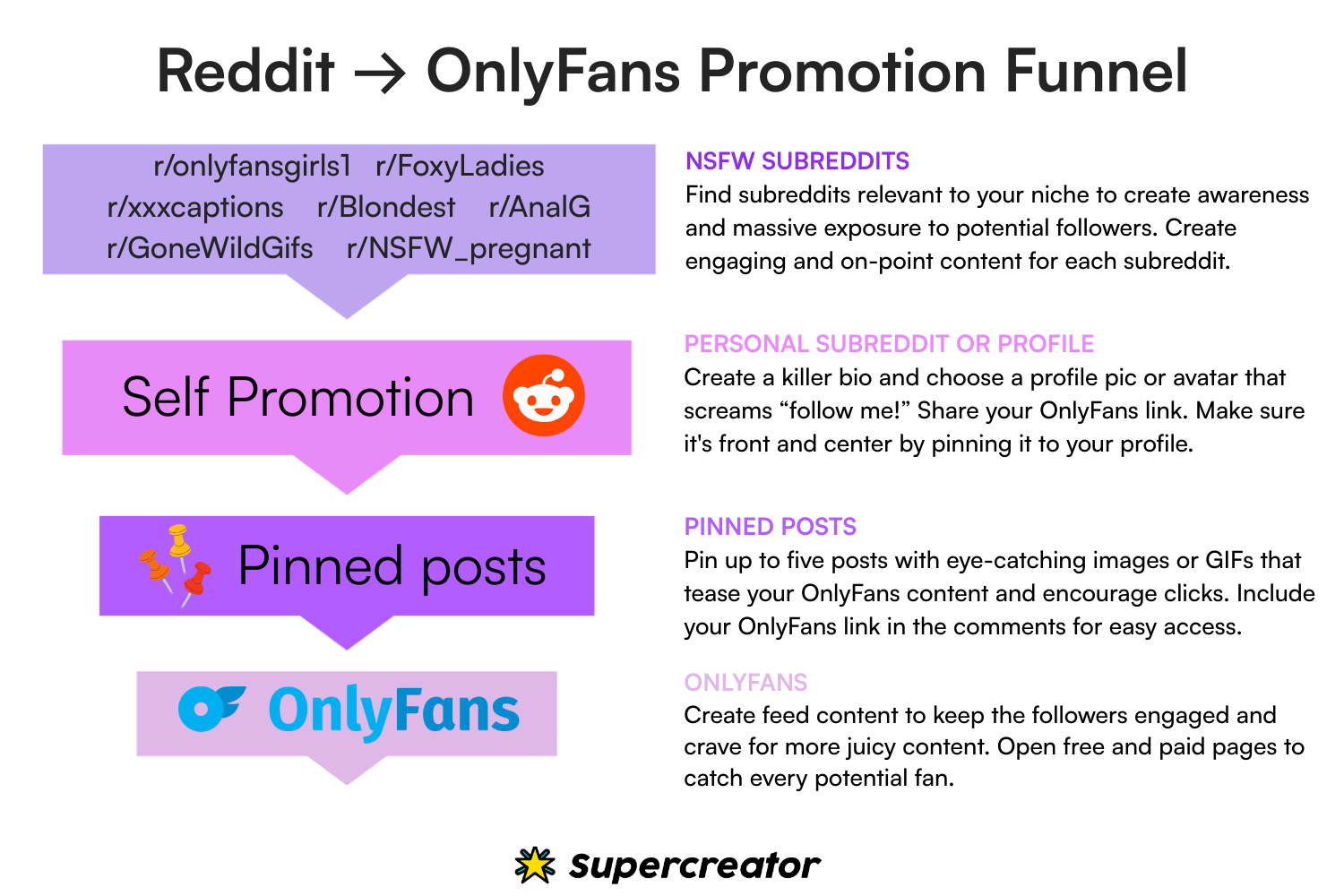
Plus, using strategies like Supercreator's Success Funnel for Reddit can help drive targeted traffic directly to your OnlyFans account, maximizing your promotion efforts.
“WTF is Supercreator’s success funnel for Reddit?” you ask.
Put simply, this is the idea: NSFW Subreddits → Your OnlyFans Subreddit or Reddit Profile → Pinned Post With Your OnlyFans Link → Your OnlyFans.
This funnel allows you to promote your OnlyFans on Reddit, tapping into communities that are already interested in your type of content.
How to Set Up a Reddit Account for OnlyFans Promotion
To begin putting your funnel into action, you’ll need to get set up on Reddit. We’ve put together a quick guide to help you get started, along with tips on how to maximize your chances of successfully promoting your OnlyFans on Reddit. Check it out below.
Create a Reddit profile that attracts subscribers
First things first, make sure your Reddit profile is set to NSFW. This ensures your content is visible to the right audience and prevents you from getting flagged or banned. Next, create a killer bio and choose a profile pic or avatar that screams, “Follow me!” It doesn’t have to be your real name, but it should be something that makes people want to click that “follow” button.
Build karma and gain trust in communities
Once your profile is set up, start engaging with Reddit communities to build your karma. This is Reddit’s way of showing trustworthiness. By interacting with others’ posts, commenting, and participating in discussions, you’ll gain karma over time. Reddit users are more likely to trust and follow you if they see that you’re an active member of the community, so take time to build genuine connections and avoid self-promotion right off the bat.
Reddit’s hidden algorithm and how it affects visibility
Reddit’s algorithm prioritizes content based on factors like user engagement, post history, and karma. To maximize the visibility of your posts and how to promote OnlyFans on Reddit, make sure your content is engaging and relevant to the community. The more interaction your posts get (comments, upvotes, and shares), the more likely they are to be seen by a larger audience. Don’t forget to read the rules and guidelines of each subreddit to avoid being flagged as spam.

Find relevant subreddits to target for your niche
Search for subreddits that align with your niche or the type of content you create. You can use keywords related to your content to find communities that are already discussing topics you’re interested in. Look for subreddits with high engagement rates and large member counts. Make sure you read through the subreddit rules to ensure you’re not violating any guidelines, which could lead to being banned.
Create engaging content for each subreddit
Tailor your content to each subreddit’s specific audience. For example, if you're targeting fitness-related subreddits, share content that highlights your fitness journey. If you’re targeting a booty-focused subreddit, share relevant content showcasing that. Make sure your posts stand out by being unique and engaging. Use captivating captions and humor to capture the audience’s attention. Research popular posts in each subreddit to replicate their success.
Prepare a content schedule and ideas
Consistency is key to maintaining engagement. Set up a content calendar with varied posts, like images, videos, GIFs, and more. Plan your content around the subreddit’s theme, and ensure it aligns with what that community enjoys. For instance, if you’re targeting a “fitness girls” subreddit, focus on showcasing your fitness lifestyle. Creating a schedule helps you stay organized and consistent, keeping your audience engaged.
Be consistent with your posting
It’s essential to post regularly. While you can post the same content to multiple subreddits, it’s beneficial to mix it up and keep things fresh. Regular posting with variety is more likely to keep your audience engaged and attract new followers.
Maximize your profile’s impact by pinning posts
Tactically pin up to five posts on your Reddit profile. These posts should include eye-catching images or GIFs that tease your OnlyFans content and encourage potential subscribers to click through. Be sure to include your OnlyFans link in the comments for easy access. Pinning special offers or positive reviews from satisfied followers will also help entice new subscribers. Additionally, link to your other social media channels to expand your following across platforms.
Best Strategies for Promoting OnlyFans on Reddit
To effectively promote your OnlyFans account on Reddit, it’s important to understand the strategies that will get you noticed on Reddit. From choosing the right subreddits to posting at optimal times, these strategies will help you boost visibility and engage with your audience.
Find the right subreddits for promotion
You need to find subreddits that match your niche. Use relevant keywords to search for active subreddits with a good number of members. Prioritize subreddits that align with your content’s theme to ensure you're reaching the right audience.
Follow posting rules & content guidelines
Each subreddit has its own rules and content guidelines. To avoid being flagged as spam or banned, make sure you read and follow these guidelines carefully. Understand what type of posts are acceptable in each subreddit, and tailor your content accordingly to avoid issues with moderation.
Find the best time to post for maximum engagement
Timing is everything on Reddit. Research when your target subreddits are most active, and schedule your posts for those peak times. Posting during high-traffic hours increases your chances of getting more upvotes, comments, and overall visibility for your OnlyFans promotion.
Avoid shadow-bans & Reddit’s strict moderation
Reddit has strict rules regarding self-promotion, and if you’re not careful, you could end up shadow-banned. This means your posts won’t show up for others even though they appear normal to you. To avoid this, ensure you’re engaging with the community, not just posting promotional content, and follow all subreddit rules to prevent moderation issues.
Content That Gets You on Reddit’s Hot Page
Now that you have a solid strategy for finding subreddits and posting correctly, the next step is to create content that will help you get noticed. Getting your posts on Reddit's Hot Page requires creating high-quality, engaging content that resonates with the community.
Content that stands out on Reddit is more likely to get on the Hot Page, where it can attract a large number of potential subscribers. Focus on crafting unique, high-quality posts that align with the specific subreddit’s tone and interests. Including attention-grabbing captions, images, and even humor can help boost your post’s chances of getting more interaction, which in turn will increase its visibility on the platform.
How to Post on Reddit for Maximum OnlyFans Exposure
After understanding the strategies and crafting content that resonates with your target audience, it’s time to focus on how to post effectively. The right posting style and engagement tactics will help maximize your OnlyFans exposure on Reddit.
The right posting style to get more upvotes
To gain more exposure, it’s important to match the style and tone of the subreddits you’re posting in. Whether it’s through informative posts, engaging humor, or high-quality images, tailor your content to the expectations of each subreddit. This increases the likelihood of your posts getting upvoted, which helps boost your visibility.
Why engagement matters & how to increase it
Engagement is a key factor for success on Reddit. Responding to comments, starting conversations, and interacting with other users builds relationships and trust within the community. The more engagement you get, the higher the chance your content will be seen by a larger audience, helping to promote your OnlyFans on Reddit.
The role of analytics in Reddit promotion
Using Reddit’s built-in analytics tools can help you measure the effectiveness of your posts. By tracking metrics like upvotes, comments, and post engagement, you can refine your content strategy and determine what works best for driving traffic to your OnlyFans account.
Advertising OnlyFans on Reddit via DMs & Direct Outreach
While posting content on subreddits is a powerful way to promote, DMs and direct outreach can provide a more personalized approach. Let’s explore how you can leverage Reddit’s private messaging system to directly reach potential subscribers without crossing any moderation lines.
When promoting OnlyFans on Reddit, direct messaging (DM) can be an effective tool when done right. Personalize your outreach messages to avoid sounding spammy and connect with potential subscribers on a more personal level. Instead of mass messaging, try to build a connection first by engaging in conversations within subreddits before sending a DM.
The importance of Reddit’s rules on messaging & how to avoid bans
Reddit has strict rules regarding unsolicited direct messages. Spammy or excessive outreach can result in a ban or shadow-ban. Always ensure that your messages are respectful, relevant, and personalized. Avoid spamming users with self-promotional content and focus on fostering genuine connections.
Best Subreddits to Promote OnlyFans & How to Use Them
Now that we’ve covered posting strategies and DMs, let’s look at the subreddits where you can truly thrive. The right subreddits will help you connect with potential subscribers and grow your OnlyFans account organically.
How to find niche subreddits where your content will succeed
Look for niche subreddits that closely align with your content type, whether it's fitness, fashion, or adult entertainment. Finding these specific communities ensures you're promoting your OnlyFans content to users who are most likely to be interested in what you offer, boosting your chances of gaining loyal subscribers. For example, fitness creators may find success in subreddits like r/Fitness, while adult content creators can benefit from subreddits like r/OnlyFans.
Which subreddits work best for new creators?
As a new OnlyFans creator, it’s important to focus on subreddits that support newcomers. Subreddits like r/OnlyFans101 or niche-specific subreddits with “new” content rules are great for getting started. These communities are more welcoming to beginners and can help build your reputation. Here are some of the best subreddits for promoting OnlyFans:
- r/OnlyFans101 – A great starting point for new creators, offering tips, support, and guidance on how to succeed on OnlyFans.
- r/OnlyFans – A general subreddit where creators share their experiences and promote their content. Ideal for anyone looking to gain exposure.
- r/SexWorkers – A supportive community for sex workers, where you can engage and promote your OnlyFans in a safe environment.
- r/AdultContentCreators – Focuses on adult content creators, providing a platform to network, share tips, and promote content.
- r/NSFW_Instagram – Allows creators to promote their NSFW Instagram accounts, making it a great place to cross-promote your OnlyFans account.
- r/PersonalBranding – Although not exclusive to OnlyFans, this subreddit offers excellent tips on growing your online presence and personal brand, which is crucial for OnlyFans creators.
By focusing on these subreddits, you can connect with users who share an interest in your content and are more likely to become loyal subscribers.
Common Mistakes to Avoid When Promoting OnlyFans on Reddit
To avoid falling into common pitfalls, let’s explore some of the mistakes creators often make when promoting their OnlyFans accounts. Staying aware of these missteps will ensure you can navigate Reddit’s platform without facing any unnecessary setbacks.
Posting too often & getting flagged as spam
One of the biggest mistakes creators make on Reddit is posting too frequently, especially self-promotional content. Over-posting can quickly get you flagged as spam, which reduces your visibility. Be mindful of how often you post and try to balance promotion with community engagement.
Ignoring Reddit’s community guidelines
Each subreddit has its own set of rules, and ignoring them can lead to account bans or shadowbans. Always review the subreddit rules before posting and make sure your content aligns with the guidelines to ensure you don't violate Reddit's policies.
Using low-quality content that hurts engagement
Posting low-quality content, whether blurry images, unprofessional videos, or poorly written posts, can hurt engagement and make it harder to attract subscribers. Always ensure your content is high-quality, engaging, and tailored to the specific audience you’re targeting.

Final Words
Hopefully, this guide gives you the tools you need to know how to promote OnlyFans on Reddit and start seeing results. The key is to stay consistent, engage with the right subreddits, and create content that resonates with your audience. By doing this, you can grow your following and boost your OnlyFans success. Keep experimenting, stay creative, and have fun with it!
How to Promote OnlyFans on Reddit – Your Guide to Growing Subscribers
.png)
If you happen to lose your OnlyFans account, you’ll be wondering if you can ever get it back. Basically, it depends. Whether recovery is possible comes down to why the account was deleted in the first place. In this guide, we’ll walk you through the steps to recover a deleted OnlyFans account and what to do if there’s no way to restore it.

Can You Recover a Deleted OnlyFans Account?
If you deleted your account yourself, recovery is not possible, though OnlyFans might retain user information for up to six months after deletion.
But if your account was banned or disabled due to policy violations, you might be able to appeal the decision. Success really depends on the circumstances. The faster you take action, the better your chances. Now, let’s learn how.
How to Recover a Deleted OnlyFans Account
Here’s a step-by-step guide on how to recover a deleted OnlyFans account:
Step 1: Determine the type of deletion
Self-deleted accounts are impossible to recover, according to OnlyFans’ Terms of Service. There’s, however, a slim chance of recovering accounts deleted due to violating the platform’s policy. The platform also lets users restore accounts that were compromised because of identity theft.
Step 2: Try logging into your OnlyFans account
Log in to see what message pops up. It will inform your next steps, whether you need to handle a content violation, fix a payment issue, or take another action.
*Note: Some community forums like Reddit and Quora support the idea that it’s possible to retrieve your account by signing in within 20 days. So, this step also helps you to confirm or refute the claim.
Step 3: Contact OnlyFans Support
Contact the OnlyFans support team via email at support@onlyfans.com. The email should include your username and the reasons for sending the mail. The support team will provide reasons for taking that particular action, and you can use the information to decide how to appeal the decision.
Step 4: Appeal the decision by submitting a Deactivation Appeal Form
To fill out the Deactivation Appeal form, you must provide the username, email, ID, or profile link in the allocated box. Next, include all relevant details about the deleted account and the deletion time. You might refer to your “account deletion” email to know the exact time and date.
You should also include reasons why the account did not violate OnlyFans’ Acceptable Use Policy and Terms of Service
Step 5: Wait for the appeal team’s decision
There’s no information on how long it takes for the team to review your request. The support team should review the request within a few business days and may request additional information. You must file an appeal within six months of the account deletion. In addition, OnlyFans is not responsible for any loss in subscribers or earnings while the account is deleted. Basically, it depends. Whether recovery is possible comes down to why the account was deleted in the first place.
What Does “Inactive User” Mean on OnlyFans?
If you see an "inactive user" status on OnlyFans, it usually means you have not been active for a while. It can also show up if you log in from multiple devices or trigger a platform policy issue. The good news is that it is not the same as a ban or deletion, and you can usually get your account back.
Fixing it is simple. Check your deactivation email from OnlyFans. It will explain why your account was marked inactive and what to do next. Most of the time, you just need to log back in or contact support. To avoid this in the future, make sure to post at least once a month to keep your account active.
If your account has been inactive for more than three months, OnlyFans might ask you to complete a two-step verification before letting you back in.
How does an inactive status impact a creator’s content and subscriptions?
A deactivated OnlyFans account affects you in three ways:
- Content visibility
- Earnings
- Subscriptions
If your account is inactive, you won’t be able to post, which means less visibility on the platform. Your earnings will also take a hit since old subscribers won’t be able to renew their subscriptions.
Can You Reactivate an OnlyFans Account?
Short answer: Yes!
If your OnlyFans account was deactivated, there’s a good chance you can get it back. In most cases, logging in is enough to restore access. If that doesn’t work, check your email for a deactivation notice. OnlyFans usually explains why your account was disabled and what you need to do next.
If your account was shut down for breaking the rules, things get trickier. You might have to contact support or submit an appeal, but if it was a serious violation, there’s a chance they won’t reinstate it.
Deactivation vs. permanent deletion
Deactivation isn’t the same as permanent deletion. If an account is deactivated, it’s still there. Your content, messages, and followers aren’t erased. You just need to reactivate it by logging in or following the steps in OnlyFans’ email. Permanent deletion, on the other hand, is final. Your account and everything in it are gone, and you can’t get it back. If that happens, the only option is to start over with a new account.
How Do I Reactivate My OnlyFans Account?
Start by signing in to your OnlyFans account; ensure you type the correct username and platform. If your account is deactivated, you will see an option to reactivate it.
You can also check the deactivation email to determine if your account is eligible for reactivation. The email may include information on the reactivation process and the grace period.
Customer support is your last resort to check if your account is eligible for reactivation. So, contact the support team at support@onlyfans.com.
OnlyFans customer support will activate your accounts if you’ve taken steps to address issues that led to the deactivation. Repeated violations may, however, lead to a permanent ban. For permanent bans, you must submit an appeal to the team for consideration.
How Long Does It Take to Recover a Deleted OnlyFans Account?
There’s no set timeframe for recovering an OnlyFans account. It might take as little as a few minutes or a few weeks. The account recovery time may depend on these factors:
- The reason behind the deactivation: It takes a short time to recover accounts that were deactivated for less serious issues, such as inactivity, multiple logins, or bugs. However, the recovery time might take weeks if the account was banned for violating the platform’s policies.
- The user’s action: You can speed up the recovery process by promptly providing complete and accurate information during an appeal to the customer support team.
Follow up with the support team if you haven’t heard back in five business days. Send a follow-up email using the same email trail or include the ticket number. In addition, check your spam folder to see if you missed their last response.
OnlyFans has an official presence on other social media channels. You can type “OnlyFans” in the search option to locate their official page. Next, send them a DM that includes the reference or ticket number. Here’s another trick to get fast results: tag them to a public post concerning the issue.
What to Do If You Can’t Recover Your OnlyFans Account
In some cases, recovering your account just isn’t an option. If OnlyFans permanently deletes it for breaking major rules or you removed it yourself, there’s no way to restore it. It’s frustrating, but it doesn’t mean you have to stop creating or making money.
Start over with a new OnlyFans account
If you’re locked out for good, your best move is to set up a new account the right way.
Use a new email and payment details
OnlyFans doesn’t allow users to reuse the same email or payment info after a ban. Create a fresh email address and make sure your new payment method hasn’t been linked to your old account.
Get your verification documents ready
To get approved, you’ll need a valid government-issued ID that matches your account details. Submitting the right documents upfront can prevent delays.
Build a stronger profile from day one
Think of this as a fresh start. Write a compelling bio, upload high-quality content, and set up an engaging welcome message. Make sure your header image and profile description reflect your niche so you can attract subscribers quickly.
How to Avoid Losing Your OnlyFans Account
Keeping your OnlyFans account safe is all about playing by the rules and protecting your access. If you want to avoid deactivation, bans, or security issues, here are the most important steps to follow.
- Follow the Terms of Service. OnlyFans has strict guidelines, and breaking them can get your account shut down. Do not post prohibited content, including content that belongs to other creators.
- Back up your content. There is no way to recover deleted content if your account gets banned. Use a cloud storage service or an external drive to save your videos, photos, and messages.
- Protect your account from hackers. Spammers and identity thieves target OnlyFans accounts. Use two-factor authentication and a strong, unique password to keep your login secure.
- Avoid suspicious activity. Logging in from too many locations, using bots, or engaging in spam-like behavior can trigger security flags. If OnlyFans thinks your account is compromised or breaking the rules, they may deactivate it.
Taking these precautions will help keep your account active and your content safe. Losing access is a headache you do not want to deal with, so it is always better to prevent the problem before it happens.
Final Thoughts
Losing an OnlyFans account sucks, but it doesn’t mean you’re done. If getting it back isn’t an option, you can start over or switch to another platform.
Keep your account safe by following the rules, backing up your content, and locking down your login. The less you have to worry about losing access, the more you can focus on making money.
Recover Deleted OnlyFans Account – Steps to Get Back Online
.png)
OnlyFans paid out $5.3 billion to creators in 2023. That’s real money going straight to people who figured out how to turn their content into cash.
Getting started is easier than you think. Whether you want a side hustle or a full-time income, OnlyFans lets you make money from your content, connect with fans, and grow a loyal audience. You do not need a massive following or a specific niche. You just need the right approach.
This guide covers how to start an OnlyFans account for beginners, from setting up your profile to making your first sale. You’ll also learn how OnlyFans works for beginners and how AI tools like Supercreator can help you manage and grow your account faster.

How Does OnlyFans Work (for Beginners)?
OnlyFans is like any other social media platform that allows users to create content and share it with others. Unlike other platforms, there’s no limit on the type of content you can create. It runs on a subscription-based model where fans pay a specific monthly fee to view your content. In turn, you get to set the monthly fee and offer discounts and promotions to your subscribers.
OnlyFans exists to help creators make money on their own terms. You can charge anywhere from $3 to $20 a month, and with the right strategy, that adds up fast. Imagine pulling in 1,000 subscribers every month; that’s serious cash. Blac Chyna took it to another level, making around $20 million per month.
What Type of Content Is Allowed on OnlyFans?
OnlyFans allows creators to share a wide range of content, from videos to photos to live streams. The platform also allows other content types, like direct messages and PPV content. There’s no restriction on what you can upload to your OnlyFans account as long as it doesn’t violate their terms of service. But before you jump in, there are a few things you should consider to set yourself up for success.
Things to Know Before Starting an OnlyFans
We know you’re eager to start making money on OnlyFans, but before you dive in, here’s what to keep in mind:
Privacy concerns
Sharing content online threatens your privacy since it is hard to take back what you share. So, decide the extent of what you want to share with your audience. For example, you might choose to stay anonymous, use pen names, or prevent users from certain regions from viewing your content. Creators like Yasmin Habibi use face coverings to protect their identity.
Understand OnlyFans fees and payout
Most beginner creators often ask questions like, “How much does OnlyFans take? Is there a limit to what you can earn? When does the platform release payments?”
First, OnlyFans takes a 20 percent commission on your earnings; this means you get to keep 80%. There is no limit on what you can earn, and there’s no reason for the platform to withhold your earnings.
OnlyFans offers the option for automatic weekly payouts. There are also daily and monthly withdrawal options. It takes three to five business days for the platform to process withdrawals. To avoid delays in the withdrawal process, you must ensure the following:
- The account details are accurate.
- You have a minimum of $20 in the account.
- You have filled all the necessary forms, such as the W-9 for creators in the US
- Legal and Tax Considerations
Your OnlyFans income is taxable. However, the platform is not responsible for reporting or paying tax on your behalf. It’s better to keep at least 30 percent of your earnings for federal, state, and self-employment tax. US creators might refer to the IRS guidelines for more information. Better still, plan to hire a tax professional to help you handle any complications.
Consistency and commitments
Good things take time and effort, and your OnlyFans account is no exception. You need to show up by producing consistent content while maintaining quality and authenticity. So, plan a posting schedule and stick to it. Tools like Excel and Airtable are great for planning content postings. Besides planning a schedule, ensure you maintain engagements by messaging and interacting with fans. For new creators, this can be quite overwhelming. So, it’s alright to implement AI-driven chat automation tools to help you better manage the chats.
Key OnlyFans Terms You Should Know
Before you start, here are a few terms you will see often:
- Direct messages (DMs): It is a private communication tool that enables creators and fans to exchange messages and exclusive content.
- Pay-Per-View (PPV) content: PPVs are content that fans must pay a one-time fee to access. Note that PPVs are separate from subscription fees.
- Live streams: This tool enables fans to connect with fans in real time. In a livestream, fans get to send requests and watch the creator perform those requests.
If you’re new to the platform, you might come across other abbreviations like JOI, GFE, and PPM. Check out our full guide on OnlyFans abbreviations to learn what they mean and how to use them to boost engagement. Now, let’s get into the logistics.
How to Start an OnlyFans Account (Step-by-Step)
Setting up your OnlyFans account is simple, but getting it right from the start can make a huge difference in how fast you grow and start earning. From signing up to optimizing your profile and setting your prices, we've outlined everything you need to launch your page the right way and set yourself up for success.
Step 1: Sign up and verify identity
Visit the OnlyFans website and provide your name and email to create an account. OnlyFans also allows you to sign up using your X account or linked Gmail account.
The next step is to verify your identity. For this process, you will need to first verify your age by scanning the front and back of a valid ID. Ensure the photos are clear and the edges are visible. You can use state or federal-issued documents like passports, driver’s licenses, or state IDs.
The next directive is to take a selfie. So, clean your front camera and ensure there’s enough lighting. The software will notify you if your face is in the right position. It may take up to 72 hours for the platform to verify the account. You may increase your chance of getting verified by including your social media accounts during registration.
Step 2: Set up and optimize your profile
Your profile is the first thing fans will see when they visit your page, so you can’t afford to mess it up. Click on the “My Profile” button on the left side of the webpage. Next, select “Edit Profile” on the subsequent page. There are three main elements you can optimize:
Username
Keep it simple and memorable. Better still, ensure the username aligns with your brand and niche. You may avoid the allure of using special characters or complicated spellings, which makes it difficult for users to find your account. Here’s a trick that might help you out: try to maintain the same username across your social platforms. This will enable prospective fans from your social media accounts to locate your OnlyFans.
Profile photo and banner
It’s all about the visuals when selecting a profile photo. Use a high-quality photo that best represents your niche and brand. Case in point: OnlyFans cosplay creators may wear suggestive costumes in their profile pictures. For your banner images, we recommend using a collage of different images to give your users a foretaste of what to expect. Tools like Photoshop, Canva, and Lightroom are great for giving your pictures a professional touch.
Bio
The rule is to keep it short and interesting. This is where you highlight your niche, services, call to action, and copyright disclaimer. You might also include links to your social media accounts. Here’s an example of what a bio can look like:
Ana Cheri: OnlyFans Fitness Model
Bio: Everything Me, Ana Cheri 💋
➕All the things I can't share anywhere else 😏
🎬 BTS (behind the scenes), 📸 photoshoots, 🏋🏻♀️️ workouts, 😍 custom content, 📲 raw iPhone content & finally a place where I can answer my DMs! 📩
😈 VIP page: https://onlyfans.com/anacherivip
https://www.amazon.com/hz/wishlist/ls/10LF5ESLJM6KH?ref_=wl_share
Step 3: Choose subscription pricing (free vs. paid accounts)
You can decide if you want a free or paid account by considering their pros and cons.
Pros of a free OnlyFans account:
- It allows you to attract a wide audience.
- It helps fans to better understand your content before they can become paid subscribers.
- You can still monetize your content through ticketed live streams or pay-per-view.
Cons of a free OnlyFans account:
- The non-exclusivity undermines the value of your content.
Pros of a paid OnlyFans account:
- Fans perceive your content as high value due to the exclusivity of a paid account.
- Opportunity to earn consistent income through monthly subscriptions.
- Protects your content from piracy since subscribers are less likely to leak it.
Cons of a paid OnlyFans account:
- It takes longer to grow a paid account due to the subscription barrier.
Step 4: Set up payment details and understand payout settings
OnlyFans supports payment options like e-wallets and bank transfers. So, set up your preferred payment in the account section. Your preferred payment option also determines how fast you get your withdrawals. Direct transfers via ACH are the fastest and may take between one and two business days. However, it takes up to five business days to get manual bank transfers and international money transfers.
Step 5: Plan and upload your first post
Your first post or welcome message sets the tone for your brand. While there is no fixed rule for the first post, it must be engaging enough to make your fans take the desired action. For example, share a photo or content to give them a taste of what to expect. In addition, get them to take action by offering incentives like free live streams or PPVs.
What to Post on OnlyFans
Now, you know how to start an OnlyFans account. The next hurdle is knowing what to post and which niche to major in. Before it gets overwhelming, use these steps to create posts on the platform:
Ffind a niche
Your niche makes you stand out. It also helps fans better understand what you’re offering. As a beginner, here are niches to try out:
- ASMR: ASMR is a good fit if you understand how to use sensory triggers like whispering, soft speaking, and tapping to evoke the desired emotions. There’s not enough competition in this niche, so it’s easy to stand out.
- Cosplaying: Here’s another niche that’s quite easy to break into. You might stick to one cosplay theme or explore multiple themes, from waifu to pop culture to gaming characters. However, this might require you to have a large collection of costumes.
- Adult content: Choose this niche if you’re not afraid of going all the way. The adult niche has a lot of sub-niches based on sexual preferences, from BDSM to fetishes to roleplaying.
- Lifestyle: You can never run out of content ideas in the lifestyle niche. Creators could choose to share their travel adventures, daily lives, or hobbies like cooking or dancing.
Invest in tools to boost the quality of your posts
Create posting schedules through tools like Excel, Google Sheets, SuperCreator, or Airtable. Set a minimum of 3 to 5 pieces of content weekly. Next, invest in good lighting, cameras, props, and editing tools.
Create a schedule for engaging with your prospective fans. You could use advanced analytics AI tools to track fans’ behavior to note when they’re most active.
Create content around these beginner-friendly content ideas
New OnlyFans creators should try out these content ideas:
Welcome post: Your welcome message is also about creating a lasting first impression. So, start with a picture or video that shows what you can do and gives users reasons for subscribing. However, don’t show it all; just enough for them to come back for more.
Behind-the-scenes (BTS): This makes your content more relatable and shows your authentic side to the audience. Share the process behind your work, be it a travel vlog or fitness routine.
Q&A sessions: Fans will be curious about your content and niche. So, create content around those questions.
Lifestyle content: It may surprise you that fans are also interested in what your typical day looks like. So, share snippets about your day.
*Tip: Focus and stay consistent. Pick one or two niches that match your strengths and passions instead of trying to do everything. Quality always wins over quantity, so create content that keeps fans coming back.
How to Promote Your OnlyFans and Gain Subscribers
The competition is fierce since you're competing with creators who have spent years perfecting their craft. So, you need to promote your content and grow a loyal following by using these strategies:
Using social media to promote your OnlyFans
You’re missing out on new fish if you’re not promoting on social media. These platforms boost your content reach and enable you to convert followers to OnlyFans subscribers. We’ve compiled some top tips on how to maximize your content reach on different social media platforms:
Tips for promoting OnlyFans on Instagram:
- Optimize your Instagram profile by uploading a high-quality, catchy profile picture and using the bio to introduce yourself and give a hint of what you do. You can write something along the lines of, “Yes, you know where to find me.”
- Add a third-party link website to the profile page. IG may suspend accounts with OnlyFans links. So, use websites like Linktree and Lnk.Bio.
- Invest more in reels since they often have a higher user engagement. Include a captivating hook at the beginning to prevent them from scrolling further.
- Research and use hashtags that are specific to your niche. You'll find most hashtag ideas from your creators in your niche.
- Engage and collaborate with other creators.
Tips for promoting OnlyFans on TikTok:
- Create tease content that is not explicit enough for you to get suspended or shadow banned.
- Include a link aggregator site like Linktree in your bio. Provide a hint about what users may get by clicking the link.
- Consistently create content using relevant hashtags. Start by replicating the hashtags used by creators in similar niches.
- Use trending sounds and filters.
Engage in OnlyFans promotion groups
These groups or communities assist creators in networking and promoting their content. In such groups, you collaborate with other creators to cross-promote each other’s content. Here’s how to find promotion groups on some social media platforms:
- Telegram: Input relevant keywords like “OnlyFans promotion” or "OnlyFans community for beginners.” You might narrow it down and make it niche-specific to get better results. For instance, fitness OnlyFans models may type in “ONlyFans fitness community.”
- Reddit: First, locate subreddits that cater to your theme or niche interests. Use the search option in the top bar to locate them. Use niche-specific keywords to get more precise results.
Offer discounts, free trials, and other incentives
Don’t be stingy with your freebies. Offer discounts for the first monthly subscription or package deals for quarterly or annual subscriptions. In addition, you may offer free trials for a specific timeframe to give fans a taste of your content. Remember to use this strategy sparingly; too many incentives might reduce your content appeal.
Collaborate with other creators
You can reach a wider audience by collaborating with other OnlyFans creators. You may join shout-out or promotion groups, host joint giveaways, or create joint content. r/OnlyFanscollabdates is one of the communities for collaborating with creators. Sometimes, you need to create an agreement or pay the required sum to collaborate with some creators.
How to Make Money on OnlyFans as a Beginner
Now that you know the basics of starting an OnlyFans account as a beginner, let’s talk about how to monetize it. New creators can follow these strategies to maximize their earnings from day one:
Set your subscription prices wisely
Be a spy and see what other creators are charging. Start by checking what other creators in the same niche are charging. Next, try to find a middle ground by using the average of their subscriptions.
New creators often charge between $2 and $15 per month. You can also offer tier-based subscriptions to accommodate fans with low spending power. For example, offer $5 per month for basic access and $25 per month for exclusive content, including livestreams. A one-time first-month discount is another strategy for attracting new fans.
Sell PPV content and custom requests to earn extra income
Besides subscriptions, fans also pay for exclusive photos or videos, such as themed photos or behind-the-scenes videos. Some fans may request custom videos or pictures that are specific to their taste or preference. You might also charge for such requests, but ensure to demand an upfront payment for them.
Engage with fans to increase revenues
Set up Q&A sessions and run polls to know what kind of content they want to see. You might also ask these questions in your DMs. These engagement activities make your fans feel heard and more likely to pay more for your services.
Common Mistakes to Avoid When Starting an OnlyFans
Mistakes are costly since they deprive you of precious cash and time. So, here are common mistakes to avoid as you’re starting an OnlyFans account.
Underpricing content
Most creators fall for the mistake of setting low prices for subscription or PPV content. However, this makes it difficult to earn a sustainable income. You can avoid this error by researching what others are charging and setting a mid-range price. In addition, don’t be afraid of charging higher prices for premium content. You may use a time-limited discount to attract new subscribers.
Ignoring marketing and promotion
It’s a big mistake if you think OnlyFans’ internal traffic is enough to grow your account. Remember that you’re competing with millions of creators on the platform. So, step outside your comfort zone by using social media platforms and by collaborating with other creators.
Neglecting audience engagement
What’s the price for this mistake? Well, your follower count will either decrease or remain stagnant since old fans are not renewing their subscriptions. You’re also leaving a lot of money on the table by not engaging with fans. So, avoid this situation by responding promptly to messages and hosting live streams to engage with the audience. AI tools like Supercreator help to not only automate chats but also reply to them.
Inconsistent posting schedule
It’s easy to get overwhelmed and not consistently post content. As a new creator, you must prevent this mistake by building a content calendar. Furthermore, create content in batches to save time and cost if you’re using a rented studio.
Stick to at least two niches
You can’t appeal to everyone, so stick to at least one or two niches. Identify your unique interests and strengths and use them to determine your niche. You should also research what content your target audience is looking for and customize your content accordingly.
Your OnlyFans Journey Starts Now
You now know how to start an OnlyFans account and set yourself up for success. The real work is in keeping it going. Here’s what matters:
- Set up your account properly from the start.
- Pick a niche that fits your strengths and interests.
- Promote yourself on social media and collaborate with other creators.
- Stick to a posting schedule and keep your content high quality.
- Engage with fans through messages, live streams, and polls.
- Use AI tools to save time and boost interactions.
- Track your analytics to see what’s working and adjust your strategy.
- Keep evolving with fresh content ideas.
Starting is the easy part. Staying consistent and adapting is what builds long-term success. Take your time, figure out what works for you, and keep pushing forward.
How to Start an OnlyFans for Beginners: A Step-by-Step Guide
.png)
For most OnlyFans creators, renting a studio space or hiring professional prop artists might be out of reach or budget.
But here’s the good news: you don’t need a huge budget to create a space that looks professional, feels inviting, and stands out from the crowd.
Your best solution is setting up an eye-catching, authentic home studio. Whether you're just starting or you’re a seasoned OnlyFans creator, your home studio plays a pivotal role in how your audience perceives and engages with your content.
In this guide, we'll walk you through practical and creative ways of transforming your home into a space that's professional-grade yet still feels like you.

Balancing Professionalism with Authenticity
A studio-quality setup isn’t always the goal. An amateur feel has its own benefits, especially for PPV. Fans are drawn to content that feels personal and unscripted. The key is to strike a balance by investing in high-quality production for posts and mass messages while keeping messaging content more casual and relatable.
You don’t need a perfect studio setup to succeed. Lean into your own style and take a direct approach that feels natural to you. Even if you prefer not to share your personal space, try to make things feel home-like. Fans love behind-the-scenes content, and creating the illusion of an intimate, real-life setting can enhance their experience.
Designing Your OnlyFans Studio
Believe us, designing your OnlyFans home studio is much easier than you realize. The best part is you already have some of the required elements to get started. So, here are things to consider when building your OnlyFans studio.
Assess Your Space
It’s not enough to just pick out any room to shoot your content. Your preferred space must tick these boxes:
- There is privacy and little to no distractions when you’re in this space. As a rule of thumb, it must be far from your sitting area, preferably an attic, basement, or bedroom.
- It is large enough for you to move around and set up your props and video equipment.
- It must have good acoustic properties. There must be no echoes or reverberation. You could try clapping. If there’s no echo, then the room is suitable for a home studio.
- It should have access to natural lighting. The preferred space must be able to capture the natural, beautiful rays of the sun. However, you may invest in lighting equipment in the absence of natural lighting.
Maximize your space
Now that you have a space, it’s time to work on the layout and maximize it.
- Plan your space by writing down all you need to procure. This could include lighting equipment, tripods, wallpaper, couches, or even niche-specific equipment. For example, OnlyFans models in the fitness niche may invest in exercise equipment to use as backdrops.
- For limited spaces, you need to create an illusion of a big space by using wall mounts or shelves as storage spaces. This frees up the ground space for your content.
- Invest in multi-purpose equipment. It’s easy to clutter your space with too many tools. Invest in tools like shelves or ottomans that may double as an aesthetic element and as storage equipment.
Balancing Function with Style
Your OnlyFans creator studio must reflect your style and niche. Goth-like BDSM niche creators might consider creating a studio with a dark background with horror-like props. The color palette should also support what you’re trying to portray. Note that your aesthetic elements must not overwhelm your content.
Lighting, Background, and Props
Your environment is a sum of the lighting, props, and background, which, like puzzle pieces, must fit to create great aesthetics and authenticity. It’s more than just a backdrop; it’s a reflection of your brand, your creativity, and your authenticity.
Lighting Techniques
Good lighting is often the difference between great and not-so-great OnlyFans content. It can set the mood and portray the right emotion for your content. For instance, soft, natural lighting may work best for ASMR niches. With that being said, here are your lighting options for an OnlyFans home studio:
- Ring lights: These are the most affordable and accessible lighting equipment. They are great for removing shadows and harsh lines in photoshoots or video content.
- Softboxes: Here’s a lighting option if you need a more professional-level effect on your OnlyFans content. Unlike ring lights, softboxes produce less harsh light to provide depth to your profile. Here’s a tip: place your softbox at a 45-degree angle facing you, and set it to match the intensity of the natural lighting. This will create a Rembrandt effect that’s great for adding personality to your content.
- Diffusers: Like softboxes, diffusers help to soften and spread light, making them ideal for creating warm and cozy effects
- Natural lighting: The sun’s golden rays are also great for lighting up your home studio. You could target the hours just before dusk and shortly after sunrise for that warm and gold effect.
Natural vs. artificial lighting: How to choose the best option
Natural lighting gives you that golden “sun-kissed” effect, while artificial lighting is more diverse and customizable. Your choice may depend on a variety of factors, including the following:
- The level of control over the lighting output
- The amount of time it takes to set it up.
- Consistency and availability of the lighting output.
Let’s break it down by looking at the pros and cons of these lighting options:
Natural light
Pros
- It is free and readily accessible.
- It gives a golden effect that complements your content.
- Enhances the mood and authenticity of video content.
Cons
- It is unpredictable and subject to the time of day and weather changes.
- You can’t control light intensity.
Artificial light
Pros
- Offers accurate control over light temperature and intensity.
- Consistent light output, irrespective of the time of day or weather conditions.
- It’s great for getting professional-grade shots and video content.
Cons
- It costs money to set it up.
- It requires a good understanding of lighting to get the desired effect.
Creating the Perfect Background
The perfect background for OnlyFans home studios should check these boxes:
- It aligns with your brand, niche, and audience expectations.
- It’s simple and clutter-free.
- It does not “clash” with your lighting settings.
- It’s authentic and conveys your true self to the fans.
Here are some creative ideas to inspire your background design:
- Minimalist backgrounds: These backdrops are great for making you the focal point of the content. You may invest in neutral colors like beige or grey for a clean and timeless look. Textured backgrounds like wood paneling and bricks are also great for that minimalist look.
- Multifunctional backdrops: This is a preferred option if you have more than one niche. Green screens or interchangeable panels can be easily customized to suit the mood or theme of the shoot.
- Themed backdrops: These backdrops are all about revealing your authentic self through the use of specific themes. For luxury-themed backdrops, you may invest in faux fur rugs or velvet curtains. In contrast, a cozy or intimate backdrop will require warm lighting, plush pillows, and soft blankets.
Utilizing Props
Props are essential components in your OnlyFans homemade studio. They are objects that best portray your style and personality to the target audience.
Here are some tips to use when selecting props:
- It must align with your brand and reflect your content style, be it playful or edgy.
- Stick to simple props that do not take attention off you.
- Less than three props is a good way to start.
- Consider colors and texture when choosing a prop; it must align with your color theme.
- Try different prop arrangements to see what works best for your composition.
If you want to add some personality and style with props, here are some ideas:
- Furniture: ottomans or couches that fit your theme.
- Decorative pieces: real or faux plants, candles, or statuettes.
- Themed props: fluffy handcuffs, whips, feather boas, or costumes.
- Textiles: rugs, throw pillows, or blankets.
- Personality-type props: books, sports gear, or musical instruments.
Enhancing Audio Quality and Reducing Noise
Quality sound is non-negotiable when building your OnlyFans home studio. Crisp, clear sounds are important for live streaming and other video niches like ASMR. To enhance your audio quality, start by assessing the acoustic properties of your space. You may clap to check if there are echoes or reverberations. If there are echoes, you may soundproof the space through soundproofing foams installed on the walls or ceiling. Rugs, carpets, soft furnishings, and acoustic caulks also have soundproofing properties.
Alternatively, you can enhance the sound quality through external microphones like Lavalier clip-ons, shotguns, and USB condenser microphones. These microphones are easy to set up and are perfect for voiceovers and video content.
Noise Reduction Tips
Background noise reduces the overall quality of your content. However, you can avoid such outcomes with our list of noise-reducing tips:
- Use editing software like Adobe Audition or Audacity to edit out background noise.
- Select a quiet room with no echoes that is far from external noise sources like traffic.
- Invest in directional microphones like shotgun mics to focus only on your voice.
- Make use of soundproofing materials and techniques.
- Reduce background noise by switching off noisy appliances and notifying other persons living in your space.
- Schedule your recordings during quiet times of the day, such as late in the evening.
Choosing the Right Camera for Your OnlyFans Studio
You don’t need an expensive camera to create high-quality content - your phone camera is more than enough. Most modern smartphones have excellent video quality, built-in stabilization, and easy-to-use editing tools, making them the best choice for OnlyFans creators.
If you want to upgrade your setup, consider buying multiple used older phones instead of investing in a high-end camera. Older phones with good cameras are affordable, and they let you:
- Shoot from multiple angles for more dynamic videos
- Have different shots to choose from when editing
- Use different perspectives for different PPV sets to add variety
- Make editing easier by keeping everything within the same device ecosystem
To get the best results, choose phones with good low-light performance, high-resolution video (1080p or 4K), and manual camera settings to give you more control over your content.
Editing and Post-Production Techniques
This is where it gets confusing for most creators using a home studio. It may require some level of expertise to operate some editing software. Nevertheless, there are a ton of beginner-friendly tools to try out. As an OnlyFans model, you may start with these tools:
- Photo editing tools: Canva, Adobe Lightroom, Snapseed, and GIMP. These beginner and intermediate-level tools help creators edit photos and implement different color grades.
- Video editing tools: Filmore, PowerDirector, Adobe Premiere Pro, and FinalCutPro. These tools are generally easy to use and are perfect for video effects, color grading, and transitions.
Video Effects
You may need to experiment till you find what works for you. For instance, a subtle transition gives your content a professional feel.
Framing and Cropping
Remove unnecessary parts of the video to focus on the main theme. Also, use different aspect ratios if you want to post on other platforms. For instance, use 16:9 for YouTube content and 9:16 for Instagram.
What’s the Best Studio Setup for $100?
You don’t need a big budget to create high-quality content. For around $100, you can put together a solid setup that improves your videos while keeping things simple and professional.
Here’s an example of what you could get:
- Used iPhone 13 ($60-$70): Great camera quality, smooth video recording, and easy editing.
- Ring light ($10-$15): Enhances lighting for clearer, more professional-looking content.
- CapCut Pro subscription ($10): Easy-to-use editing software with premium effects and background removal.
- Backdrop ($10-$15): A simple fabric or paper backdrop to keep your setup clean and polished.
This is just an example of how you can maximize a small budget to create high-quality content. Depending on what you already have, you can adjust your spending to focus on what matters most for your setup.
5 Tips for Building Your Home Studio
Setting up your home studio doesn’t have to be complicated. These simple tricks can help you create high-quality content while keeping your setup flexible and easy to manage.
1. Paint each wall a different color
Painting each of your four walls a different color lets you switch backgrounds easily without extra props. Try neutral, dark, bold, or textured options to match different moods.
2. Use green screens or AI background editors
If painting isn’t an option, green screens or AI tools (like CapCut or Adobe Premiere Pro) let you swap backgrounds for travel, seasonal, or premium-themed content.
3. Invest in essential equipment
A few tools can improve quality without breaking the bank:
- Ring light or softbox for better lighting
- Tripod and Bluetooth clicker for hands-free filming
- Lavalier mic or shotgun mic for clearer audio
4. Create a multi-purpose setup
Use rolling backdrops, moveable LED lights, and a mix of standing/seated setups to add variety without needing extra space.
5. Mix high-quality and casual content
Fans love pro-quality content but also want a personal touch. Keep polished content for mass messages and use more natural, relatable clips for DMs and PPV.
Balancing Aesthetics and Authenticity
To build a loyal following on OnlyFans, you need to create visually appealing content that showcases your personality while staying consistent with yourself. Here are some tips to keep it real and engaging:
- Avoid overediting by maintaining those little imperfections and skin textures.
- Let your personality and quirks shine through your video with bloopers or BTS clips.
- Maintain consistency in your brand styles while experimenting with new ideas.
- Add a personal touch by using props that reflect your interests or hobbies.
- Do not oversaturate your content with lighting and colors.
- Create captions that express your personal thoughts.
Next Steps
A great OnlyFans studio isn’t about having the most expensive setup - it’s about making the most of what you have. Good lighting, a clean background, and clear audio all add up, but the real game-changer is how you use them to reflect your personality. Start with what you can, improve as you go, and focus on creating a space that feels like you.
If you’ve already set up your home studio, tweak it, test new ideas, and make it work even better for you. What matters most is showing up, staying consistent, and keeping your content both polished and real!
How to Create an OnlyFans Studio at Home
.png)
OnlyFans assistants help creators focus on creativity and growth while they handle mundane tasks like messaging, scheduling, and subscriber management.
The best part is that you can easily hire them from OnlyFans Assistant job boards or freelance platforms to free up more time for content creation and engagement.
Are you ready to take the leap? Then, this guide will show you how to identify your needs, find the right assistant, and manage them effectively, so you can make the most of your OnlyFans journey.

The Benefits of Hiring an OnlyFans Assistant
Hiring an OnlyFans assistant comes with too many perks and little to no downsides, especially if your revenue justifies the cost. This step has the potential to boost your earnings and grow your account. Here are some of the ways you can benefit from hiring an assistant for your account.
Increased Efficiency
There’s so much involved when running an OnlyFans account. In most cases, creators get overwhelmed by the tasks required to operate their accounts. With a VA OnlyFans assistant, you get to boost efficiency by delegating routine and mundane tasks while regaining enough time to focus on more important tasks that only you can do. A VA’s responsibilities may include engaging fans in different time zones and monitoring performance metrics.
Enhanced Fan Engagement
Let’s face it: It’s quite difficult to keep track of your fans’ unique preferences and chatting styles. Doing it alone means spending hours glued to your inbox. The right chat assistant is a master at managing communication with fans. They get to learn your chatting style and replicate it to meet the fans' demands. Chat assistants can also help push your pay-per-view content to subscribers, thus increasing your earnings.
Scalability and Growth
There’s much demand on your time and energy as your OnlyFans account grows. A VA helps you to better manage this growth by taking on tasks that would otherwise overwhelm you. For instance, they handle routine administrative tasks like tracking subscriptions and organizing content. VA OnlyFans assistants also help your account to grow in the following ways:
- They help to better manage your global audience by scheduling content or chats to suit different time zones.
- They track and analyze your account metrics to know what’s working or not.
- They also help you implement and manage new income streams. For example, if you've always wanted to open a channel to promote your OnlyFans on Telegram but never had the time, now’s your chance to start.
Finding and Hiring the Right OnlyFans Assistant
Finding and hiring an OnlyFans assistant should be easy, right? Not by a mile, since not every assistant is the right fit for your brand and niche. To find the right one for your account, you may start by following these steps.
Where to Look
To find the right VA OnlyFans assistant, you need to know where to look. Here are effective ways to locate prospective assistants:
- OnlyFans creator communities: While some forums and groups provide general advice, virtual assistants (VAs) are typically found on platforms dedicated to freelance work. Reddit communities like r/OFChatter, Telegram channels, Fiverr, and Craigslist (for local hires) are more reliable options for finding experienced assistants.
- Virtual assistant platforms: Platforms like Upwork, Indeed, ZipRecruiter, and Belay offer a diverse pool of virtual assistants with experience in social media and content management. The platforms typically include information about the assistant’s rates and past job reviews.
Screening and Interviewing
It is often easy to be swamped by attractive resumes. To help you maintain a clear head, here are key qualities to look for when hiring OnlyFans assistants:
- Good communication skills: The right chat assistant must have a good command of your preferred language and should be able to mimic your tone and style.
- Familiarity with OnlyFans culture: Your assistant should already understand how OnlyFans works, including key policies like those on AI-generated content. They should know the platform’s rules and features without requiring extensive training. Hiring someone with prior experience in the industry saves time and money.
- Their ability to handle sensitive information: Since OnlyFans restricts third-party access, your assistant must be trustworthy with confidential details. Most importantly, you want someone you feel comfortable with and who understands your vibe. It’s worth paying more for an assistant who gives you peace of mind while keeping your account secure. If you need to manage permissions safely, access management tools can help control and limit access.
Sample questions to ask during an interview might include the following:
- Can you describe your experience with OnlyFans or similar platforms?
- Can you provide references from past clients or creators you have worked with?
- Are you comfortable working with adult content and maintaining confidentiality?
- How do you handle high volumes of messages or tasks?
- Describe a time when you had to handle a difficult situation or conflict with a fan. How did you resolve it?
- How do you stay organized when managing multiple tasks or accounts simultaneously?
- Are you comfortable signing a non-disclosure agreement (NDA) to protect privacy?
Here’s a checklist to note during the interview:
- The applicant displayed good communication skills during the interview.
- The applicant showed professionalism while answering the questions.
- The applicant provided solid examples of past work experience.
- The applicant showed enthusiasm during the interview.
- The applicant’s demeanor aligned with your brand’s values and tones.
Evaluating Experience
While experience is not compulsory, it’s an advantage if the chat assistant has worked in the industry before. The next best option is if the assistant has VA experience in related industries, such as social media platforms and corporate entities.
Training Your OnlyFans Assistant
Congrats on hiring your first OnlyFans chat assistant! The next step is to get them up to speed on your brand requirements, values, and tone.
Setting Clear Expectations
Start by outlining the assistant’s roles and duties to ensure a smooth transition. Be specific about the content guidelines, including what is permissible or off-limits when chatting with fans. In addition, you must set clear expectations for these tasks:
- Tone: Specify the tone you want the assistant to emulate. Ask them to read previous chats, especially with your biggest spenders, to understand your tone.
- Response time: Set a time limit within which they must respond to chats. You can be flexible by making them respond faster to top-paying subscribers.
- Scheduling posts: They must upload or plan content according to your posting schedule.
- Administrative task handling: They must manage promotions and shoutouts, track subscriptions, handle fan inquiries, and organize media files.
Onboarding Best Practices
The next step is to get up to speed through these onboarding processes:
- Create SOPs or guides: a step-by-step guide on how to use the platform’s features, your brand tone, and your content calendar. While it seems cumbersome to some creators, this guide saves you the stress of creating one for every new hire.
- Monitor and provide support for a set timeframe: It takes time for them to become familiar with your brand tone and style. So, let them observe your work process for a while before they fully take over.
- Create a daily, weekly, or monthly workflow: Your workflow helps your assistants efficiently perform tasks and track completed ones. Here’s an example of what a workflow could look like:
Morning check-in (30 minutes)
- Review and respond to messages. Prioritize paid subscribers.
- Monitor notifications about new subscribers and comments from posts.
Content scheduling (1 hour)
- Create engaging captions for upcoming posts.
- Upload scheduled posts
- Organize new photos and videos for easy access.
Fan engagement (ongoing throughout the day)
- Respond to fan messages
- Send pay-per-view content to paid subscribers and push it to those who have yet to order it.
Administrative tasks (30 to 1 hour)
- Track payments
- Reply to comments
- Check the daily performance metric and note the trend.
End-of-day wrap-up (10 to 15 minutes)
- Schedule content for tomorrow
- Review pending tasks or flag them to follow up at a later date.
Incorporating AI Tools
OnlyFans chat assistants also get overwhelmed, so you can make it easier on them by integrating AI tools like Supercreator into your OnlyFans account. Supercreator, for instance, has a chatbot that aids assistants in catching up with unending fan DMs. The bot also automates chats, thereby freeing up time to focus on more productive tasks. In addition, the app’s access management function ensures streamlined workflows to enhance efficiency.
Communication Tips for Managing Your Remote Team
How do you manage your remote team, especially when they are in different time zones? It’s simple: all you need is to develop effective communication strategies through these options:
Maintain clear and consistent communication.
- Use communication strategies like active listening and constructive feedback to build collaboration and trust.
- Schedule biweekly or weekly calls to discuss work progress, concerns, and priorities on available tasks.
- Next, make use of message platforms like Microsoft Teams and Slack. WhatsApp is also a good option for hosting your conversations.
- Invest in video calls to create deeper relationships with your teams.
Invest in tools to track and measure performance.
- For project management, platforms like Notion, Asana, and Trello help to set deadlines, delegate tasks, and track the progress of delegated tasks.
- For content scheduling, you may use Airtable, Google Calendar, or Calendly to organize tasks and set reminders.
Key Performance Indicators (KPIs) for OnlyFans Assistants
To make sure that your assistant is delivering results, track both backend tasks and chat performance. Backend tasks, such as content scheduling, data tracking, and promotions, should be completed efficiently. For chat-based tasks, focus on:
- Hours worked: Verify that they are actually working the hours they claim.
- Message volume: They should send at least 20 messages per hour, with a target of 50 for maximum engagement.
- Sales per hour: Their sales should be profitable based on their salary. A strong benchmark is earning at least $25 per hour, with top performers maintaining $50+.
- Conversion rate: They should convert at least 5-8% of the fans they interact with into paying customers.
By tracking these KPIs, you can ensure that your assistant is actively contributing to revenue growth while maintaining strong fan engagement.
Final Thoughts
Hiring an OnlyFans chat assistant offers more perks than we can count. However, you only get to enjoy these perks if you do it right, that is, by doing proper hiring, training, and management.
Will it be easy? Not at first; it takes time for you to navigate this uncharted territory. Know that it is okay to get professional support and integrate tools to optimize your workflow and fan engagements.
Hiring and Managing OnlyFans Assistants: A Guide for Creators
.png)
OnlyFans chatters are crucial to the success of creators on the platform. They help creators build loyal followings by engaging with fans and boost earnings by pushing paid services, like PPVs, to subscribers.
The demand for skilled chatters has surged as OnlyFans has become a multi-billion-dollar platform. Creators rely on OnlyFans chatter services—freelancers, agencies, and AI tools—to scale their businesses and maintain engagements with fans.
This guide will explain all you need to know about OnlyFans chatter, including their legitimacy and how AI-driven solutions are transforming communications with fans

What Is an OnlyFans Chatter?
OnlyFans chatters are the bridge between creators and their loyal fans. They take on the persona of the creator and replicate their style while engaging with fans. Their roles also include promoting paid content and driving up sales, thereby allowing creators to focus on producing content.
In the OnlyFans industry, chatters provide several benefits that contribute to a creator’s success:
- They improve the fan's overall experience. The overall experience is the reason why fans keep coming back to a particular creator, and it is not limited to the photos or videos; it also applies to the way they feel while chatting.
- Chatters increase engagement rates. They create meaningful conversations to keep fans interested and eager for more positive emotions. With time, this interaction will lead to higher retention rates and subsequently, higher earnings.
- Chatters increase revenue through sales strategies. Lead generation and sales are major aspects of an OnlyFans chatter's duties. They should know how to upsell services like PPV content and custom requests.
- They use loyalty and trust to scale creator accounts. Chatters are masters at building trust and loyalty with subscribers. They take note of little quirks, such as the fan's sexual preferences or life experience. Then, they interact with them based on this knowledge to boost their commitment to the creator.
Chatters are now a part of the OnlyFans ecosystem. They keep fans happy and engaged while driving significant revenue growth for creators.
Is OnlyFans Chatter Legit?
In recent years, there have been many concerns about the legitimacy of OnlyFans chatters. These concerns center around authenticity, platform compliance, and their effectiveness in driving sales.
In terms of authenticity, creators are concerned that fans will be able to spot the difference in the chatting style and tone. There are also fears about the chatter’s ability to handle explicit chats. However, chatters are often masters at mimicking the creator’s style and engaging in authentic conversations. Chatter agencies also use detailed guidelines or SOPs to train their chatters.
The OnlyFans Terms of Service is another major concern for most creators. Thankfully, the platform does not expressly prohibit third parties from accessing your content.
The last concern is if OnlyFans chatter services can really drive up sales and revenue. Thanks to data and testimonials, we know this for a fact: professional chatters boost sales through upselling, building fan loyalty, and managing more fans than a creator could alone.
OnlyFans chatter is now a legitimate and professionalized service within the creator economy. This profession has all the characteristics of a legit service, including the following:
- Confidentiality and trust: OF Chatter freelancers or agencies operate under confidentiality agreements. Such agreements help to protect both the chatter and the creator’s privacy.
- Liveable wage: Though the average earning is at the minimum level, chatters get paid for their services and may receive commissions based on the creator’s earnings.
- Industry recognition: The legitimacy of the chatter industry is further reinforced through the rise in freelancers who specialize in it. There are even official forums, communities, and platforms that specifically cater to the industry.
Effective Communication Strategies for OnlyFans Chatters
To excel as an OF chatter, you must first master how to communicate efficiently. The right communication strategy boosts engagement and revenue for the creator. With that being said, here are some proven strategies for effective communication:
Learn active listening. This requires paying full attention to the fans' needs. Take note of their tone, choices of words, and the hidden context in them. If unclear about the message, you can ask questions until you fully grasp their intention. Remember, the fans want to feel visible and heard.
Show empathy to create a deeper connection. You may validate their feelings by using phrases like, “Yeah, I feel the same” and “I understand why it happened that way.” In addition, include their name or preferred alias when addressing them.
Spark interest with engaging responses. If you share the same interests, reference them to build intimacy. If not, research topics using tools like ChatGPT or social media. Use phrases like, “Oh yeah, I saw on TikTok that X has done Y” to keep the conversation flowing naturally.
Handle complaints or difficult fans with professionalism. Stay calm and avoid getting emotional or defensive in such situations. Next, acknowledge the issue and take responsibility, if necessary. You might offer alternatives to resolve the issue. However, you must escalate the issue to the agency or creator if the situation becomes too complex.
Measuring Performance with KPIs
Most OnlyFans creators use revenue as the most important metric for measuring a chatter’s performance. But, revenue does not always reflect the quality of fan engagement and the chatter’s ability to build lasting relationships. To accurately gauge performance, it’s essential to look at these Key Performance Indicators (KPIs):
- Conversion rate: This is the percentage of fans who purchase paid content after interacting with the chatter. A standard conversion rate is around 5%, though it can be lower for large or free accounts. If a chatter achieves above 10%, it indicates they are highly effective at upselling and engaging fans.
- Message volume: This is the number of messages received and replied to within a specific timeframe. A good chatter can maintain around 50 messages per hour. If the number is significantly higher, it may indicate that multiple people are managing the account. On the other hand, a lower message count doesn’t necessarily mean poor performance. Some focus on quality over quantity and may still achieve high sales.
- Response time: The average time it takes for a chatter to respond to fan messages. A faster response time will increase the engagement rate and improve the conversion rate.
- Retention rate: This is the percentage of fans who are subscribers after a set period. If the retention rate increases, it means the account has built fan loyalty.
- PPVs sold per fan: This measures how many pay-per-view (PPV) messages a chatter sells to the same fan. If they manage to sell an average of more than 1.5 PPVs per fan, the chatters are performing well. If it’s above 2, they are highly effective. This KPI is valuable because it focuses only on paying fans, making it a reliable performance indicator across different account types.
Why Use AI OnlyFans Chatter Tools?
AI-powered OnlyFans chatters play a crucial role in engaging with low spenders and qualifying new fans, turning them into paying subscribers. This allows human chatters to focus on high-value Super Fans who drive the most revenue.
AI chatters are trained to escalate custom requests or delicate situations to human assistants while still maximizing sales. Unlike human chatters, AI never gets tired, can engage in extended sexting conversations, and strategically manages interactions before pushing for a sale.
Another major advantage is handling fluctuating chat volume efficiently. With AI, you don’t pay for staffing during dead hours, but if you go viral or appear on OFTV, it can manage thousands of fans at once—something no human team could handle at scale.
AI also automatically fills the CRM, so when human chatters take over, they can pick up the conversation without wasting time reading past messages. This ensures smoother interactions and a more personalized experience for fans.
The Bottom Line
Success as an OnlyFans chatter is not just about building real connections. It is also about creating a profitable and sustainable operation. Understanding fan preferences, showing empathy, and keeping conversations engaging will set you apart. However, long-term growth comes from having a system that works. When your chatters are well-supported and financially rewarded, they stay longer, improve their skills, and help you scale even further. Investing in a solid team ensures consistent engagement, higher earnings, and long-term success.
OnlyFans Chatter 101: Driving Engagement and Increasing Sales
.png)
We took some time to chat with Diego Ramos, the Founder and CEO, of Bash Girls about what it takes to stand out, how their creators stay sane, and ways AI is rapidly changing the industry.
A Safe Space First, An Agency Second
The OnlyFans world has very high highs, but with that also comes some pretty low lows. To be honest, it’s not always the safest or most structured space.
Combatting that is a key part of the mission of Bash Girls. They're not just trying to help models make bank (though that's definitely part of it). They want to create a safe bubble where creators can thrive and avoid the most stressful or toxic parts of the industry.

“We wanted to create a space where models feel safe, respected, and taken seriously,” he shared. "So many talented people burn out or get taken advantage of because there's no real support system. We wanted to be that support system."
Turning Followers Into Superfans
According to Bash Girls, what matters above all else is authenticity and niche branding. “The biggest mistake new creators make is trying to copy what’s already out there,” Diego said. “The ones who really stand out are the ones who embrace their unique personality and turn it into a brand.”
That means showing up consistently, engaging with your audience in a real way, and knowing exactly what makes you different. “People aren’t just here for content. They’re subscribing for you.”

Whatever You Do, Don’t Stagnate
OnlyFans is not a “set it and forget it” kind of place. Rules change, trends come and go, and what worked last year is probably irrelevant now.
The same applies to social media. Trying to consistently grow can be so frustrating sometimes. “The industry moves fast,” Diego explained. “New policies drop out of nowhere, the algorithm does a 180, and suddenly what worked yesterday is useless today."
Bash Girls learned early on that staying ahead of the curve is everything. They're diving into the data and using tech to work smarter, not harder.
“We don’t believe in a ‘one-size-fits-all’ approach,” he said. “Each creator is so unique so we need to constantly analyze what works for each of them and adapt in real time. We've learned to customize everything.”


What Does AI Have to Do With It?
Bash Girls uses AI to personalize content, target the right audiences, and automate workflows so creators can focus on what they do best—create.
“We use AI for automation, analytics, and optimizing content strategies,” Diego shared. “It helps us predict what kind of content will perform best, track engagement patterns, and even automate certain interactions so our creators can spend more time actually creating content.”
The coolest part is how this tech actually makes content feel more personal, not less. It helps creators spend time on the creative stuff they love instead of getting buried in tedious admin work.

The Future Is Already Here. Are You Ready?
Bash Girls knows a lot is shifting, especially with AI becoming more sophisticated.
“2024 showed us just how quickly things can change. There’s now more competition and higher audience expectations,” Diego said. “This year, we expect to see even more AI-driven marketing, interactive content, and decentralized monetization models. If you’re not evolving, you’ll risk fading into the background.”
So what’s their biggest piece of advice? Set up systems early.
“It doesn’t matter if you’re an independent creator or looking for agency support, building systems from the start will save you time, stress, and lost revenue,” he stressed.
Another thing you should lock in? Multi-platform branding. “OnlyFans is only part of a bigger ecosystem for your brand. We encourage our models to build their presence on other platforms like TikTok and Instagram because the more places your audience can find you, the stronger your brand will be.”


Scale Smart
“Your success won’t come just from what looks good on camera,” Diego said. “It's about treating this like the business it is, using every tech advantage you can get your hands on, and surrounding yourself with people who actually understand this wild industry."
One thing is clear: when you combine real industry knowledge with cutting-edge technologies and genuine care for your creators, that's when the magic happens.
OnlyFans Success isn’t Just Looking Good on Camera, A Chat With Bash Girls
.png)
What if you could automate yymessaging without losing your personal touch?

Keep It Personal, But Effortless
We combined the best strategies for mass messaging, welcome messages, and list management into one powerful tool.
Now, instead of blasting the same message to everyone, you can:
✨ Use pre-made templates, so you’re never starting from scratch.
✨ Build custom sequences. Want to filter chatty fans from big spenders? Done.
✨ Set up automations. Every fan gets a personalized experience with less work on your end.
Get the Most Mileage Out of Your Content
Are you using all of your content to its full potential?
The truth is, most subs only stick around for a few months. There’s a constant churn of subscribers who are seeing what you have to offer for the very first time.
So there’s no reason why you can’t reuse and repurpose all the great content you already have! Now, you can ensure every new fan sees all your best-selling stuff. You’ll sell more, have more satisfied fans, and be able to take downtime from always pushing yourself to put out something new.
Send More Than Just a “Hey”
Most automations stop at a basic “Thanks for subscribing!” and a PPV drop. Not here.
With MessageFlow, you can:
💌 Send a warm (or spicy) intro message sequence instead of just one generic message.
💰 Offer discounted PPVs to fans who didn’t buy.
😈 Even get a little cheeky with non-buyers if that’s your vibe.
With MessageFlow, there’s no more blasting the same message to everyone and hoping for the best. Now, you can schedule your messages to go out at the right time based on where your fan is located. Smart, not spammy. 😉
Watch this demo for a full overview of how to get message flow up and running!

Let Your DMs Do the Work
You get detailed reports on everything. So you can see what’s working, tweak what’s not, and make your messages convert even better.
Start small, experiment, and watch your OnlyFans messages start working for you.

So, What Do You Think?
See how MessageFlow makes talking to fans way easier?
Stop wasting hours manually sending mass messages or updating lists. Set it up once, and let it do its thing while you focus on the fun stuff.
Less work, more money, zero stress.
DM Smarter, Not Harder: Automate Your OnlyFans Inbox With MessageFlow

Creating content for TikTok and Instagram is a constant challenge. The algorithm changes, new trends take off every day, and figuring out what works can feel like guesswork. For OnlyFans creators and agencies, staying relevant means tracking viral content before it peaks.
That’s why we’re bringing the Discover Viral Videos feature to our platform in partnership with SpyFans. This tool is designed to help creators discover viral TikToks and Instagram Reels in real time. Instead of searching manually, you get a curated feed of the most viewed and trending videos, all in one place.
This tool isn't just about keeping up with trends. It helps creators stay ahead and make content that performs better.

What is the Discover Viral Videos Feature?
The Discover Viral Videos tool, powered by our partnership with SpyFans, is designed for agencies that want to make data-driven content decisions or creators who just need a boost of inspiration.
The SpyFans tool tracks over 50,000 OnlyFans models on TikTok and Instagram, using AI to identify trends. So, instead of relying on guesswork or spending hours searching for viral videos, users get instant access to a feed of the most viewed and trending TikToks and Instagram Reels.
Available for free to both creators and managers, with this tool, users can:
- Find viral TikToks and Reels before they peak
- Switch between TikTok and Instagram with a click of a button
- Filter by gender, niche, number of views, and follower count
- See what kind of content is performing best across social media
- Get insights into audience preferences and engagement patterns
- Create content that’s more likely to succeed
Deeper Tracking with SpyFans
For creators and agencies who want more than just viral trend tracking, SpyFans offers advanced tools to analyze content and spot patterns with more precision. From filtering trends by niche to tracking deleted content, these features help creators and agencies make smarter content decisions.
- 24/7 account scanning to keep track of content even if accounts are deleted
- Niche filtering with AI for sorting trends by attributes like hair color or tattoos
- Date range filters to analyze trends from the past 24 hours, week, or month
- Tracking trending TikTok sounds to see which audio clips are driving engagement
- Personalized lists to follow and monitor specific creators
This way, creators can focus on what works best for their audience without spending hours searching for insights manually.
Discover Viral Trends Before They Peak: The Ultimate Content Tracking Tool

Being on OnlyFans isn’t easy. You’re not just posting content—you’re running a business, building your brand, and, some days, it feels like you need to be in ten places at once, right?
The OnlyFans world is a lot to navigate, and learning all the ins and outs on your own is hard. That’s why we’re talking with the world’s top agencies to share their stories, strategies, and tips that actually work.
In our new blog series, we’re sharing tried-and-true lessons and a behind-the-scenes look at how others are crushing it.
Let’s get to it. 👇

Chatting with Joy, the Owner of Foxy Studios
We recently talked with Joy, founder of Foxy Studios, a female-led OnlyFans agency.
are trying to move too fasJoy started in traditional marketing, working with brands and crypto startups before transitioning to OnlyFans management. She noticed the male-dominated nature of the industry and wanted to create a female-led agency that supports creators more holistically.
Now, their clients regularly rake in anywhere from $30,000 to $100,000 a month. 💸
How do OnlyFans agencies like Foxy make so much money?
A mix of sharp business strategy and cutting-edge technology.

Their models receive weekly coaching, daily motivation, content ideas, and structured growth strategies. For them, staying ahead is about strategy, timing, and execution. That’s where smart tech tools come in.
“What we have as an agency is a Foxy app,” shared Joy. “It helps us manage social media opportunities, keep our clients organized, have all the documents in one place, and also motivate them.”
Their tech is built to work smarter by analyzing algorithms, spotting trends, and helping creators make the most of their content.
“A lot of creators had struggled so much with social media and going viral because they were all shadow-banned due to so much censorship. So we have the Foxy AI research model, which basically always looks at what the algorithm likes, what it does not like, and how it keeps on changing. And that's how we keep our models up to date with the latest trends.”
For example, when Threads launched, Foxy’s tools immediately started figuring out how to create the best captions.
“Now they're all going viral on Threads,” said Joy. “This is the problem in this industry. As a creator, it's hard to keep up with it all. But you have to be on top of everything.”
How to Grow Your Fanbase (Without Losing Your Mind)
Do you know what trips up a lot of new creators? They want to sprint before they can even walk. Joy sees it all the time.
“They start expecting results too quickly instead of taking their time first to figure out what's authentic to them, what brand fits them, where they can create something sustainable - something long-term. They start running at it,” she shared.
Joy believes that OnlyFans marketing cannot be taught; it must be learned through experience.
“I feel like that's more important than just feeling, okay, I have to do this to stand out. You have to find the strategy.”
Joy recommends learning and testing out ideas on your own first before signing with an agency.
She also emphasized that each creator needs their unique trend or gimmick rather than just following general industry trends. “One creator, a flight attendant, started a real-life treasure hunt with hidden airplanes and cash for fans, increasing engagement.”
Joy maintains a normal work-life balance, rejecting the idea that you have to wake up at 5 AM to be successful. Taking care of your mental health is just as important as your physical safety, so Foxy Studios also strongly emphasizes security, advising models to use stage names, avoid sharing personal locations, and remain cautious with fans
Use a Human Touch… With a Dash of Robot

Technology shouldn’t replace the personal side of being a creator—it should enhance it. ✨
Agencies like Foxy Studios show us that while AI and tools handle the heavy lifting, the heart of the creator-fan relationship remains personal.
“I view AI more as a helper tool rather than a replacement,” shared Joy. “I think it allows us to stay aligned with current trends and enhance our operations effectively. And, you know, this balance ensures we remain innovative but still maintain the human touch where it matters most.”
It’s not about choosing one over the other; it’s about making them work together seamlessly.
“For AI, what's next? There are so many opportunities - it’s not even clear yet,” commented Joy. “For example, AI cloning will eventually allow creators to produce less content while maintaining a presence.”
So, What Now?
If there’s one thing to take away from Joy’s stories, it’s to trust in yourself and trust in the technology that’s here to help you.
The reality is, no one builds success alone. If something feels overwhelming, that’s because it is a lot. But the good news?
You’re not the only one figuring it out. Entire teams are working behind the scenes to crack the code, streamline the process, and make it easier for you to do what you do.
So lean in. Stay curious. Learn from those who’ve been there. And most importantly, give yourself the right tools.
You will succeed. It’s just about having the right strategy and the right mindset to put it into action.
We’ll have more agency conversations to share with you soon. Until then, keep creating!
You Don’t Have to Wake Up at 5 AM to Succeed: A Chat with Foxy Studios

Being an OnlyFans manager is becoming a real job opportunity as more creators realize they need help running their accounts. It’s not just about posting content; it’s about managing engagement, optimizing earnings, and handling the behind-the-scenes work so creators can focus on what they do best.
If you’re organized, good at communication, and have an eye for marketing, this role could be a great fit. In this guide, we’ll break down what an OnlyFans manager does, how to become an OnlyFans manager, where to find creators to work with, and what you need to know about contracts. Let’s get into it.
What Does an OnlyFans Manager Do?
An OnlyFans manager helps creators grow their accounts, interact with fans, and maximize revenue. The job varies depending on the creator’s needs, but some of the main tasks include:
- Handling messages and engagement – Replying to DMs, managing paid chats, and keeping subscribers engaged.
- Scheduling and posting content – Making sure content is posted at the right time for maximum visibility.
- Setting up pricing strategies – Adjusting subscription fees, pay-per-view content, and tips to increase earnings.
- Marketing and promotion – Helping creators grow by networking, running promotions, and leveraging social media.
- Analyzing data – Looking at stats and adjusting strategies to boost performance.
- Handling admin work – Managing transactions, refunds, and other account-related tasks.
Essentially, an OnlyFans manager makes sure everything runs smoothly while helping creators make more money.
How Do I Become an OnlyFans Manager?

Getting started as a manager for OnlyFans creators isn’t just about knowing the platform…it’s about developing the right skills and setting yourself up for success.
First, take the time to fully understand how OnlyFans works. Study different creators’ pages, learn how subscriptions and pay-per-view content are structured, and get familiar with fan interactions. Marketing and communication skills are also crucial since you’ll be responsible for promoting accounts and keeping fans engaged.
Next, decide whether you want to work independently or join an established management team. Some managers work solo, handling a few clients, while others join agencies that manage multiple creators.
Either way, you’ll need to market yourself, network with creators, and prove your value. Having a contract in place is also key, protecting both you and your client ensures a professional and fair working relationship. Once you have the basics down, focus on efficiency. Managing multiple accounts can be time-consuming, so using automation and analytics tools can help streamline your workflow. With the right approach, you can turn OnlyFans management into a scalable and profitable business.
How to Find Creators to Manage
Networking on social media. Creators are always looking for help, and platforms like Twitter, Reddit, and TikTok are full of them. Engage with their content, build relationships, and offer value before pitching your services.
Engaging in creator communities. Join OnlyFans-related Discord servers, Telegram groups, and forums. Many creators openly discuss needing managers, so this is a great place to connect.
Cold outreach and marketing yourself. Reach out to potential clients with a well-crafted message that explains how you can help. Keep it short and specific (no one likes spammy pitches!).
Referrals and word of mouth. Once you successfully manage a creator, they’re likely to recommend you to others. This is one of the best ways to grow your client base over time.
OnlyFans Management Contracts: What You Need to Know

Working as an OnlyFans manager means handling money, content, and fan interactions on behalf of a creator. A clear contract protects both you and the creator by outlining expectations and responsibilities. Without one, misunderstandings can lead to unpaid work, disputes, or even legal trouble. A good contract ensures transparency and professionalism while setting boundaries on workload and payments.
Key Elements of an OnlyFans Management Contract
- Scope of work: List out exactly what services you’ll provide.
- Payment terms: Are you taking a percentage of earnings or charging a flat fee?
- Duration and termination: How long will the contract last? What happens if either party wants to end it?
- Confidentiality: OnlyFans content is exclusive, so privacy agreements matter.
- Dispute resolution: Outline what happens if there’s a disagreement.
A solid contract prevents miscommunication and ensures everyone is on the same page.
Final Thoughts
Being an OnlyFans manager can be a lucrative and rewarding job, but it requires organization, marketing skills, and a solid understanding of the platform. Using Supercreator can make managing accounts easier by automating fan interactions and handling routine tasks. Access management features allow for secure handling of multiple creator accounts, and analytics tools provide insights to help boost engagement and revenue. If you’re serious about becoming an OnlyFans manager, start by learning the platform, networking, and putting solid contracts in place. With the right approach, it can become a steady and scalable business.
How to Become an OnlyFans Manager

The right caption can really tie your OnlyFans content together, not to mention what it does for engagement, discoverability, and so on. The bottom line is that you need captions for OnlyFans, but there will be times when you can’t be bothered to think of the perfect caption,. That’s why there are OnlyFans caption generator tools to help.
In this article, we’ll cover the importance of OnlyFans captions and list some of the best OnlyFans caption generators you can use. We’ll also show you how to write your own caption and throw in some examples for inspiration.
Why Captions for OnlyFans Actually Matter
- Engagement and interaction: OnlyFans captions encourage subscribers to interact with your content. Anything like a playful hint or an enticing question can drive engagement, be it through likes, comments, tips, or shares. Captions such as “What do you want to see next?” or “Don’t miss this exclusive set!” can create a sense of curiosity or urgency. It’s all about hyping up your fans and getting them to participate.
- Building a personal brand: Captions for OnlyFans are a great way to express your personality, whether you want to be playful, flirty, or even naughty. By sticking with a consistent style, you can build a brand identity that your fans can recognize and relate to. The right captions can also help you connect with your audience on an emotional level. This way, your fans will be more drawn to your authentic vibe—and more loyal to you.
- Boosting discoverability: With the right keywords, captions can do wonders for discoverability. Keywords that match niche interests or popular search terms can attract a specific audience, making your content appear in searches or recommendations. For example, phrases like “sexy cosplay” or “fitness tips” target fans who are interested in those topics. You can reach a wider audience by including such keywords in your captions. Just make sure they fit in naturally.
- Making money: Effective captions can directly translate to sales and, in turn, profits. By effective, we mean those that spark curiosity or a sense of exclusivity. Phrases that highlight limited-time offers or special content perks, for example, can motivate your followers to act fast. When you appeal to your fans’ emotions or desires, they will be more compelled to buy your exclusive content. The trick is to make them feel special by giving them “insider access.”
OnlyFans Caption Generator Tools
Writing captions for OnlyFans can be fun, but when you’re putting out content several times a day, you can run out of ideas on what to write—which is completely normal. After all, writer’s block is a thing. And that’s where an OnlyFans caption generator comes in handy. Here are some of the top caption generators you can use when you can’t think of one yourself:
Pseudoface

Pseudoface uses advanced language modeling to generate captions that match the theme of your content. In the settings menu, you can adjust the spicy level, the number of captions, and the length of the caption. You can also specify your gender and your niches. Then, all you need to do is describe what you’re doing in your content and hit “Generate.” Besides creating captions, the platform specializes in generating AI masks that change your facial features so you can be unrecognizable on OnlyFans—ideal for those who want to hide their identities without blurring or censoring their faces.
Anakin.ai

Another resource you can use is Anakin.ai. This platform offers an OnlyFans AI caption generator that comes up with caption ideas based on your prompt. Its algorithm analyzes trending keywords to make sure the captions are optimized for visibility and engagement. As a chatbot, the tool lets you input specific information to make sure the result fits your style and preferences. It generates everything from questions to emojis and hashtags for maximum engagement. The OnlyFans Caption Ideas Generator is one of the many apps Anakin.ai offers.
Hootsuite

While it’s not exclusive to OnlyFans, Hootsuite can captions that you can adjust for adult content. The tool itself is meant for social media, which means it doesn’t use explicit or adult language directly. Having said that, you can still use its ideas as a foundation for captions and adapt them so that they’re relevant to your OnlyFans content. In terms of customization, Hootsuite lets you choose from a variety of styles like Cheeky, Girlboss, and Playful. You’ll find different language options, too.
Writing Captions for OnlyFans Posts: Step-by-Step
Step 1: Know Your Audience
Before writing your caption, you should know who will be reading it. What do they prefer? What are they interested in? Are they your casual followers or your loyal fans? Knowing who your audience is will help you tailor your caption accordingly. If your post is meant for VIP patrons, for example, you may want to make the caption extra personal—something like “I wore these panties just for you.”
Step 2: Define the Purpose of the Post
Next, you’ll want to decide what the post is for. Is it to entertain? Is it to spark conversation? This goes without saying, but crafting your caption based on the goal of your post will help you actually achieve that goal. Let’s say you’re looking to drive engagement. The best way to do so is with a question. People love voicing their opinions. For example, a question like “How do my boobs look in this top?” or “Is this mini-skirt too revealing?” will have comments rolling in by the dozens.
Step 3: Keep It Short and Engaging
People have short attention spans. Nothing drives fans away from a post more than a large block of text. Yes, it may be tempting to write a whole story. And yes, your story might be interesting and all. But it’s always best if you stick to something short and witty. If you absolutely need to write more than four or five sentences, isolate the first sentence from the rest and make it attention-grabbing.
Step 4: Use Emojis and Formatting
Emojis can give your caption a dash of character and really bring it to life. Add an emoji that complements the caption. For instance, if you’re saying something naughty, you can add the “😈” emoji. Formatting is also crucial. We’re talking about elements like bold text, bullet points, and line breaks. Suppose you want to highlight the main features of the PPV video you’re selling. You could break them up into bullet points. Pair those with emojis, and you’ve got yourself a nice caption.
Step 5: Include a Call-to-Action (CTA)
Ending your caption with a strong call to action can always go a long way. It basically tells your subscribers what to do next. Do you want them to leave a comment, buy your new PPV content, or maybe send a tip to receive a spicy photo in the DMs? Make sure to make the CTA as persuasive as possible. It’s all about invoking FOMO in your subscribers—for example, “This is a limited-time set, so hurry up and unlock it before it’s gone.”
Step 6: Experiment and Analyze
Remember, it’s all about trial and error. Try a variety of caption styles and see what works best. This means analyzing metrics such as likes, tips, and comments to find out how well your caption is performing. A/B testing comes in handy here. It’s where you post two different captions and see which one your fans respond to better. Once you figure out the best caption style for your content, it’s game on.
OnlyFans Caption Ideas
Now that you have an idea of what makes a good caption, here are some examples to help you get started.
Sexy Captions
Sometimes, a little spice goes a long way. These captions add just the right amount of heat to keep them hooked.
- “It’s getting hot in here... I wonder how long you’ll be able to keep your eyes on me.”
- “You won’t believe what I’m wearing... or maybe you’ll wish you didn’t see it.”
- “I’m tied up in more ways than one... and trust me, you want to be part of the story.”
NSFW Captions
For when you’re feeling bold, breaking the rules, and embracing what you want.
- “This isn’t for the faint-hearted... but if you're brave enough, let's see what happens next.”
- “You won’t be able to look away, no matter how hard you try. Careful, you might get addicted.”
- “Ready to take it to the next level? It’s going to get wild in here.”
Catchy Captions
Short, snappy, and guaranteed to stick with them all day.
- “Can you handle all this?”
- “I’m here for a good time, not a long time... but you’ll remember every second.”
- “Come for the view, stay for the thrill. You won’t regret it.”
Seductive Captions
When you want to leave them wanting more, with a little bit of mystery.
- “I could tell you what’s next, but I think it’s better if I just show you.”
- “Everything you want is just one click away. Are you ready to explore?”
- “Tease me, please me... let’s see how far we can take this.”
Hot MILF Captions
When you’re owning your confidence and showing them exactly what you’ve got.
- “Who says age matters when you’re still bringing the heat? Come find out for yourself.”
- “I’m not just a mom... I’m the fantasy you didn’t know you needed.”
- “Don’t let the title fool you... I’m as hot as they come, and I’m not slowing down.”
BDSM Captions
For those who like it rough, real, and all about the control.
- “Ready to give in to your desires? I’m in charge here... but I might let you take the lead.”
- “I’m in control... but I’ll let you think you are, for now.”
- “Let’s see how far you’ll go... I’ll make you beg for more before I’m done.”
Lesbian Captions
For when you want to show off that undeniable chemistry with a touch of raw desire.
- “Two women, one irresistible chemistry... let’s see how much you can handle.”
- “She’s got my attention... now let’s see if you can keep up.”
- “You know what they say, two women are better than one... especially when it gets this hot.”

Using AI for You OF Captions
We’ve established how important captions are for your OnlyFans page. Not only do they boost engagement and visibility, but they also help you build your brand identity and convert fans into paying customers. Of course, using the right caption can be a hit or miss, which is why you experiment with different styles until you find the one that works. And if you’re feeling stuck, you can always use an OnlyFans caption generator.
Should you need more help with your OnlyFans page, Supercreator offers AI tools to help you scale up your page without working hard—especially with features like chat automation and access management. Your OnlyFans account will be reaching new heights in no time.
Best OnlyFans Caption Generators: 25+ Caption Ideas
.png)

